FabCon is coming to Atlanta
Join us at FabCon Atlanta from March 16 - 20, 2026, for the ultimate Fabric, Power BI, AI and SQL community-led event. Save $200 with code FABCOMM.
Register now!- Power BI forums
- Get Help with Power BI
- Desktop
- Service
- Report Server
- Power Query
- Mobile Apps
- Developer
- DAX Commands and Tips
- Custom Visuals Development Discussion
- Health and Life Sciences
- Power BI Spanish forums
- Translated Spanish Desktop
- Training and Consulting
- Instructor Led Training
- Dashboard in a Day for Women, by Women
- Galleries
- Data Stories Gallery
- Themes Gallery
- Contests Gallery
- QuickViz Gallery
- Quick Measures Gallery
- Visual Calculations Gallery
- Notebook Gallery
- Translytical Task Flow Gallery
- TMDL Gallery
- R Script Showcase
- Webinars and Video Gallery
- Ideas
- Custom Visuals Ideas (read-only)
- Issues
- Issues
- Events
- Upcoming Events
The Power BI Data Visualization World Championships is back! Get ahead of the game and start preparing now! Learn more
- Power BI forums
- Forums
- Get Help with Power BI
- Desktop
- Create Column counting values in ascending order
- Subscribe to RSS Feed
- Mark Topic as New
- Mark Topic as Read
- Float this Topic for Current User
- Bookmark
- Subscribe
- Printer Friendly Page


- Mark as New
- Bookmark
- Subscribe
- Mute
- Subscribe to RSS Feed
- Permalink
- Report Inappropriate Content
Create Column counting values in ascending order
Hi,
Was hoping people could help. I would like to add a column in Query editor counting the number of times a value appears in a column in ascending order (see below desired output). I have tried to combine countrows, filter and earliest but haven't quite figured it out. Thanks!
| Country | Value |
| Algeria | 1 |
| Belgium | 1 |
| Belgium | 2 |
| Belgium | 3 |
| Canada | 1 |
| Canada | 2 |
| Canada | 3 |
| Canada | 4 |
| Chile | 1 |
Solved! Go to Solution.


- Mark as New
- Bookmark
- Subscribe
- Mute
- Subscribe to RSS Feed
- Permalink
- Report Inappropriate Content
Hi @AuroraNI
Add the index column first, and then add the calculated column:
Column = CALCULATE(DISTINCTCOUNT('Table'[Index]),FILTER('Table',[Country]=EARLIER('Table'[Country])&&[Index]<=EARLIER('Table'[Index])))
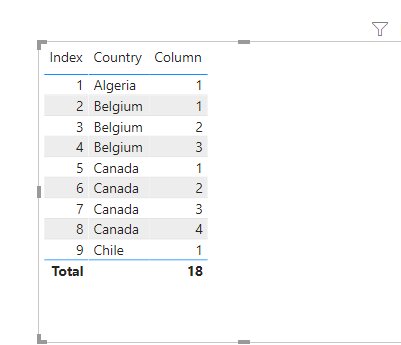
Pbix attached.
If this post helps, then please consider Accept it as the solution to help the other members find it more
quickly.
- Mark as New
- Bookmark
- Subscribe
- Mute
- Subscribe to RSS Feed
- Permalink
- Report Inappropriate Content
Hi @AuroraNI
Add the index column first, and then add the calculated column:
Column = CALCULATE(DISTINCTCOUNT('Table'[Index]),FILTER('Table',[Country]=EARLIER('Table'[Country])&&[Index]<=EARLIER('Table'[Index])))
Pbix attached.
If this post helps, then please consider Accept it as the solution to help the other members find it more
quickly.
- Mark as New
- Bookmark
- Subscribe
- Mute
- Subscribe to RSS Feed
- Permalink
- Report Inappropriate Content
Thanks for this, worked really well!


- Mark as New
- Bookmark
- Subscribe
- Mute
- Subscribe to RSS Feed
- Permalink
- Report Inappropriate Content
Hi,
Your question is not clear. Share 2 seperate tables - input and output.
Regards,
Ashish Mathur
http://www.ashishmathur.com
https://www.linkedin.com/in/excelenthusiasts/
- Mark as New
- Bookmark
- Subscribe
- Mute
- Subscribe to RSS Feed
- Permalink
- Report Inappropriate Content
Hi, apologies here is the input column
Country |
| Algeria |
| Belgium |
| Belgium |
| Belgium |
| Canada |
| Canada |
| Canada |
| Canada |
| Chile |
and here is the output I would like
Country | Value |
| Algeria | 1 |
| Belgium | 1 |
| Belgium | 2 |
| Belgium | 3 |
| Canada | 1 |
| Canada | 2 |
| Canada | 3 |
| Canada | 4 |
| Chile | 1 |
- Mark as New
- Bookmark
- Subscribe
- Mute
- Subscribe to RSS Feed
- Permalink
- Report Inappropriate Content
Hi,
This M code works
let
    Source = Excel.CurrentWorkbook(){[Name="Data"]}[Content],
    #"Changed Type" = Table.TransformColumnTypes(Source,{{"Country", type text}}),
    Partition = Table.Group(#"Changed Type", {"Country"}, {{"Partition", each Table.AddIndexColumn(_, "Index",1,1), type table}}),
    #"Expanded Partition" = Table.ExpandTableColumn(Partition, "Partition", {"Index"}, {"Index"})
in
    #"Expanded Partition"
Hope this helps.
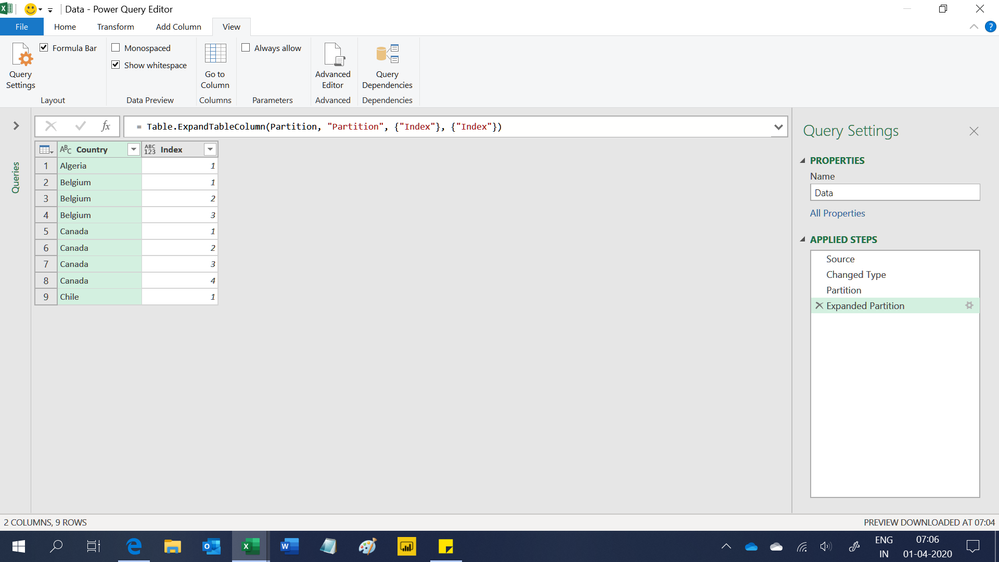
Regards,
Ashish Mathur
http://www.ashishmathur.com
https://www.linkedin.com/in/excelenthusiasts/
- Mark as New
- Bookmark
- Subscribe
- Mute
- Subscribe to RSS Feed
- Permalink
- Report Inappropriate Content
Thanks for this answer, I have tried this and works thank you. I will go with the calculated column option as simpler in my current dashboard
- Mark as New
- Bookmark
- Subscribe
- Mute
- Subscribe to RSS Feed
- Permalink
- Report Inappropriate Content
You are welcome.
Regards,
Ashish Mathur
http://www.ashishmathur.com
https://www.linkedin.com/in/excelenthusiasts/


- Mark as New
- Bookmark
- Subscribe
- Mute
- Subscribe to RSS Feed
- Permalink
- Report Inappropriate Content
Hi, maybe there are better ways but this is my first way:
let
    Source = Table.FromRows(Json.Document(Binary.Decompress(Binary.FromText("i45WcixKT83JTFSK1YlWci7KT0yGsgNSi0rBDGQFrq6hoWCGb2pFZnI+qphTUWJxZg5uzXBBDFNiAQ==", BinaryEncoding.Base64), Compression.Deflate)), let _t = ((type text) meta [Serialized.Text = true]) in type table [Pais = _t]),


    #"Changed Type" = Table.TransformColumnTypes(Source,{{"Pais", type text}}),
    #"Grouped Rows" = Table.Group(#"Changed Type", {"Pais"}, {{"Count", each _, type table [Pais=text]}}),
    #"Added Custom" = Table.AddColumn(#"Grouped Rows", "Custom", each Table.AddIndexColumn([Count],"index",1,1)),
    #"Expanded Custom" = Table.ExpandTableColumn(#"Added Custom", "Custom", {"Pais", "index"}, {"Custom.Pais", "Custom.index"}),
    #"Removed Columns" = Table.RemoveColumns(#"Expanded Custom",{"Pais", "Count"})
in
    #"Removed Columns"
Regards
Victor
Lima - Peru

Helpful resources

Power BI Monthly Update - November 2025
Check out the November 2025 Power BI update to learn about new features.

Fabric Data Days
Advance your Data & AI career with 50 days of live learning, contests, hands-on challenges, study groups & certifications and more!

FabCon Atlanta 2026
Join us at FabCon Atlanta, March 16-20, for the ultimate Fabric, Power BI, AI and SQL community-led event. Save $200 with code FABCOMM.

| User | Count |
|---|---|
| 57 | |
| 43 | |
| 41 | |
| 22 | |
| 17 |


| User | Count |
|---|---|
| 183 | |
| 114 | |
| 93 | |
| 62 | |
| 45 |


