FabCon is coming to Atlanta
Join us at FabCon Atlanta from March 16 - 20, 2026, for the ultimate Fabric, Power BI, AI and SQL community-led event. Save $200 with code FABCOMM.
Register now!- Power BI forums
- Get Help with Power BI
- Desktop
- Service
- Report Server
- Power Query
- Mobile Apps
- Developer
- DAX Commands and Tips
- Custom Visuals Development Discussion
- Health and Life Sciences
- Power BI Spanish forums
- Translated Spanish Desktop
- Training and Consulting
- Instructor Led Training
- Dashboard in a Day for Women, by Women
- Galleries
- Data Stories Gallery
- Themes Gallery
- Contests Gallery
- QuickViz Gallery
- Quick Measures Gallery
- Visual Calculations Gallery
- Notebook Gallery
- Translytical Task Flow Gallery
- TMDL Gallery
- R Script Showcase
- Webinars and Video Gallery
- Ideas
- Custom Visuals Ideas (read-only)
- Issues
- Issues
- Events
- Upcoming Events
The Power BI Data Visualization World Championships is back! Get ahead of the game and start preparing now! Learn more
- Power BI forums
- Forums
- Get Help with Power BI
- Desktop
- Combining 2 columns from 2 different tables into o...
- Subscribe to RSS Feed
- Mark Topic as New
- Mark Topic as Read
- Float this Topic for Current User
- Bookmark
- Subscribe
- Printer Friendly Page

- Mark as New
- Bookmark
- Subscribe
- Mute
- Subscribe to RSS Feed
- Permalink
- Report Inappropriate Content
Combining 2 columns from 2 different tables into one column
Hi All,
Please kindly can you help!
I have 2 tables as showing below
Table 1 name = "TableA"
| DLL Business Unit | Opportunity Name/ FO Application # | Customer Name | Account Name (Originator) | First Docs In Date/Time | Net NBV | Sales Support Owner | Sales Stage | Sales Sub Stage | Reason for Audit Rejection |
| Constr. Transp. & Industrial | 8.2621E+13 | D O Constable Contractor | Ernest Doe & Sons Ltd | 25/03/2020 08:43 | UK_SPOC_CV_Flow_WIP | 4.Accepted | 4.5 Clarification on docs | Credit;Fraud Checklist |
Table 2 name = "TableB"
| BU | Contract No | Date & Time Received | Customer name |
| Constr. Transp. & Industrial | 82621450019119 | 26/03/2020 10:08 | JHD Bowen Building Contractor |
Question Please;
- I would like to extract all the data in column "Opportunity Name/ FO Application #" from TableA, and all the data in column "Contract No" in TableB. As you notice there is no direct link between the 2 tables. Is there a solution to pull all the data from the 2 columns in to one column (only distinct value)? Many thanks
Kind Regards
Sarmad Dra
Solved! Go to Solution.


- Mark as New
- Bookmark
- Subscribe
- Mute
- Subscribe to RSS Feed
- Permalink
- Report Inappropriate Content
Hi @Anonymous ,
It seems that you are missing a ")"that will occur such error:

I tested again and the function works fine.
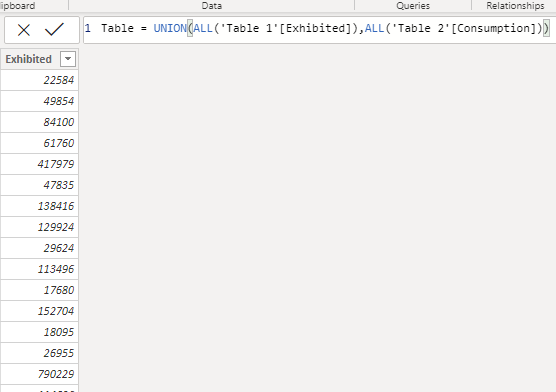
Here is a sample .pbix file you can refer to.
Kelly
- Mark as New
- Bookmark
- Subscribe
- Mute
- Subscribe to RSS Feed
- Permalink
- Report Inappropriate Content
Hi @Anonymous ,
Create a table using below dax expression:
Table C= UNION(ALL(TableA[Opportunity Name/ FO Application #]) , ALL(TableB[Contract No]) ))
Kelly
- Mark as New
- Bookmark
- Subscribe
- Mute
- Subscribe to RSS Feed
- Permalink
- Report Inappropriate Content
when I use the following;
Table C= UNION(ALL(TableA[Opportunity Name/ FO Application #]) , ALL(TableB[Contract No]) ))
I am getting this error "Too few arguments were passed to the UNION function. The minimum argument count for the function is 2."
Do you know whye?
Thank you,
Sam


- Mark as New
- Bookmark
- Subscribe
- Mute
- Subscribe to RSS Feed
- Permalink
- Report Inappropriate Content
- Mark as New
- Bookmark
- Subscribe
- Mute
- Subscribe to RSS Feed
- Permalink
- Report Inappropriate Content
when I use the following;
distinct(union(all(TableA[Opportunity Name/ FO Application #]) , all(TableB[Contract No]) ))
I am getting this error "Too few arguments were passed to the UNION function. The minimum argument count for the function is 2."
Do you know whye?
Thank you,
Sam
- Mark as New
- Bookmark
- Subscribe
- Mute
- Subscribe to RSS Feed
- Permalink
- Report Inappropriate Content
Hi @Anonymous ,
It seems that you are missing a ")"that will occur such error:
I tested again and the function works fine.
Here is a sample .pbix file you can refer to.
Kelly

- Mark as New
- Bookmark
- Subscribe
- Mute
- Subscribe to RSS Feed
- Permalink
- Report Inappropriate Content
Yes, you would do this in Power Query using a Cartesian Join, but I'll need good data to play with. See the links below. I cannot use what you pasted in because it is not in a table format and I'll spend more time cleaning up random spaces and special char 160 spaces than actually working on the problem.
How to get good help fast. Help us help you.
How to Get Your Question Answered Quickly
How to provide sample data in the Power BI Forum
Did I answer your question? Mark my post as a solution!
Did my answers help arrive at a solution? Give it a kudos by clicking the Thumbs Up!
DAX is for Analysis. Power Query is for Data Modeling
Proud to be a Super User!
MCSA: BI Reporting
Helpful resources

Power BI Dataviz World Championships
The Power BI Data Visualization World Championships is back! Get ahead of the game and start preparing now!

Power BI Monthly Update - December 2025
Check out the December 2025 Power BI Holiday Recap!

FabCon Atlanta 2026
Join us at FabCon Atlanta, March 16-20, for the ultimate Fabric, Power BI, AI and SQL community-led event. Save $200 with code FABCOMM.

| User | Count |
|---|---|
| 65 | |
| 43 | |
| 40 | |
| 29 | |
| 19 |


| User | Count |
|---|---|
| 200 | |
| 126 | |
| 103 | |
| 70 | |
| 54 |


