Join us at FabCon Atlanta from March 16 - 20, 2026, for the ultimate Fabric, Power BI, AI and SQL community-led event. Save $200 with code FABCOMM.
Register now!The Power BI Data Visualization World Championships is back! Get ahead of the game and start preparing now! Learn more
I have a base with 3 years of history and I would like to create a column with the same period of the previous year... Aiming to hit line by line (of the same date), without having to place the date column in the visual (the same table).
In short, it is taking the date without losing this mapping between the same dates and dates.
Can you help me with the best procedure to do creating this column?
Thanks!
Solved! Go to Solution.
Hi @DouglasRoubaud ,
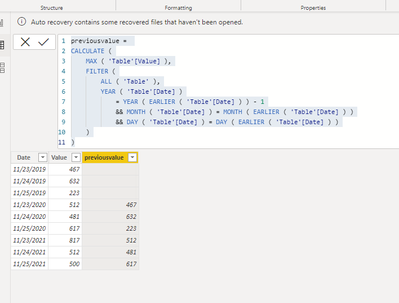
Tty to use the following dax to create a new column:
previousvalue =
CALCULATE (
MAX ( 'Table'[Value] ),
FILTER (
ALL ( 'Table' ),
YEAR ( 'Table'[Date] )
= YEAR ( EARLIER ( 'Table'[Date] ) ) - 1
&& MONTH ( 'Table'[Date] ) = MONTH ( EARLIER ( 'Table'[Date] ) )
&& DAY ( 'Table'[Date] ) = DAY ( EARLIER ( 'Table'[Date] ) )
)
)
Get:
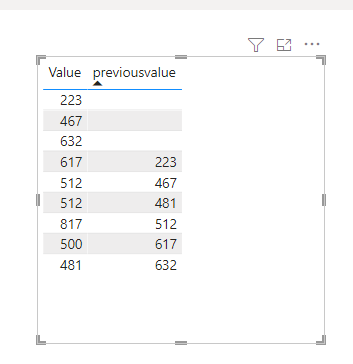
Final create visual:
Did I answer your question? Mark my post as a solution!
Best Regards
Lucien
Hi @DouglasRoubaud ,
Tty to use the following dax to create a new column:
previousvalue =
CALCULATE (
MAX ( 'Table'[Value] ),
FILTER (
ALL ( 'Table' ),
YEAR ( 'Table'[Date] )
= YEAR ( EARLIER ( 'Table'[Date] ) ) - 1
&& MONTH ( 'Table'[Date] ) = MONTH ( EARLIER ( 'Table'[Date] ) )
&& DAY ( 'Table'[Date] ) = DAY ( EARLIER ( 'Table'[Date] ) )
)
)
Get:
Final create visual:
Did I answer your question? Mark my post as a solution!
Best Regards
Lucien
@DouglasRoubaud you can create a measure to calc previous year value like below
Proud to be a Super User!
The Power BI Data Visualization World Championships is back! Get ahead of the game and start preparing now!
| User | Count |
|---|---|
| 37 | |
| 36 | |
| 33 | |
| 31 | |
| 29 |
| User | Count |
|---|---|
| 132 | |
| 86 | |
| 85 | |
| 68 | |
| 64 |