This time we’re going bigger than ever. Fabric, Power BI, SQL, AI and more. We're covering it all. You won't want to miss it.
Learn moreLevel up your Power BI skills this month - build one visual each week and tell better stories with data! Get started
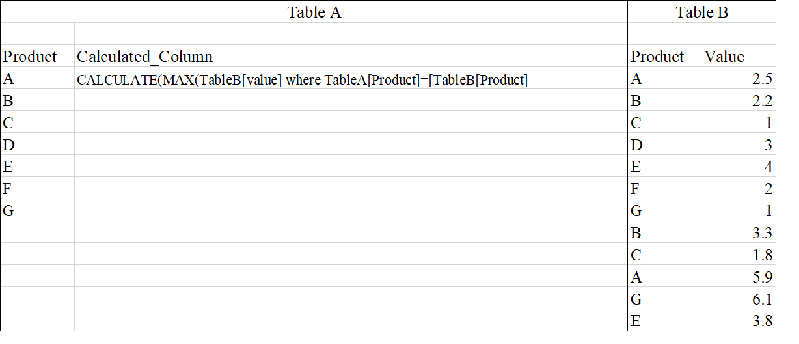
I want to create a calculated column in one table (call it TableA) that Calculates a value from another table (TableB) based on column value in TableA
ProdMax = CALCULATE(MAX(TABLEB[Value]) WHERE TABLEA[PRODUCT] = TABLEB[PRODUCT]
Solved! Go to Solution.
Try this:
ProdMax =
VAR _Prod = TABLEA[PRODUCT]
RETURN
CALCULATE ( MAX ( TABLEB[Value] ), TABLEB[PRODUCT] = _Prod )
Other variations:
ProdMax =
CALCULATE (
MAX ( TABLEB[Value] ),
TABLEB[PRODUCT] = EARLIER ( TABLEA[PRODUCT] )
)ProdMax =
MAXX (
FILTER ( TABLEB, TABLEB[PRODUCT] = TABLEA[PRODUCT] ),
TABLEB[Value]
)
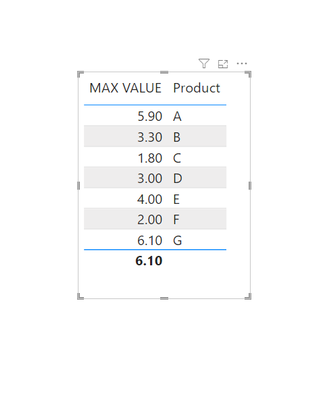
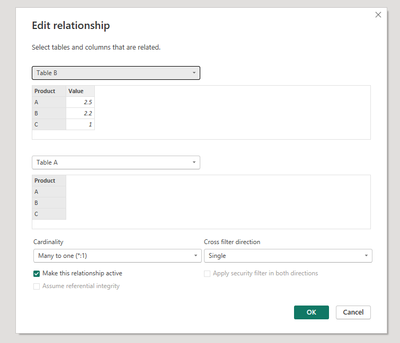
I replicated your data. Solution is as follows. Create a relationship between table A and B based on the product field. Then create a measure :
Try this:
ProdMax =
VAR _Prod = TABLEA[PRODUCT]
RETURN
CALCULATE ( MAX ( TABLEB[Value] ), TABLEB[PRODUCT] = _Prod )
Other variations:
ProdMax =
CALCULATE (
MAX ( TABLEB[Value] ),
TABLEB[PRODUCT] = EARLIER ( TABLEA[PRODUCT] )
)ProdMax =
MAXX (
FILTER ( TABLEB, TABLEB[PRODUCT] = TABLEA[PRODUCT] ),
TABLEB[Value]
)
Why does STDEV.P not workin place of MAX
I tried your 2nd suggestion and it worked. Thank YOU!!
You need to create a relationship between the two tables. In my response you can see how it is achieved. @AlexisOlson measures work great but you need to get the relationship down for it all to be tied in together.
Check out the April 2026 Power BI update to learn about new features.
Sign up to receive a private message when registration opens and key events begin.
If you have recently started exploring Fabric, we'd love to hear how it's going. Your feedback can help with product improvements.
| User | Count |
|---|---|
| 36 | |
| 29 | |
| 29 | |
| 21 | |
| 18 |
| User | Count |
|---|---|
| 68 | |
| 39 | |
| 33 | |
| 24 | |
| 23 |