Get certified for free when you join Fabric Data Days 2026 and dive into Fabric, Power BI, SQL, AI, and other essential data skills.
Join nowData Days is here! Join us now for 60+ days of learning, challenges, and connection. Learn more
Hi Power BI gurus,
I am farily new to Power BI, might ask some simple questions, but please kindly help! 🙂
I am trying to create couple new fields related to Aging bucket ( Account receivable)
1. Days Past Due: is the days difference between report date and due date, I simply used the folumar = 1.0* ([Report Date]-[due date]), and it works..
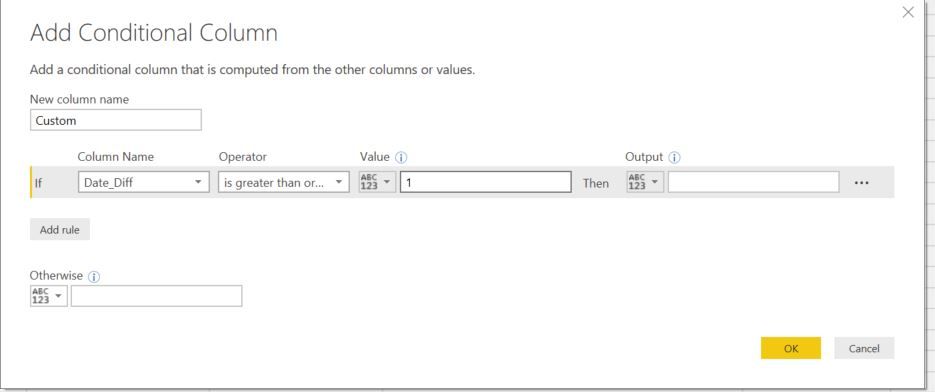
2. then I want to create a categorical field - Aging bucket with an conditonal formular, please see below. The questions is that it won't let me to add “AND" logic in one single condition. For example, if date_diff is greaten then 1 AND also less then 30, then "1-30Days".
Over all, I am looking for this field with logic:
- if date_diff less then 1, then "current", elseif Date_Diff>1 and also <30 then "1-30 Days"; elseif Date_Diff>31 and also <60 then "31-60 Days".... etc.
In additon, is there other ways to create the measure instead of using the conditonl column? I am not very familiar with writing formula.. if someone could further advise, I really appericate it.
Thank you,
Flora
Solved! Go to Solution.
Hi @Anonymous,
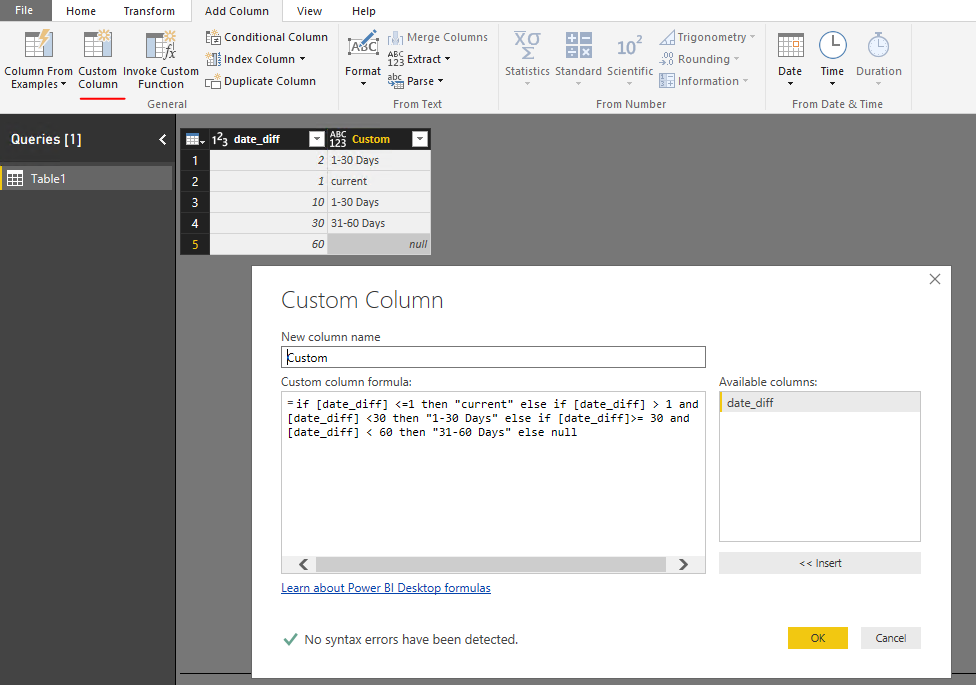
You can create a custom column in Query Editor use Power Query below:
=if [date_diff] <=1 then "current" else if [date_diff] > 1 and [date_diff] <30 then "1-30 Days" else if [date_diff]>= 30 and [date_diff] < 60 then "31-60 Days" else null
To create a measure, we need to back to report level use DAX.
Measure = IF(MAX([date_diff]) <=1 , "current",IF( MAX([date_diff]) > 1 && MAX([date_diff])<30, "1-30 Days",IF(MAX([date_diff])>= 30 && MAX([date_diff]) < 60, "31-60 Days", BLANK())))
You can downlaod attached pbix file to have a look.
Best Regards,
Qiuyun Yu
Hi @Anonymous,
You can create a custom column in Query Editor use Power Query below:
=if [date_diff] <=1 then "current" else if [date_diff] > 1 and [date_diff] <30 then "1-30 Days" else if [date_diff]>= 30 and [date_diff] < 60 then "31-60 Days" else null
To create a measure, we need to back to report level use DAX.
Measure = IF(MAX([date_diff]) <=1 , "current",IF( MAX([date_diff]) > 1 && MAX([date_diff])<30, "1-30 Days",IF(MAX([date_diff])>= 30 && MAX([date_diff]) < 60, "31-60 Days", BLANK())))
You can downlaod attached pbix file to have a look.
Best Regards,
Qiuyun Yu
Hi,
This is a great example, but is there a way around this in Direct Query
Thanks a million?
HI Qiuyun,
This is exactly what I am looking for, and thanks for sharing more than one solutions. Good to learn both. 🙂
Thank you!!
Flora
Don't miss out on Data Days, June 15 through August 7. Learn Fabric, Power BI, SQL, AI and more.
Check out the May 2026 Power BI update to learn about new features.
| User | Count |
|---|---|
| 23 | |
| 23 | |
| 21 | |
| 17 | |
| 13 |
| User | Count |
|---|---|
| 58 | |
| 50 | |
| 37 | |
| 29 | |
| 24 |