Join us at FabCon Atlanta from March 16 - 20, 2026, for the ultimate Fabric, Power BI, AI and SQL community-led event. Save $200 with code FABCOMM.
Register now!The Power BI Data Visualization World Championships is back! Get ahead of the game and start preparing now! Learn more
Gentleman, I have faced some difficulties in finding Carrier Number.
From below sample table, I wanted Carrier operated per month by Customer shown in 2nd Table.
Customer Carrier Jan'19 Feb'19 Mar'19
A A1 400 500
B A1 500 200
C A2 400 300 400
D A3 700 600 700
Here I want to find out no of Carrier by per month by Customers. e.g if Career A1 used in Mar'19 by Two customer A & B, but it should be only one(no duplicate count) and same assigned to highest sales to Customer A.
| Customer | Carrier Jan | Carrier Feb | Carrier Mar |
| A | 1 | 1 | |
| B | 1 | 0 | 0 |
| C | 1 | 1 | 1 |
| D | 1 | 1 | 1 |
Kindly Help to formulate CountX DAX function
Thanks,
K
Solved! Go to Solution.
Hi @Anonymous ,
Take a try of this:
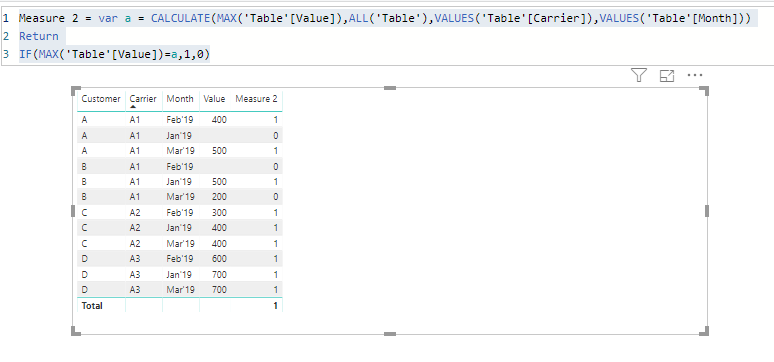
Measure 2 = var a = CALCULATE(MAX('Table'[Value]),ALL('Table'),VALUES('Table'[Carrier]),VALUES('Table'[Month]))
Return
IF(MAX('Table'[Value])=a,1,0)Best regards,
Dina Ye
Hi @Anonymous ,
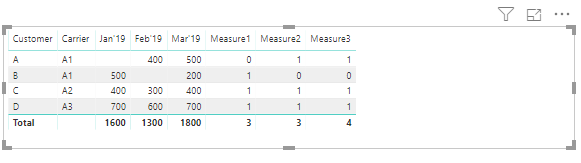
I created a sample as your requested, plz use below measures to generate the results:
Measure1 = IF(ISBLANK(MAX([Jan'19])),0,COUNTX(Table1,[Jan'19]))
Measure2 = IF(ISBLANK(MAX([Feb'19])),0,COUNTX(Table1,[Feb'19]))
Measure3 = var a = CALCULATE(MAX([Mar'19]),ALL(Table1),VALUES(Table1[Carrier])) var b = IF(MAX(Table1[Mar'19])=a,MAX(Table1[Mar'19]),BLANK()) Return IF(ISBLANK(COUNTX(table1,b)),0,COUNTX(table1,b))
Best regards,
Dina Ye
Thanks Dina, its really workout out.
Need one more help. which i have tried to do but couldn't get any success.
Suppose, if my Table is in another formate like instead of the month in Column it is in Row format then? i have tired to apply same code but failed.
appreciate your help if you can
| Customer | Carrier | Month | Value | Carrier Count** |
| A | A1 | Jan'19 | 0 | |
| B | A1 | Jan'19 | 500 | 1 |
| C | A2 | Jan'19 | 400 | 1 |
| D | A3 | Jan'19 | 700 | 1 |
| A | A1 | Feb'19 | 400 | 1 |
| B | A1 | Feb'19 | 0 | |
| C | A2 | Feb'19 | 300 | 1 |
| D | A3 | Feb'19 | 600 | 1 |
| A | A1 | Mar'19 | 500 | 1 |
| B | A1 | Mar'19 | 200 | 0 |
| C | A2 | Mar'19 | 400 | 1 |
| D | A3 | Mar'19 | 700 | 1 |
Hi @Anonymous ,
Take a try of this:
Measure 2 = var a = CALCULATE(MAX('Table'[Value]),ALL('Table'),VALUES('Table'[Carrier]),VALUES('Table'[Month]))
Return
IF(MAX('Table'[Value])=a,1,0)Best regards,
Dina Ye
Thanks its works absolutely 🙂
The Power BI Data Visualization World Championships is back! Get ahead of the game and start preparing now!
| User | Count |
|---|---|
| 46 | |
| 41 | |
| 34 | |
| 32 | |
| 23 |
| User | Count |
|---|---|
| 125 | |
| 116 | |
| 90 | |
| 73 | |
| 69 |