Join us at FabCon Atlanta from March 16 - 20, 2026, for the ultimate Fabric, Power BI, AI and SQL community-led event. Save $200 with code FABCOMM.
Register now!The Power BI Data Visualization World Championships is back! Get ahead of the game and start preparing now! Learn more
Hi,
I am trying to get a count of how many patients I made appointments for on a single day, the usual answer should be 1, but sometimes 2 or more are made on the same day, I am failing at figuring out the best approach. The columns I want to count are;
[Patient ID]
[Appt Date]
So if patient 12345 made two appointments on 02/09/2017 I want to return 2.
I have been searching on Count, Countrows, Summasize and nit quite got the answer I needed.
Martin
Solved! Go to Solution.
I worked around my issue by concatenating the columns I needed, then doing a countrows.
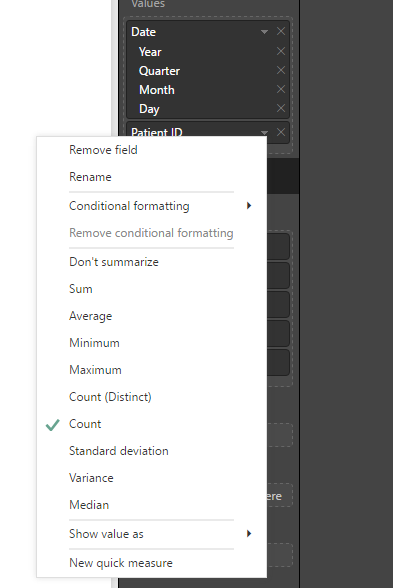
Or you can just skip the measure part and instead of adding the measure to the visual, add Appts[Patient ID] and select Count as aggregation for Appts[Patient ID]. Like this:
Thanks for the reply Erik, I will get better at articulating my questions.
I have a table [lets call it Appt], with the two fields.
I need tp identify if multiple appointments were made on the same day so I can trigger another formula to disregard one of them. for example.
If Joe made two appointments on one day, one with 'Doc x' and one with 'Doc y' then I want to be able to say, okay Joe had two appointments on the 24th, but for reporting purposes I want to ignore the appointment with 'Doc x'.
I have managed to get to a count of Appointments on a Day or Patients on a day but not a subset of both.
This is what I am trying so far.
Measure { Same Day Appointment Count 2 = COUNTA('Appt'[Patient ID]) }
Calculated Column { Same Day Appointment Count = (CALCULATE([Same Day Appointment Count 2],'Appt'[Revised Appointment Date])) }
The result is giving me 1 for "each appointment" but not a 2 for the two appointments on the same day.
Martin
I worked around my issue by concatenating the columns I needed, then doing a countrows.
Assuming you have a table called Appts with the columns you refer to, all you have to do is add the following measure:
Appointments = COUNTROWS(Appts)
Create a table visual on the dashboard and place Appts[Appt Date] and [Appointments] in the values section.
The Power BI Data Visualization World Championships is back! Get ahead of the game and start preparing now!
| User | Count |
|---|---|
| 45 | |
| 40 | |
| 32 | |
| 30 | |
| 21 |
| User | Count |
|---|---|
| 127 | |
| 125 | |
| 94 | |
| 78 | |
| 65 |