Join us at FabCon Atlanta from March 16 - 20, 2026, for the ultimate Fabric, Power BI, AI and SQL community-led event. Save $200 with code FABCOMM.
Register now!The Power BI Data Visualization World Championships is back! It's time to submit your entry. Live now!
Hi,
I am trying to get a count of how many patients I made appointments for on a single day, the usual answer should be 1, but sometimes 2 or more are made on the same day, I am failing at figuring out the best approach. The columns I want to count are;
[Patient ID]
[Appt Date]
So if patient 12345 made two appointments on 02/09/2017 I want to return 2.
I have been searching on Count, Countrows, Summasize and nit quite got the answer I needed.
Martin
Solved! Go to Solution.
I worked around my issue by concatenating the columns I needed, then doing a countrows.
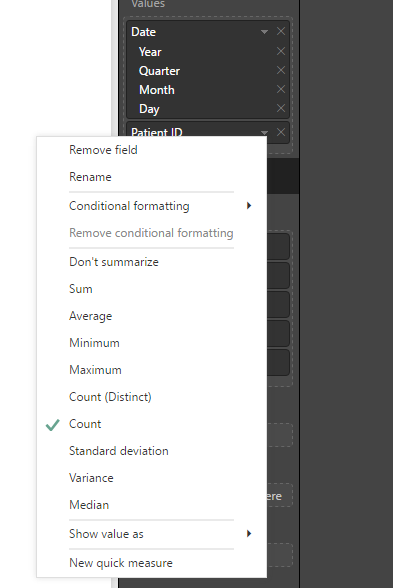
Or you can just skip the measure part and instead of adding the measure to the visual, add Appts[Patient ID] and select Count as aggregation for Appts[Patient ID]. Like this:
Thanks for the reply Erik, I will get better at articulating my questions.
I have a table [lets call it Appt], with the two fields.
I need tp identify if multiple appointments were made on the same day so I can trigger another formula to disregard one of them. for example.
If Joe made two appointments on one day, one with 'Doc x' and one with 'Doc y' then I want to be able to say, okay Joe had two appointments on the 24th, but for reporting purposes I want to ignore the appointment with 'Doc x'.
I have managed to get to a count of Appointments on a Day or Patients on a day but not a subset of both.
This is what I am trying so far.
Measure { Same Day Appointment Count 2 = COUNTA('Appt'[Patient ID]) }
Calculated Column { Same Day Appointment Count = (CALCULATE([Same Day Appointment Count 2],'Appt'[Revised Appointment Date])) }
The result is giving me 1 for "each appointment" but not a 2 for the two appointments on the same day.
Martin
I worked around my issue by concatenating the columns I needed, then doing a countrows.
Assuming you have a table called Appts with the columns you refer to, all you have to do is add the following measure:
Appointments = COUNTROWS(Appts)
Create a table visual on the dashboard and place Appts[Appt Date] and [Appointments] in the values section.
The Power BI Data Visualization World Championships is back! It's time to submit your entry.
Check out the January 2026 Power BI update to learn about new features.
| User | Count |
|---|---|
| 56 | |
| 40 | |
| 38 | |
| 21 | |
| 20 |
| User | Count |
|---|---|
| 141 | |
| 105 | |
| 63 | |
| 36 | |
| 35 |