FabCon is coming to Atlanta
Join us at FabCon Atlanta from March 16 - 20, 2026, for the ultimate Fabric, Power BI, AI and SQL community-led event. Save $200 with code FABCOMM.
Register now!- Power BI forums
- Get Help with Power BI
- Desktop
- Service
- Report Server
- Power Query
- Mobile Apps
- Developer
- DAX Commands and Tips
- Custom Visuals Development Discussion
- Health and Life Sciences
- Power BI Spanish forums
- Translated Spanish Desktop
- Training and Consulting
- Instructor Led Training
- Dashboard in a Day for Women, by Women
- Galleries
- Data Stories Gallery
- Themes Gallery
- Contests Gallery
- QuickViz Gallery
- Quick Measures Gallery
- Visual Calculations Gallery
- Notebook Gallery
- Translytical Task Flow Gallery
- TMDL Gallery
- R Script Showcase
- Webinars and Video Gallery
- Ideas
- Custom Visuals Ideas (read-only)
- Issues
- Issues
- Events
- Upcoming Events
View all the Fabric Data Days sessions on demand. View schedule
- Power BI forums
- Forums
- Get Help with Power BI
- Desktop
- Re: Countrows on weekly periods
- Subscribe to RSS Feed
- Mark Topic as New
- Mark Topic as Read
- Float this Topic for Current User
- Bookmark
- Subscribe
- Printer Friendly Page


- Mark as New
- Bookmark
- Subscribe
- Mute
- Subscribe to RSS Feed
- Permalink
- Report Inappropriate Content
Countrows on weekly periods
Happy August-ing developers
Some help from whom can lend an ear
I have table A. showing entries data by created date
I have table B. showing historic performance per specific dates
The two date columns have a relationship
My DAX calclulated values are definitely not correct. Any ideas?
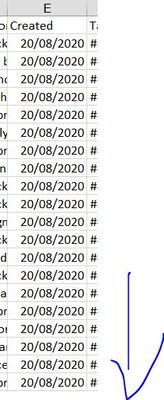
B. Pefromance dates
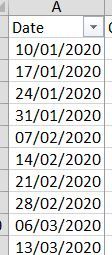
Solved! Go to Solution.
- Mark as New
- Bookmark
- Subscribe
- Mute
- Subscribe to RSS Feed
- Permalink
- Report Inappropriate Content
Hi @Mike_Mace,
My formula is a measure please create a measure and copy the code into measure expression to use it:
Entries New/week test 2=
VAR currDate =
    MAX ( 'Performance Table'[Dates] )
RETURN
    CALCULATE (
        COUNTROWS ( 'Entries Table' ),
        FILTER (
            ALLSELECTED ( 'Entries Table'),
            YEAR ( [Created]) = YEAR ( currDate )
                && WEEKNUM ( [Created] ) = WEEKNUM ( currDate )
        )
    )
If you want a calculated column version, you can try to use following calculated column formula: (Notice: calculated column/table did not dynamic changes based on filters/slicers)
Entries New/week test 2 =
CALCULATE (
    COUNTROWS ( 'Entries Table' ),
    FILTER (
        ALLSELECTED ( 'Entries Table' ),
        YEAR ( [Created] ) = YEAR ( EARLIER ( 'Performance Table'[Dates] ) )
            && WEEKNUM ( [Created] ) = WEEKNUM ( EARLIER ( 'Performance Table'[Dates] ) )
    )
)
Regards,
Xiaoxin Sheng

- Mark as New
- Bookmark
- Subscribe
- Mute
- Subscribe to RSS Feed
- Permalink
- Report Inappropriate Content
Hi @Mike_Mace,
I'd like to suggest you use year and weeknum to filter and calculated the records:
formual =
VAR currDate =
    MAX ( Performance[Date] )
RETURN
    CALCULATE (
        COUNTROWS ( 'Entries table' ),
        FILTER (
            ALLSELECTED ( 'Entries table' ),
            YEAR ( [Created] ) = YEAR ( currDate )
                && WEEKNUM ( [Created] ) = WEEKNUM ( currDate )
        )
    )
If the above not help, please provide more detailed information to help us clarify your requirement.
Regards,
Xiaoxin Sheng
- Mark as New
- Bookmark
- Subscribe
- Mute
- Subscribe to RSS Feed
- Permalink
- Report Inappropriate Content
Hi @Anonymous ,
Attaching the pbix on a wetranfer link as my first message was not accurate enough to pass on the query.
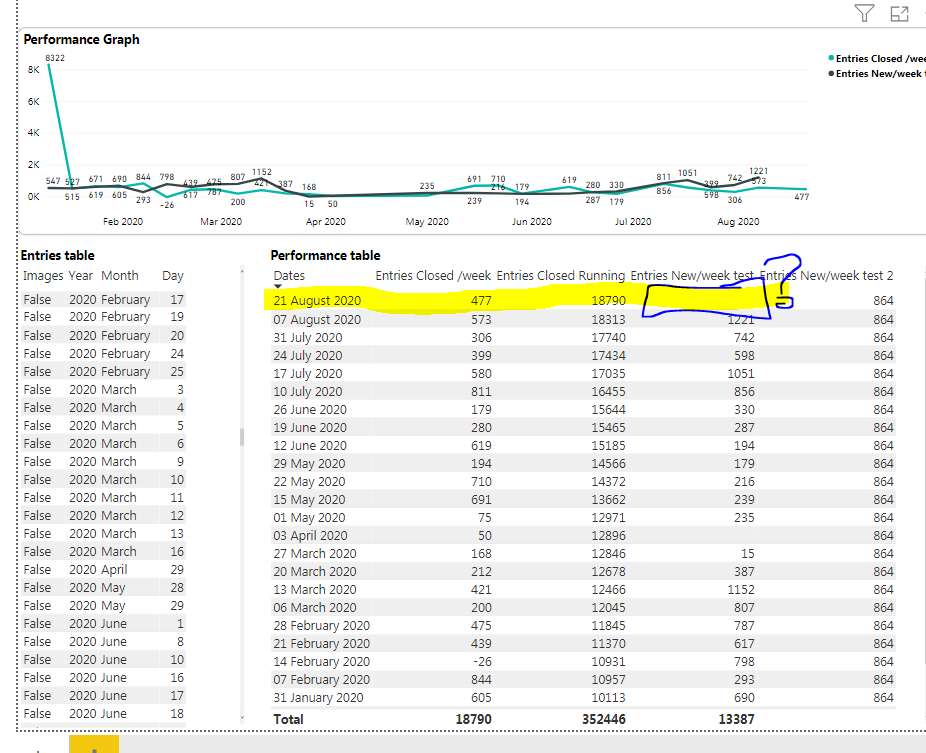
I've removed the relationship between the two datasets and the original formula to calculate all the entries per said week (on performance dataset) seems to work BUT the value for the latest date is not calculated.
I've manually checked the numbers from the spreadsheet side for that week to be 864 but see on snip it is left empty.
Does formula need another filter?
I've crosschecked another two weeks by checking the number of entries from the spreadsheet manually and the numbers are correct
Entries /week column = CALCULATE(COUNTROWS('Entries table'), DATESINPERIOD('Entries table'[Created], Performance[Date], -7, DAY))
- Mark as New
- Bookmark
- Subscribe
- Mute
- Subscribe to RSS Feed
- Permalink
- Report Inappropriate Content
Hi @Mike_Mace,
Can you please upload this to onedrive for business? I can't download from the third party web drive that you shared.
Regards,
Xiaoxin Sheng
- Mark as New
- Bookmark
- Subscribe
- Mute
- Subscribe to RSS Feed
- Permalink
- Report Inappropriate Content
Here, copying link to onedrive
- Mark as New
- Bookmark
- Subscribe
- Mute
- Subscribe to RSS Feed
- Permalink
- Report Inappropriate Content
HI @Mike_Mace,
Shared content seems to be removed when I access to your link, can you please fix this?
Regards,
Xiaoxin Sheng
- Mark as New
- Bookmark
- Subscribe
- Mute
- Subscribe to RSS Feed
- Permalink
- Report Inappropriate Content
Hi @Anonymous ,
Of course, here's the right link for it
https://1drv.ms/u/s!Amf63tQXGj5rklkr-5wKw8XgwEK1
- Mark as New
- Bookmark
- Subscribe
- Mute
- Subscribe to RSS Feed
- Permalink
- Report Inappropriate Content
Hi @Mike_Mace,
My formula is a measure please create a measure and copy the code into measure expression to use it:
Entries New/week test 2=
VAR currDate =
    MAX ( 'Performance Table'[Dates] )
RETURN
    CALCULATE (
        COUNTROWS ( 'Entries Table' ),
        FILTER (
            ALLSELECTED ( 'Entries Table'),
            YEAR ( [Created]) = YEAR ( currDate )
                && WEEKNUM ( [Created] ) = WEEKNUM ( currDate )
        )
    )
If you want a calculated column version, you can try to use following calculated column formula: (Notice: calculated column/table did not dynamic changes based on filters/slicers)
Entries New/week test 2 =
CALCULATE (
    COUNTROWS ( 'Entries Table' ),
    FILTER (
        ALLSELECTED ( 'Entries Table' ),
        YEAR ( [Created] ) = YEAR ( EARLIER ( 'Performance Table'[Dates] ) )
            && WEEKNUM ( [Created] ) = WEEKNUM ( EARLIER ( 'Performance Table'[Dates] ) )
    )
)
Regards,
Xiaoxin Sheng
- Mark as New
- Bookmark
- Subscribe
- Mute
- Subscribe to RSS Feed
- Permalink
- Report Inappropriate Content
hi @Anonymous
The column one is what I was after
Many thanks!


- Mark as New
- Bookmark
- Subscribe
- Mute
- Subscribe to RSS Feed
- Permalink
- Report Inappropriate Content
@Mike_Mace - You may find this helpful - https://community.powerbi.com/t5/Community-Blog/To-bleep-With-Time-Intelligence/ba-p/1260000
Also, see if my Time Intelligence the Hard Way provides a different way of accomplishing what you are going for.
https://community.powerbi.com/t5/Quick-Measures-Gallery/Time-Intelligence-quot-The-Hard-Way-quot-TIT...
Otherwise, Not really enough information to go on, please first check if your issue is a common issue listed here: https://community.powerbi.com/t5/Community-Blog/Before-You-Post-Read-This/ba-p/1116882
Also, please see this post regarding How to Get Your Question Answered Quickly: https://community.powerbi.com/t5/Community-Blog/How-to-Get-Your-Question-Answered-Quickly/ba-p/38490
The most important parts are:
1. Sample data as text, use the table tool in the editing bar
2. Expected output from sample data
3. Explanation in words of how to get from 1. to 2.
Follow on LinkedIn
@ me in replies or I'll lose your thread!!!
Instead of a Kudo, please vote for this idea
Become an expert!: Enterprise DNA
External Tools: MSHGQM
YouTube Channel!: Microsoft Hates Greg
Latest book!: DAX For Humans
DAX is easy, CALCULATE makes DAX hard...


- Mark as New
- Bookmark
- Subscribe
- Mute
- Subscribe to RSS Feed
- Permalink
- Report Inappropriate Content
@Mike_Mace , Not very clear.
For week vs week check - With date table and week rank
https://medium.com/@amitchandak.1978/power-bi-wtd-questions-time-intelligence-4-5-98c30fab69d3
https://community.powerbi.com/t5/Community-Blog/Week-Is-Not-So-Weak-WTD-Last-WTD-and-This-Week-vs-La...
how to create week on your choice https://community.powerbi.com/t5/Community-Blog/Any-Weekday-Week-Decoding-Date-and-Calendar-2-5-Powe...
Helpful resources

Power BI Monthly Update - November 2025
Check out the November 2025 Power BI update to learn about new features.

Fabric Data Days
Advance your Data & AI career with 50 days of live learning, contests, hands-on challenges, study groups & certifications and more!

FabCon Atlanta 2026
Join us at FabCon Atlanta, March 16-20, for the ultimate Fabric, Power BI, AI and SQL community-led event. Save $200 with code FABCOMM.


