Join us at FabCon Atlanta from March 16 - 20, 2026, for the ultimate Fabric, Power BI, AI and SQL community-led event. Save $200 with code FABCOMM.
Register now!The Power BI Data Visualization World Championships is back! It's time to submit your entry. Live now!
Hi,
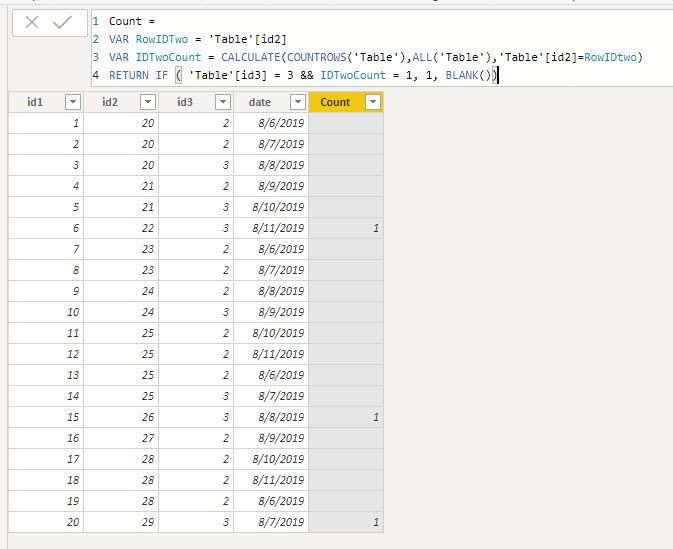
Here my table:
Outcome expected: 3
I want Count Rows if id3=3 but alone. If I have id2 with id3 = 2 or 3 I don't want count these. I only want count if id3 = 3 and it's alone in id2.
Can you help me?
Thanks
Solved! Go to Solution.
The cleanest way I can think of doing this is as a calculated column added to your table.
Count =
VAR RowIDTwo = 'Table'[id2]
VAR IDTwoCount = CALCULATE(COUNTROWS('Table'),ALL('Table'),'Table'[id2]=RowIDtwo)
RETURN IF ( 'Table'[id3] = 3 && IDTwoCount = 1, 1, BLANK())
I mean alone if the value 3 it's not present in id3 column with value 2. See in the cloumn id2 I have the 20 value with values 2,2,3 in the id3 column. In thise case I don't want count the 3 value.
In my case the expected value is 3 because it's count of lines 6,15 and 20
Thanks @jdbuchanan71
The cleanest way I can think of doing this is as a calculated column added to your table.
Count =
VAR RowIDTwo = 'Table'[id2]
VAR IDTwoCount = CALCULATE(COUNTROWS('Table'),ALL('Table'),'Table'[id2]=RowIDtwo)
RETURN IF ( 'Table'[id3] = 3 && IDTwoCount = 1, 1, BLANK())
Hello @youconnect
What do you mean by "alone" in ID2? Do you mean if ID2 is empty? In your screen shot, which rows should be counted?
| User | Count |
|---|---|
| 53 | |
| 40 | |
| 35 | |
| 24 | |
| 22 |
| User | Count |
|---|---|
| 135 | |
| 109 | |
| 57 | |
| 43 | |
| 38 |