Don't miss your chance to take the Fabric Data Engineer (DP-700) exam on us!
Learn moreNext up in the FabCon + SQLCon recap series: The roadmap for Microsoft SQL and Maximizing Developer experiences in Fabric. All sessions are available on-demand after the live show. Register now
Hi...I am not sure I what I about to say correctly so please forgive me. I am trying to count rows in a table and have the filters that have applied to the table outside applied.
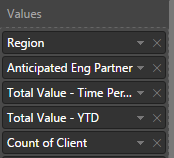
When I use the Count function where all the fields are listed, I get the correct number.
However, I want to change the name of the column from "count of client" to something else and you can't do that so I was trying to create an expression to get the same output but have been unsuccessful.
My expression is:
Client Count = COUNTROWS(ALLSELECTED('Global Sales and Pipeline Extra'[Client]))
Any help is appreciated.
Thanks
Solved! Go to Solution.
And how have you written Client Count for that screenshot? COUNTA should give the same results as the count quick measure unless you've added something else.
Why would you not just use counta?
Client Count = COUNTA('Global Sales and Pipeline Extra'[Client])
The outcome is not right. I am assuming it is counting all the text characters in each cell. The column is all text. Thanks.
No, it's counting each non-blank row in the column given the filter context, including duplicate values. Maybe you want DISTINCTCOUNT? It's unclear how your data is structured or how exactly the incorrect results are incorrect.
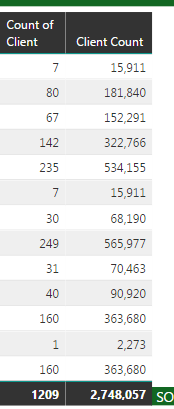
Here is a screenshot of it. Does this help? Count of client is correct.
And how have you written Client Count for that screenshot? COUNTA should give the same results as the count quick measure unless you've added something else.
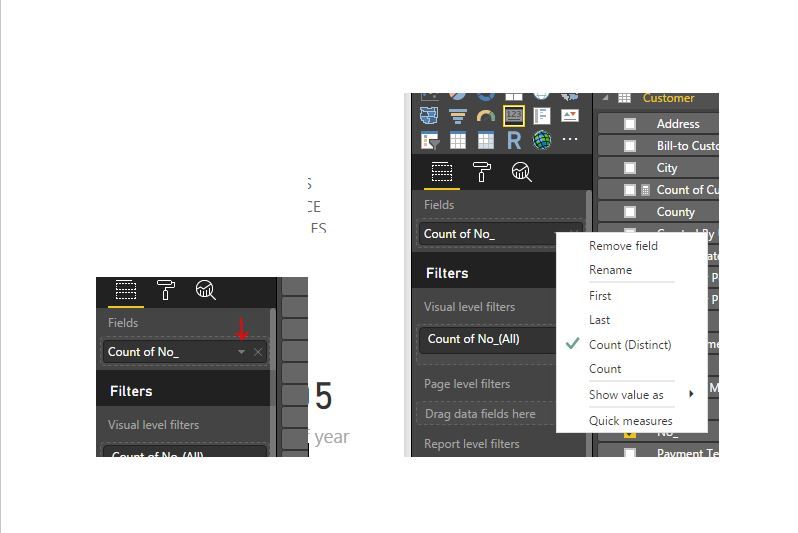
Check to see which count is automating by clicking the drop down arrow by the name in your fields. Then create a measure to match. See image.
Proud to be a Super User!
Counta as a measure worked. When I did it as a new column, it didn't. Thank you...thank you...thank you.
If you have recently started exploring Fabric, we'd love to hear how it's going. Your feedback can help with product improvements.
A new Power BI DataViz World Championship is coming this June! Don't miss out on submitting your entry.
Share feedback directly with Fabric product managers, participate in targeted research studies and influence the Fabric roadmap.
| User | Count |
|---|---|
| 50 | |
| 44 | |
| 42 | |
| 19 | |
| 19 |
| User | Count |
|---|---|
| 70 | |
| 68 | |
| 33 | |
| 32 | |
| 32 |