Join us at FabCon Atlanta from March 16 - 20, 2026, for the ultimate Fabric, Power BI, AI and SQL community-led event. Save $200 with code FABCOMM.
Register now!The Power BI Data Visualization World Championships is back! Get ahead of the game and start preparing now! Learn more
Hi All,
Below is an example of the dataset to which I wanted to be able to return the total number of campaign ID's given in the first instance, then counting the number of campaign ID's that were given in the second instance .
| Gift Date | Campaign ID | Gift Date 2 | Campaign ID 2 |
| 02/04/2018 | Camp - 121 | 15/05/2018 | Camp - 252 |
| 12/05/2019 | Camp - 232 | 16/05/2019 | Camp - 252 |
| 06/05/2019 | Camp - 121 | 23/05/2019 | Camp - 252 |
| 07/06/2019 | Camp - 232 | 01/06/2019 | Camp - 252 |
| 08/05/2019 | Camp - 121 | 12/05/2019 | Camp - 555 |
| 09/06/2018 | Camp - 121 | 23/06/2018 | Camp - 252 |
| 10/06/2019 | Camp - 121 | 12/06/2019 | Camp - 252 |
| 11/06/2018 | Camp - 232 | 15/06/2018 | Camp - 232 |
| 12/06/2019 | Camp - 121 | 15/06/2018 | Camp - 232 |
| 13/06/2018 | Camp - 121 | 17/06/2018 | Camp - 232 |
| Total | 10 | ||
| 252 | 6 | ||
| 555 | 1 | ||
| 232 | 3 |
I tried doing a count, but keep getting errors. didnt know if there was an alternative way of doing this?
TIA
Solved! Go to Solution.
Hi @UK_User123456 ,
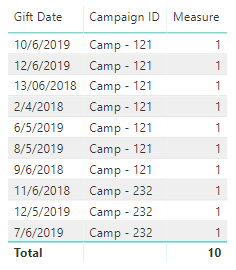
The following is my sample you can have a try.
For table 1 :
Measure = COUNT(Table1[Campaign ID])
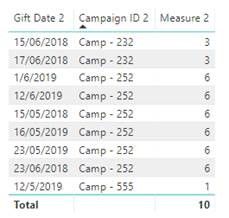
For table 2:
Measure 2 =
SWITCH( TRUE(), MAX(Table4[Campaign ID 2]) = "Camp - 252",CALCULATE(COUNT(Table4[Campaign ID 2]),ALLEXCEPT(Table4,Table4[Campaign ID 2])), MAX(Table4[Campaign ID 2]) = "Camp - 232",CALCULATE(COUNT(Table4[Campaign ID 2]),ALLEXCEPT(Table4,Table4[Campaign ID 2])), MAX(Table4[Campaign ID 2]) = "Camp - 555",CALCULATE(COUNT(Table4[Campaign ID 2]),ALLEXCEPT(Table4,Table4[Campaign ID 2])))
Best Regards,
Xue Ding
If this post helps, then please consider Accept it as the solution to help the other members find it more quickly.
Hi @UK_User123456 ,
Could you tell me if your problem has been solved? If it is, kindly mark the helpful answer as a solution if you feel that makes sense. Welcome to share your own solution. More people will benefit from here.
Best Regards,
Xue Ding
If this post helps, then please consider Accept it as the solution to help the other members find it more quickly.
Hi,
I havent had the chance to test it out yet, I will do as soon as I can and come back with any issues.
Okay, I hope your issue can be solved smoothly.
Hi @UK_User123456 ,
The following is my sample you can have a try.
For table 1 :
Measure = COUNT(Table1[Campaign ID])
For table 2:
Measure 2 =
SWITCH( TRUE(), MAX(Table4[Campaign ID 2]) = "Camp - 252",CALCULATE(COUNT(Table4[Campaign ID 2]),ALLEXCEPT(Table4,Table4[Campaign ID 2])), MAX(Table4[Campaign ID 2]) = "Camp - 232",CALCULATE(COUNT(Table4[Campaign ID 2]),ALLEXCEPT(Table4,Table4[Campaign ID 2])), MAX(Table4[Campaign ID 2]) = "Camp - 555",CALCULATE(COUNT(Table4[Campaign ID 2]),ALLEXCEPT(Table4,Table4[Campaign ID 2])))
Best Regards,
Xue Ding
If this post helps, then please consider Accept it as the solution to help the other members find it more quickly.
The Power BI Data Visualization World Championships is back! Get ahead of the game and start preparing now!
Check out the November 2025 Power BI update to learn about new features.
| User | Count |
|---|---|
| 59 | |
| 46 | |
| 42 | |
| 23 | |
| 17 |
| User | Count |
|---|---|
| 190 | |
| 122 | |
| 96 | |
| 66 | |
| 47 |