FabCon is coming to Atlanta
Join us at FabCon Atlanta from March 16 - 20, 2026, for the ultimate Fabric, Power BI, AI and SQL community-led event. Save $200 with code FABCOMM.
Register now!- Power BI forums
- Get Help with Power BI
- Desktop
- Service
- Report Server
- Power Query
- Mobile Apps
- Developer
- DAX Commands and Tips
- Custom Visuals Development Discussion
- Health and Life Sciences
- Power BI Spanish forums
- Translated Spanish Desktop
- Training and Consulting
- Instructor Led Training
- Dashboard in a Day for Women, by Women
- Galleries
- Data Stories Gallery
- Themes Gallery
- Contests Gallery
- QuickViz Gallery
- Quick Measures Gallery
- Visual Calculations Gallery
- Notebook Gallery
- Translytical Task Flow Gallery
- TMDL Gallery
- R Script Showcase
- Webinars and Video Gallery
- Ideas
- Custom Visuals Ideas (read-only)
- Issues
- Issues
- Events
- Upcoming Events
The Power BI Data Visualization World Championships is back! Get ahead of the game and start preparing now! Learn more
- Power BI forums
- Forums
- Get Help with Power BI
- Desktop
- Counting events in timeslots
- Subscribe to RSS Feed
- Mark Topic as New
- Mark Topic as Read
- Float this Topic for Current User
- Bookmark
- Subscribe
- Printer Friendly Page

- Mark as New
- Bookmark
- Subscribe
- Mute
- Subscribe to RSS Feed
- Permalink
- Report Inappropriate Content
Counting events in timeslots
Hi,
I only recently came accross Power Bi and now I'm lost with the following problem:
I have a table with each line time representing an event with a date-time timestamp. I want to analyse this table and count the events (by categories etc.) in pre-defined time slots. The in-built drill down function in Power Bi appears to go no further than a day, but I want to be able to see the data hourly or even in shorter intervals.
So I created a second table with time slots and wanted to add a column with the CALCULATE and COUNTa, and some FILTER functions:
1. part works but is of course only returning only the total number of entries in the table:
CALCULATE(COUNTa('events'[timestamp]))
I tried to add a FILTER function
column = CALCULATE(COUNTa('events'[timestamp]), FILTER (DATESBETWEEN('events'[timestamp],'timeslot'[from],'timeslot'[to])))
But it returns a syntax error not accepting the paramters for the DATESBETWEEN function.
A query like this works in excel (e.g. with countifs or sumproduct), in SQL it would be a task for a join, but how to solve this in Power BI?
Below is a snapshot that illustrates the principle setup of the two tables.
Would be great, if someone can help!
Thanks, Thomas

Solved! Go to Solution.
- Mark as New
- Bookmark
- Subscribe
- Mute
- Subscribe to RSS Feed
- Permalink
- Report Inappropriate Content
@thoms1,
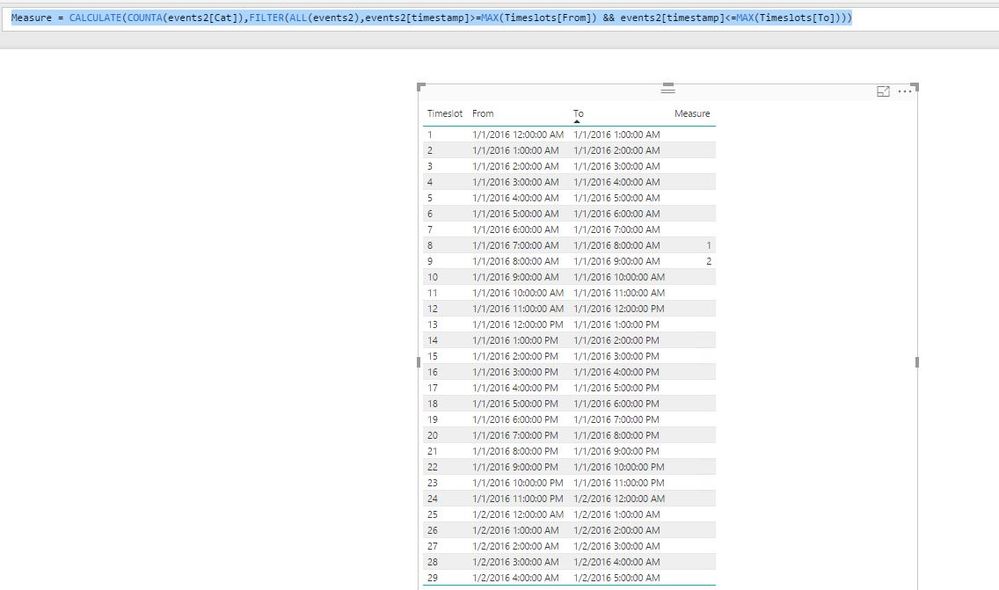
Create the following measure in the Timeslots table and check if you get expected result.
Measure = CALCULATE(COUNTA(events2[Cat]),FILTER(ALL(events2),events2[timestamp]>=MAX(Timeslots[From]) && events2[timestamp]<=MAX(Timeslots[To])))
Regards,
Lydia

- Mark as New
- Bookmark
- Subscribe
- Mute
- Subscribe to RSS Feed
- Permalink
- Report Inappropriate Content
@thoms1,
In your events tables, create the following columns. Then change data type of Date column to Date, and change data type of Time column to Time.
Date = DATE(YEAR(events[timestamp]),MONTH(events[timestamp]),DAY(events[timestamp]))
Time = TIME(HOUR(events[timestamp]),MINUTE(events[timestamp]),SECOND(events[timestamp]))
This way, you are able to drag Date column and Time column to Axis, and drill down to Time level.
Regards,
Lydia

- Mark as New
- Bookmark
- Subscribe
- Mute
- Subscribe to RSS Feed
- Permalink
- Report Inappropriate Content
Hi Lydia,
many thanks for your message indicating how to drill down to hour-level!
However, I am still looking for a way to count events that occured during pre-set timeslots.
Any idea how to solve this?
Regards
Thomas


- Mark as New
- Bookmark
- Subscribe
- Mute
- Subscribe to RSS Feed
- Permalink
- Report Inappropriate Content
Hi, @thoms1
try this:
1) create new calculated column (f. ex. HourStep) in EVENTS tab:
HourStep = CEILING([timestamp]*100;1) + HOUR([timestamp])
2) count you events:
EventsNum =
CALCULATE(COUNTROWS(EVENTS);ALLEXCEPT(Records;Records[HourStep])
)
Let me known if its worked
Best regs
- Mark as New
- Bookmark
- Subscribe
- Mute
- Subscribe to RSS Feed
- Permalink
- Report Inappropriate Content
Hi McCow,
thanks for your help. I added a calculate column with the ceiling function. I modified your query slightly to
HourStep = CEILING([timestamp],TIME(1,0,0))
Now I have for each event a rounded date-time.
Yet I 'm lost with regard to your second step. The string "Records..." is not recognised, apparently referring to data fields not part of my model.
My problem is that I'm looking for a way to count events in pre-defined timeslots. Excel / SQL provide functions such as "countifs" or have where conditions and I wonder why such functions are not implemented in DAX.
Many thanks & best regards
Thomas
- Mark as New
- Bookmark
- Subscribe
- Mute
- Subscribe to RSS Feed
- Permalink
- Report Inappropriate Content
@thoms1 wrote:Hi McCow,
... skiped...
My problem is that I'm looking for a way to count events in pre-defined timeslots. Excel / SQL provide functions such as "countifs" or have where conditions and I wonder why such functions are not implemented in DAX.
Of course @thoms1, DAX has a lot of functions, but the strongest (and complicated) part of this is the combination of this.
I can better show an examples on your own data , if you send as PBIX (not all of total, one short example set will be enough).
Or someone can send you abstract example / solution.
- Mark as New
- Bookmark
- Subscribe
- Mute
- Subscribe to RSS Feed
- Permalink
- Report Inappropriate Content
Hi McCow,
I have uploaded the model to the Power Bi webspace. https://app.powerbi.com/view?r=eyJrIjoiNDBhYWE2OWYtYTFhNC00MDllLTlhNDgtNTc5MTIyODhmZTkxIiwidCI6ImQxY...
Don't know if that works, or how I could else send the pbix.
I also tried with DATESBETWEEN but this is returning error messages like in this older post here: https://community.powerbi.com/t5/Desktop/DATESBETWEEN-Date-and-Time-Field/td-p/17462
Would be great if you can find a solution!
Best
Thomas
- Mark as New
- Bookmark
- Subscribe
- Mute
- Subscribe to RSS Feed
- Permalink
- Report Inappropriate Content
Hi Thomas again.
There is a tons of free upload services. Try in google: "upload file without registration". Try for example THIS. It's quick and easy.
Enjoy
- Mark as New
- Bookmark
- Subscribe
- Mute
- Subscribe to RSS Feed
- Permalink
- Report Inappropriate Content
Thanks, McCow,
I think I'm getting there. Hope this link is working:
And hope you find a way to help me solving this problem!
Best
Thomas
- Mark as New
- Bookmark
- Subscribe
- Mute
- Subscribe to RSS Feed
- Permalink
- Report Inappropriate Content
@thoms1,
Create the following measure in the Timeslots table and check if you get expected result.
Measure = CALCULATE(COUNTA(events2[Cat]),FILTER(ALL(events2),events2[timestamp]>=MAX(Timeslots[From]) && events2[timestamp]<=MAX(Timeslots[To])))
Regards,
Lydia
- Mark as New
- Bookmark
- Subscribe
- Mute
- Subscribe to RSS Feed
- Permalink
- Report Inappropriate Content
Hi @Anonymous ,
I do have a similar situation with little more complexity. Both of my tables contains an additional field called 'Server'. I need to calculate the number of timeslot events for individual server. Basically, I do have an additional categorical field corresponding to both Events and Timeslot tables. Can you please help me on this?
Thanks in advance.
Regards,
Yeedhi
- Mark as New
- Bookmark
- Subscribe
- Mute
- Subscribe to RSS Feed
- Permalink
- Report Inappropriate Content
Thanks, Lydia,
this is exactly what I was looking for!
Best
Thomas
- Mark as New
- Bookmark
- Subscribe
- Mute
- Subscribe to RSS Feed
- Permalink
- Report Inappropriate Content
Sorry @thoms1 , my mistake.
"Records" is my own test table 🙂 You must change Records to EVENTS in the second formula, like this:
EventsNum =
CALCULATE(COUNTROWS(EVENTS);ALLEXCEPT(EVENTS;EVENTS[HourStep])
)
Helpful resources

Power BI Dataviz World Championships
The Power BI Data Visualization World Championships is back! Get ahead of the game and start preparing now!

Power BI Monthly Update - December 2025
Check out the December 2025 Power BI Holiday Recap!

FabCon Atlanta 2026
Join us at FabCon Atlanta, March 16-20, for the ultimate Fabric, Power BI, AI and SQL community-led event. Save $200 with code FABCOMM.

| User | Count |
|---|---|
| 41 | |
| 38 | |
| 36 | |
| 30 | |
| 28 |


| User | Count |
|---|---|
| 129 | |
| 88 | |
| 79 | |
| 68 | |
| 63 |


