Don't miss your chance to take the Fabric Data Engineer (DP-700) exam on us!
Learn moreThe FabCon + SQLCon recap series starts April 14th at 8am Pacific. If you’re tracking where AI is going inside Fabric, this first session is a can't miss. Register now
I've scrolled at least 20 help threads to no avail—amazes me if there isn't a simple solution out there—but no one has been looking for precisely the same thing as me.
So I have a dataset where school students do multiple subjects, anywhere from one to four. These subjects (e.g. "Maths", "English", "Architecture") are in four columns—a student either has just one entry in subject 1 if they studied one subject, or up to four entries, with each of their subjects in a separate column associated with their row.
It's very easy to plot a bar chart count of subject by subject for any individual column, but I want a sum of the most popular subjects to have studied. You can't just add in the extra columns, because then it gives you what other subjects (subject 2-4) someone studying a given subject 1 did.
Essentially, I want the total times any given subject, across all four columns, was studied. I know the answer because it's very trivial to do in R, but I want to work it through in Power BI as well. Any help massively appreciated!
Solved! Go to Solution.
Hi @bswud
Sorry not to explaining better.
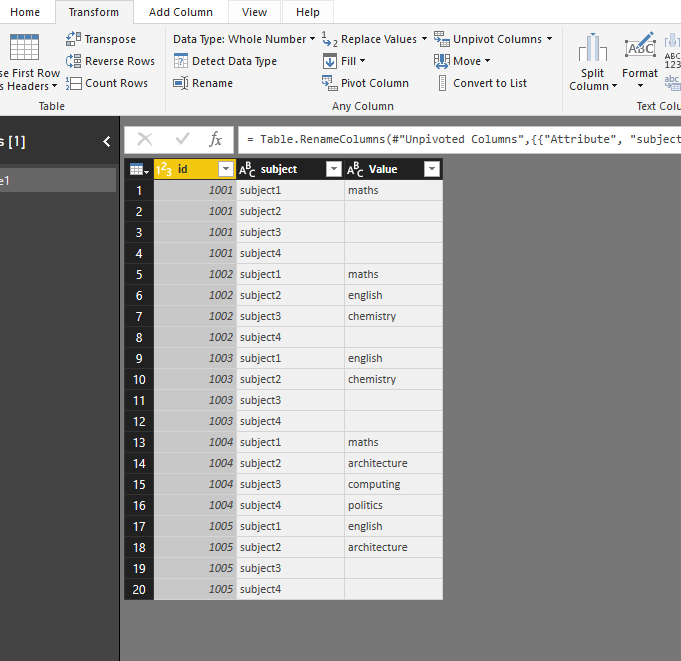
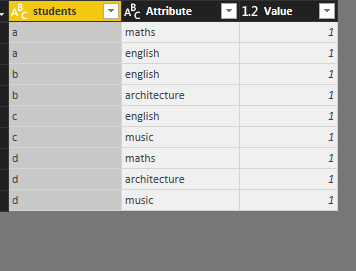
Before creating measure, i go to "edit queries"->"Transform", select four subject columns, then select "unpivot columns", then "apply&&colse", next create measures.
Below is the table after transform
Best Regards
Maggie
Hi @bswud
Test with your table
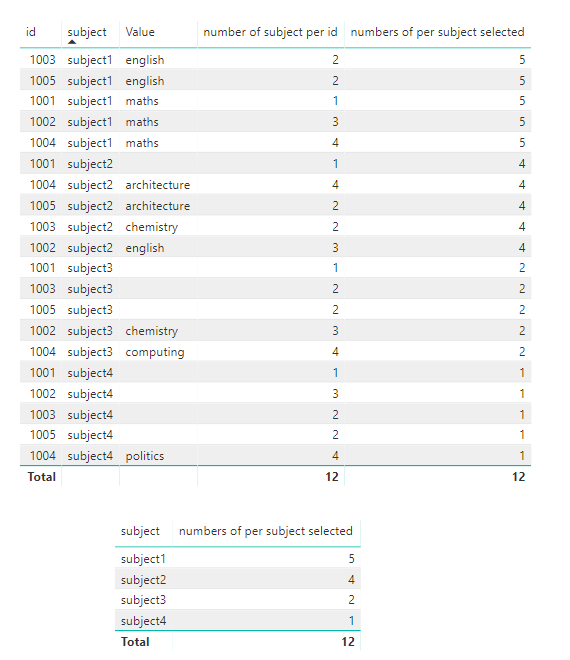
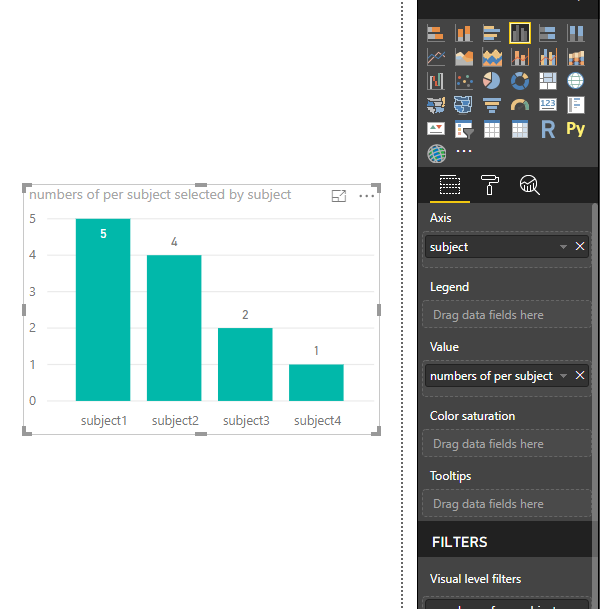
Create measures
numbers of per subject selected = CALCULATE(COUNT(Table1[subject]),FILTER(ALLEXCEPT(Table1,Table1[subject]),[Value]<>BLANK()))
Best Regards
Maggie
Thank you Maggie, that is what I'm looking for, but it doesn't work. I think because I'm not understanding what I should put for [Value], and I'm not understanding how many times I need to iterate the measure (for each subject number column?) I'd appreciate a tiny bit more explanation so I can try and understand the underlying issue.
Hi @bswud
Sorry not to explaining better.
Before creating measure, i go to "edit queries"->"Transform", select four subject columns, then select "unpivot columns", then "apply&&colse", next create measures.
Below is the table after transform
Best Regards
Maggie
Hi @bswud
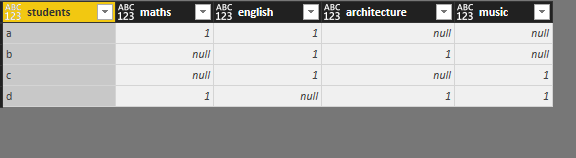
Assume your table is like
"1" represents the student has entries in this subject.
Then in Edit quieries, select all subject columns from "math" to "music", then in "Transform"->"Unpivot columns", the dataset would change as below
Then in Report view, create a measure to count the number of entries in each subject for all students
Measure = CALCULATE(COUNT(Sheet4[Value]),ALLEXCEPT(Sheet4,Sheet4[Attribute]))
But, for your final requirement about total time, i can't figure out since i don't know how your data look like.
Please share some data example with me so that i can help you efficiently.
Best Regards
Maggie
Thank you for the reply. No that is not at all how it looks, my apologies for describing it poorly. I can't share screenshots of the data itself because it's from a private project, but I'll mock up some similar data for explanation.
It looks like this. I want to count all the instances of all the unique subjects across all four columns. It's trivially easy to count them across one column, so I can see the "main" subject easily. But I can't get a summed chart across all four.
If you have recently started exploring Fabric, we'd love to hear how it's going. Your feedback can help with product improvements.
A new Power BI DataViz World Championship is coming this June! Don't miss out on submitting your entry.
Share feedback directly with Fabric product managers, participate in targeted research studies and influence the Fabric roadmap.
| User | Count |
|---|---|
| 53 | |
| 40 | |
| 38 | |
| 19 | |
| 18 |
| User | Count |
|---|---|
| 69 | |
| 68 | |
| 34 | |
| 33 | |
| 30 |