FabCon is coming to Atlanta
Join us at FabCon Atlanta from March 16 - 20, 2026, for the ultimate Fabric, Power BI, AI and SQL community-led event. Save $200 with code FABCOMM.
Register now!- Power BI forums
- Get Help with Power BI
- Desktop
- Service
- Report Server
- Power Query
- Mobile Apps
- Developer
- DAX Commands and Tips
- Custom Visuals Development Discussion
- Health and Life Sciences
- Power BI Spanish forums
- Translated Spanish Desktop
- Training and Consulting
- Instructor Led Training
- Dashboard in a Day for Women, by Women
- Galleries
- Data Stories Gallery
- Themes Gallery
- Contests Gallery
- QuickViz Gallery
- Quick Measures Gallery
- Visual Calculations Gallery
- Notebook Gallery
- Translytical Task Flow Gallery
- TMDL Gallery
- R Script Showcase
- Webinars and Video Gallery
- Ideas
- Custom Visuals Ideas (read-only)
- Issues
- Issues
- Events
- Upcoming Events
Get Fabric Certified for FREE during Fabric Data Days. Don't miss your chance! Request now
- Power BI forums
- Forums
- Get Help with Power BI
- Desktop
- Re: Counting Uni-char Characters
- Subscribe to RSS Feed
- Mark Topic as New
- Mark Topic as Read
- Float this Topic for Current User
- Bookmark
- Subscribe
- Printer Friendly Page

- Mark as New
- Bookmark
- Subscribe
- Mute
- Subscribe to RSS Feed
- Permalink
- Report Inappropriate Content
Counting Uni-char Characters
Hi Experts
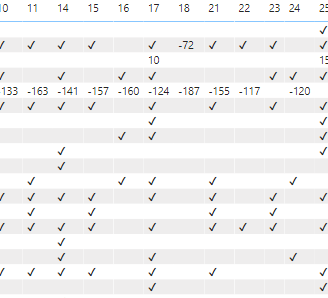
Is it possibel to count the number of unichar characters? I am tyring to count the number of X and ticks and X i have against a products. In order to plot the count in a pie chart.
My DAX for unichar

Solved! Go to Solution.


- Mark as New
- Bookmark
- Subscribe
- Mute
- Subscribe to RSS Feed
- Permalink
- Report Inappropriate Content
Sure @Anonymous - Here is an example (attached PBIX).
Number of Ticks Measure =
    VAR __Table = SUMMARIZE('DH_AUDITCONTENTIMPORT',[Column1],"__Status",[Status])
RETURN
    COUNTROWS(FILTER(__Table,[__Status] = UNICHAR(10004)))
Follow on LinkedIn
@ me in replies or I'll lose your thread!!!
Instead of a Kudo, please vote for this idea
Become an expert!: Enterprise DNA
External Tools: MSHGQM
YouTube Channel!: Microsoft Hates Greg
Latest book!: DAX For Humans
DAX is easy, CALCULATE makes DAX hard...

- Mark as New
- Bookmark
- Subscribe
- Mute
- Subscribe to RSS Feed
- Permalink
- Report Inappropriate Content


- Mark as New
- Bookmark
- Subscribe
- Mute
- Subscribe to RSS Feed
- Permalink
- Report Inappropriate Content
@Anonymous
refer :https://community.powerbi.com/t5/Desktop/UNICHAR-Green-Up-arrow-and-Red-Down-arrow/td-p/367804
https://community.powerbi.com/t5/Desktop/UNICHAR-Green-Up-arrow-and-Red-Down-arrow/td-p/367804
In new release you have an option for icon in Matrix under conditional formatting
- Mark as New
- Bookmark
- Subscribe
- Mute
- Subscribe to RSS Feed
- Permalink
- Report Inappropriate Content
Right, so create a measure that SUMMARIZE your data just like in the visual, add a column with your UNICHAR characters and then use COUNTX or COUNTROWS and FILTER to count the number rows of interest.
Follow on LinkedIn
@ me in replies or I'll lose your thread!!!
Instead of a Kudo, please vote for this idea
Become an expert!: Enterprise DNA
External Tools: MSHGQM
YouTube Channel!: Microsoft Hates Greg
Latest book!: DAX For Humans
DAX is easy, CALCULATE makes DAX hard...
- Mark as New
- Bookmark
- Subscribe
- Mute
- Subscribe to RSS Feed
- Permalink
- Report Inappropriate Content
Super Greg
You are expectional more smarter then me on this, confused.....do you have a demo pbix, please.
- Mark as New
- Bookmark
- Subscribe
- Mute
- Subscribe to RSS Feed
- Permalink
- Report Inappropriate Content
Sure @Anonymous - Here is an example (attached PBIX).
Number of Ticks Measure =
    VAR __Table = SUMMARIZE('DH_AUDITCONTENTIMPORT',[Column1],"__Status",[Status])
RETURN
    COUNTROWS(FILTER(__Table,[__Status] = UNICHAR(10004)))
Follow on LinkedIn
@ me in replies or I'll lose your thread!!!
Instead of a Kudo, please vote for this idea
Become an expert!: Enterprise DNA
External Tools: MSHGQM
YouTube Channel!: Microsoft Hates Greg
Latest book!: DAX For Humans
DAX is easy, CALCULATE makes DAX hard...
- Mark as New
- Bookmark
- Subscribe
- Mute
- Subscribe to RSS Feed
- Permalink
- Report Inappropriate Content
thanks for all your help greg, God Bless.
- Mark as New
- Bookmark
- Subscribe
- Mute
- Subscribe to RSS Feed
- Permalink
- Report Inappropriate Content
Also my max days is a meaure not a calculated column as per your pbix file.
- Mark as New
- Bookmark
- Subscribe
- Mute
- Subscribe to RSS Feed
- Permalink
- Report Inappropriate Content
Greg
Thanks excellent, but how do i plot the 5 dashes and 3 x and four ticks in a pie chart...within a single measure...
- Mark as New
- Bookmark
- Subscribe
- Mute
- Subscribe to RSS Feed
- Permalink
- Report Inappropriate Content
I do not believe that it matters that your days overdue is a measure.
Man @Anonymous, moving the goal posts!! 🙂
In your case, I would create a disconnected table, let's call it Categories with a single column called Category with the following data:
Tick
Cross
Dash
Use this in a legend on your pie chart. Then a measure like this:
Measure =
    VAR __Category = MAX('Categories'[Category])
RETURN
    SWITCH(__Category,
        "Tick",COUNTROWS(FILTER('DH_AUDITCONTENTIMPORT',[Status] = UNICHAR(10004))),
        "Cross",COUNTROWS(FILTER('DH_AUDITCONTENTIMPORT',[Status] = UNICHAR(10006))),
        COUNTROWS(FILTER('DH_AUDITCONTENTIMPORT',[Status] = UNICHAR(10134)))
    )
Updated PBIX attached, ignore "Table".
Follow on LinkedIn
@ me in replies or I'll lose your thread!!!
Instead of a Kudo, please vote for this idea
Become an expert!: Enterprise DNA
External Tools: MSHGQM
YouTube Channel!: Microsoft Hates Greg
Latest book!: DAX For Humans
DAX is easy, CALCULATE makes DAX hard...
- Mark as New
- Bookmark
- Subscribe
- Mute
- Subscribe to RSS Feed
- Permalink
- Report Inappropriate Content
Great Greg, how do you get the pie chart to filter the other tables you have added to your PBIX
- Mark as New
- Bookmark
- Subscribe
- Mute
- Subscribe to RSS Feed
- Permalink
- Report Inappropriate Content
@Anonymous I did it like below. PBIX attached.
Status 2 =
VAR Tick = UNICHAR(10004)
VAR Cross = UNICHAR(10006)
VAR Dash = UNICHAR(10134)
VAR DaysOverdue = MAX('DH_AUDITCONTENTIMPORT'[Days Overdue])
VAR Symbol =
    SWITCH( TRUE(),
        DaysOverdue >= 0 && DaysOverdue <= 2 , Tick ,
        DaysOverdue > 2 && DaysOverdue <= 7 , Dash,
        DaysOverdue > 7 && DaysOverdue <= 100, Cross
    )
VAR Category = MAX('Categories'[Category])
RETURN
    SWITCH(TRUE(),
        Category = "Tick" && Symbol = Tick,Tick,
        Category = "Cross" && Symbol = Cross,Cross,
        Category = "Dash" && Symbol = Dash,Dash,
        BLANK()
    )
Follow on LinkedIn
@ me in replies or I'll lose your thread!!!
Instead of a Kudo, please vote for this idea
Become an expert!: Enterprise DNA
External Tools: MSHGQM
YouTube Channel!: Microsoft Hates Greg
Latest book!: DAX For Humans
DAX is easy, CALCULATE makes DAX hard...
Helpful resources

Power BI Monthly Update - November 2025
Check out the November 2025 Power BI update to learn about new features.

Fabric Data Days
Advance your Data & AI career with 50 days of live learning, contests, hands-on challenges, study groups & certifications and more!

FabCon Atlanta 2026
Join us at FabCon Atlanta, March 16-20, for the ultimate Fabric, Power BI, AI and SQL community-led event. Save $200 with code FABCOMM.


