cancel
Showing results for 
Search instead for 
Did you mean: 

Did you hear? There's a new SQL AI Developer certification (DP-800). Start preparing now and be one of the first to get certified. Register now

Reply
npals
Frequent Visitor

Counting Text Values in Multiple Columns

Hello,


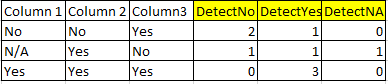
I am attempting to count a total of multiple different text values within multiple columns.  For example, if I have three columns, with three different options "Yes" "No" and "N/A" I would want to count how many of each are in each row.  See attached photo showing the result that I would like to reach through a calculated column.  Please let me know if there is a dax formula that can be used to get to solve this, or if there is a different unique workaround to get this accomplished.  


DetectNo, DetectYes, and DetectNA would be calculated columns to count the totals of the values from Column 1, 2, and 3 per row.


1.PNG


Thanks,


Nate

1 ACCEPTED SOLUTION
v-frfei-msft
Community Support
Community Support

Hi @npals,


Based on my test, we can create three measures and create a table visual to work around.


DetectN/A = var
nety = CALCULATE(COUNTA(Table1[Column1]),FILTER(ALL(Table1[Column1]),Table1[Column1]= "N/A"))+ CALCULATE(COUNTA(Table1[Column2]),FILTER(ALL(Table1[Column2]),Table1[Column2]= "N/A"))+ CALCULATE(COUNTA(Table1[Column3]),FILTER(ALL(Table1[Column3]),Table1[Column3]= "N/A"))
return
IF(ISBLANK(nety),0,nety)
DetectNo = var
nety = CALCULATE(COUNTA(Table1[Column1]),FILTER(ALL(Table1[Column1]),Table1[Column1]= "No"))+ CALCULATE(COUNTA(Table1[Column2]),FILTER(ALL(Table1[Column2]),Table1[Column2]= "No"))+ CALCULATE(COUNTA(Table1[Column3]),FILTER(ALL(Table1[Column3]),Table1[Column3]= "No"))
return
IF(ISBLANK(nety),0,nety)
 
DetectYes = var
nety = CALCULATE(COUNTA(Table1[Column1]),FILTER(ALL(Table1[Column1]),Table1[Column1]= "Yes"))+ CALCULATE(COUNTA(Table1[Column2]),FILTER(ALL(Table1[Column2]),Table1[Column2]= "Yes"))+ CALCULATE(COUNTA(Table1[Column3]),FILTER(ALL(Table1[Column3]),Table1[Column3]= "Yes"))
return
IF(ISBLANK(nety),0,nety)


Then we can get the result as below


image001.png


For more details, please check the pbix as attached.
https://www.dropbox.com/s/dmelerdhcw5dvfw/Counting%20Text%20Values%20in%20Multiple%20Columns.pbix?dl...

Regards,
Frank

Community Support Team _ Frank
If this post helps, then please consider Accept it as the solution to help the others find it more quickly.

View solution in original post

3 REPLIES 3
v-frfei-msft
Community Support
Community Support

Hi @npals,


Based on my test, we can create three measures and create a table visual to work around.


DetectN/A = var
nety = CALCULATE(COUNTA(Table1[Column1]),FILTER(ALL(Table1[Column1]),Table1[Column1]= "N/A"))+ CALCULATE(COUNTA(Table1[Column2]),FILTER(ALL(Table1[Column2]),Table1[Column2]= "N/A"))+ CALCULATE(COUNTA(Table1[Column3]),FILTER(ALL(Table1[Column3]),Table1[Column3]= "N/A"))
return
IF(ISBLANK(nety),0,nety)
DetectNo = var
nety = CALCULATE(COUNTA(Table1[Column1]),FILTER(ALL(Table1[Column1]),Table1[Column1]= "No"))+ CALCULATE(COUNTA(Table1[Column2]),FILTER(ALL(Table1[Column2]),Table1[Column2]= "No"))+ CALCULATE(COUNTA(Table1[Column3]),FILTER(ALL(Table1[Column3]),Table1[Column3]= "No"))
return
IF(ISBLANK(nety),0,nety)
 
DetectYes = var
nety = CALCULATE(COUNTA(Table1[Column1]),FILTER(ALL(Table1[Column1]),Table1[Column1]= "Yes"))+ CALCULATE(COUNTA(Table1[Column2]),FILTER(ALL(Table1[Column2]),Table1[Column2]= "Yes"))+ CALCULATE(COUNTA(Table1[Column3]),FILTER(ALL(Table1[Column3]),Table1[Column3]= "Yes"))
return
IF(ISBLANK(nety),0,nety)


Then we can get the result as below


image001.png


For more details, please check the pbix as attached.
https://www.dropbox.com/s/dmelerdhcw5dvfw/Counting%20Text%20Values%20in%20Multiple%20Columns.pbix?dl...

Regards,
Frank

Community Support Team _ Frank
If this post helps, then please consider Accept it as the solution to help the others find it more quickly.

Hi @v-frfei-msft, Frank, I have similar situation here but I can't pass the columns to the formula since it changes every refresh. Imagine that sometimes I have 3 columns, just like the example, but sometimes more than 3 or less than 3... it happens every refresh of database and my dashboard should catch it. So, what I want need to do is count the occurrences of word in a row, the same what you did, but independent how many columns the dataframe has, got it? Perhaps there is a way to set a range of columns or concatenate all in one... I got stucked at this point and appreciate your help.


Is there a way to do this in a calculated column instead?  

Helpful resources

Announcements
April Power BI Update Carousel

Power BI Monthly Update - April 2026

Check out the April 2026 Power BI update to learn about new features.

Fabric SQL PBI Data Days

Data Days 2026 coming soon!

Sign up to receive a private message when registration opens and key events begin.

New to Fabric survey Carousel

New to Fabric Survey

If you have recently started exploring Fabric, we'd love to hear how it's going. Your feedback can help with product improvements.

Power BI DataViz World Championships carousel

Power BI DataViz World Championships - June 2026

A new Power BI DataViz World Championship is coming this June! Don't miss out on submitting your entry.