Join us at FabCon Atlanta from March 16 - 20, 2026, for the ultimate Fabric, Power BI, AI and SQL community-led event. Save $200 with code FABCOMM.
Register now!The Power BI Data Visualization World Championships is back! Get ahead of the game and start preparing now! Learn more
Hello,
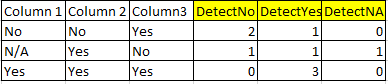
I am attempting to count a total of multiple different text values within multiple columns. For example, if I have three columns, with three different options "Yes" "No" and "N/A" I would want to count how many of each are in each row. See attached photo showing the result that I would like to reach through a calculated column. Please let me know if there is a dax formula that can be used to get to solve this, or if there is a different unique workaround to get this accomplished.
DetectNo, DetectYes, and DetectNA would be calculated columns to count the totals of the values from Column 1, 2, and 3 per row.
Thanks,
Nate
Solved! Go to Solution.
Hi @npals,
Based on my test, we can create three measures and create a table visual to work around.
DetectN/A = var nety = CALCULATE(COUNTA(Table1[Column1]),FILTER(ALL(Table1[Column1]),Table1[Column1]= "N/A"))+ CALCULATE(COUNTA(Table1[Column2]),FILTER(ALL(Table1[Column2]),Table1[Column2]= "N/A"))+ CALCULATE(COUNTA(Table1[Column3]),FILTER(ALL(Table1[Column3]),Table1[Column3]= "N/A")) return IF(ISBLANK(nety),0,nety)
DetectNo = var nety = CALCULATE(COUNTA(Table1[Column1]),FILTER(ALL(Table1[Column1]),Table1[Column1]= "No"))+ CALCULATE(COUNTA(Table1[Column2]),FILTER(ALL(Table1[Column2]),Table1[Column2]= "No"))+ CALCULATE(COUNTA(Table1[Column3]),FILTER(ALL(Table1[Column3]),Table1[Column3]= "No")) return IF(ISBLANK(nety),0,nety)
DetectYes = var nety = CALCULATE(COUNTA(Table1[Column1]),FILTER(ALL(Table1[Column1]),Table1[Column1]= "Yes"))+ CALCULATE(COUNTA(Table1[Column2]),FILTER(ALL(Table1[Column2]),Table1[Column2]= "Yes"))+ CALCULATE(COUNTA(Table1[Column3]),FILTER(ALL(Table1[Column3]),Table1[Column3]= "Yes")) return IF(ISBLANK(nety),0,nety)
Then we can get the result as below
For more details, please check the pbix as attached.
https://www.dropbox.com/s/dmelerdhcw5dvfw/Counting%20Text%20Values%20in%20Multiple%20Columns.pbix?dl...
Regards,
Frank
Hi @npals,
Based on my test, we can create three measures and create a table visual to work around.
DetectN/A = var nety = CALCULATE(COUNTA(Table1[Column1]),FILTER(ALL(Table1[Column1]),Table1[Column1]= "N/A"))+ CALCULATE(COUNTA(Table1[Column2]),FILTER(ALL(Table1[Column2]),Table1[Column2]= "N/A"))+ CALCULATE(COUNTA(Table1[Column3]),FILTER(ALL(Table1[Column3]),Table1[Column3]= "N/A")) return IF(ISBLANK(nety),0,nety)
DetectNo = var nety = CALCULATE(COUNTA(Table1[Column1]),FILTER(ALL(Table1[Column1]),Table1[Column1]= "No"))+ CALCULATE(COUNTA(Table1[Column2]),FILTER(ALL(Table1[Column2]),Table1[Column2]= "No"))+ CALCULATE(COUNTA(Table1[Column3]),FILTER(ALL(Table1[Column3]),Table1[Column3]= "No")) return IF(ISBLANK(nety),0,nety)
DetectYes = var nety = CALCULATE(COUNTA(Table1[Column1]),FILTER(ALL(Table1[Column1]),Table1[Column1]= "Yes"))+ CALCULATE(COUNTA(Table1[Column2]),FILTER(ALL(Table1[Column2]),Table1[Column2]= "Yes"))+ CALCULATE(COUNTA(Table1[Column3]),FILTER(ALL(Table1[Column3]),Table1[Column3]= "Yes")) return IF(ISBLANK(nety),0,nety)
Then we can get the result as below
For more details, please check the pbix as attached.
https://www.dropbox.com/s/dmelerdhcw5dvfw/Counting%20Text%20Values%20in%20Multiple%20Columns.pbix?dl...
Regards,
Frank
Hi @v-frfei-msft, Frank, I have similar situation here but I can't pass the columns to the formula since it changes every refresh. Imagine that sometimes I have 3 columns, just like the example, but sometimes more than 3 or less than 3... it happens every refresh of database and my dashboard should catch it. So, what I want need to do is count the occurrences of word in a row, the same what you did, but independent how many columns the dataframe has, got it? Perhaps there is a way to set a range of columns or concatenate all in one... I got stucked at this point and appreciate your help.
Is there a way to do this in a calculated column instead?
The Power BI Data Visualization World Championships is back! Get ahead of the game and start preparing now!
| User | Count |
|---|---|
| 64 | |
| 43 | |
| 41 | |
| 32 | |
| 23 |
| User | Count |
|---|---|
| 200 | |
| 126 | |
| 103 | |
| 71 | |
| 54 |