cancel
Showing results for 
Search instead for 
Did you mean: 

Vote for your favorite vizzies from the Power BI Dataviz World Championship submissions. Vote now!

Reply
Matt_Mohawk
Helper II
Helper II

Counting Services Separately

Hi,


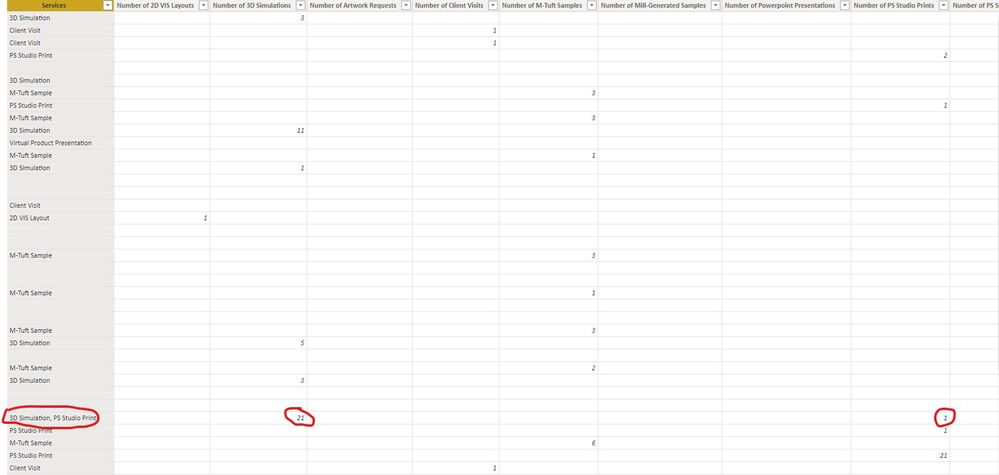
I have a report that I am trying to calulate a number of services provided in one of our showrooms. The information is being pulled from Smartsheet and I have the multi-select function selected on that column. This means they can select multiple services per row and put in how many times that service was used during that visit. I have an image attached showing the data that I need to track. If possible I need a formula that will notice the names of service and track it based on the column name using the counted column.


Let me know if you need any other information.


Annotation 2021-10-27 153636.jpg

4 REPLIES 4
Anonymous
Not applicable

Hello @Matt_Mohawk ,


You can unpivot table in Power Query, so that there is Value and atribute column. Then you can see what is the filtered attribute from values over 0.


Here is the link to the documentation.

https://support.microsoft.com/en-us/office/unpivot-columns-power-query-0f7bad4b-9ea1-49c1-9d95-f5882...


Hope that helped.

If that solved the issue, please mark the reply as solution 🙂


@Anonymous ,


Would this also be able to tell what information was placed in each column? The thing I need to make sure is that the correct data is being calculated based on the Service provided.

Anonymous
Not applicable

Hello @Matt_Mohawk ,


Yes it will, In the atribute column will be the column name and the value will be the column value

@Anonymous ,


So this is the problem that I am running into right now. I have data that have 2 different values combined but deliminated with a comma. When I unpivot it does not separate those values and calculate them based on the counted columns. See below:


Matt_Mohawk_0-1635366322146.png


Helpful resources

Announcements
Power BI DataViz World Championships

Power BI Dataviz World Championships

Vote for your favorite vizzies from the Power BI World Championship submissions!

Sticker Challenge 2026 Carousel

Join our Community Sticker Challenge 2026

If you love stickers, then you will definitely want to check out our Community Sticker Challenge!

January Power BI Update Carousel

Power BI Monthly Update - January 2026

Check out the January 2026 Power BI update to learn about new features.

FabCon Atlanta 2026 carousel

FabCon Atlanta 2026

Join us at FabCon Atlanta, March 16-20, for the ultimate Fabric, Power BI, AI and SQL community-led event. Save $200 with code FABCOMM.