cancel
Showing results for 
Search instead for 
Did you mean: 

Level up your Power BI skills this month - build one visual each week and tell better stories with data! Get started

Reply
NSBS
Helper I
Helper I

Counting Rows with Conditions in Measure

Hi PowerBI Community,


Need some help in creating a DAX measure code for below case.


Considering below attempt # and its status for each person, and the Overall Status will be consided as "Passed" if there is any "Passed" attempt (within 3 attempts).
Now I need to create a mesure to directly calculate how many person has "Passed" overall status

Notes: the Overall Status column is not exist in my data and I don't want to create one, instead I want to create a measure to directly count the number of "Passed" Overall Status

NameAttemptAttempt StatusOverall Status
Carol1FailedPassed
Carol2Failed
Carol3Passed
Jane1PassedPassed
Jane2Passed
Jane3Passed
Adam1FailedFailed
Adam2Failed
Adam3Failed
1 ACCEPTED SOLUTION
v-jianboli-msft
Community Support
Community Support

Hi @NSBS ,


Please try:

Count Passed = 
var _a = ADDCOLUMNS(ALL('Table'),"Overall", IF("Passed" in SELECTCOLUMNS(FILTER('Table',[Name]=EARLIER('Table'[Name])&&[Attempt]<=3),"Attempt status",[Attempt Status]),
"Passed","Failed"))
return CALCULATE(DISTINCTCOUNT('Table'[Name]),FILTER(_a,[Overall]="Passed"))

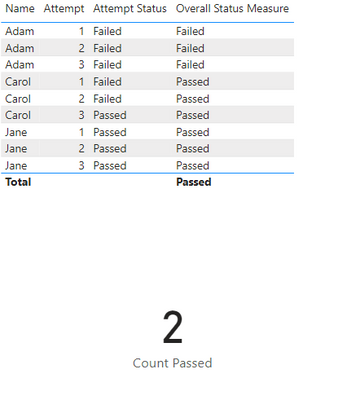
Final output:

vjianbolimsft_2-1670552132779.png


Best Regards,

Jianbo Li

If this post helps, then please consider Accept it as the solution to help the other members find it more quickly.

View solution in original post

2 REPLIES 2
v-jianboli-msft
Community Support
Community Support

Hi @NSBS ,


Please try:

Count Passed = 
var _a = ADDCOLUMNS(ALL('Table'),"Overall", IF("Passed" in SELECTCOLUMNS(FILTER('Table',[Name]=EARLIER('Table'[Name])&&[Attempt]<=3),"Attempt status",[Attempt Status]),
"Passed","Failed"))
return CALCULATE(DISTINCTCOUNT('Table'[Name]),FILTER(_a,[Overall]="Passed"))

Final output:

vjianbolimsft_2-1670552132779.png


Best Regards,

Jianbo Li

If this post helps, then please consider Accept it as the solution to help the other members find it more quickly.

NSBS
Helper I
Helper I

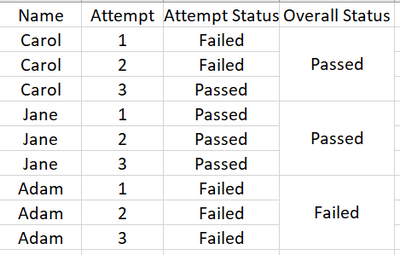
NSBS_0-1670461477128.png

Kindly refer attached screenshot for clearer table

Helpful resources

Announcements
April Power BI Update Carousel

Power BI Monthly Update - April 2026

Check out the April 2026 Power BI update to learn about new features.

Fabric SQL PBI Data Days

Data Days 2026 coming soon!

Sign up to receive a private message when registration opens and key events begin.

New to Fabric survey Carousel

New to Fabric Survey

If you have recently started exploring Fabric, we'd love to hear how it's going. Your feedback can help with product improvements.

Power BI DataViz World Championships carousel

Power BI DataViz World Championships - June 2026

A new Power BI DataViz World Championship is coming this June! Don't miss out on submitting your entry.