Get Fabric or SQL Certified for Free.
Get certified for free when you join Fabric Data Days 2026 and dive into Fabric, Power BI, SQL, AI, and other essential data skills.
Join now- Power BI forums
- Get Help with Power BI
- Desktop
- Service
- Report Server
- Power Query
- Mobile Apps
- Developer
- DAX Commands and Tips
- Custom Visuals Development Discussion
- Health and Life Sciences
- Power BI Spanish forums
- Translated Spanish Desktop
- Training and Consulting
- Instructor Led Training
- Dashboard in a Day for Women, by Women
- Galleries
- Data Stories Gallery
- Themes Gallery
- Contests Gallery
- QuickViz Gallery
- Quick Measures Gallery
- Visual Calculations Gallery
- Fabric Apps Gallery
- Notebook Gallery
- Translytical Task Flow Gallery
- TMDL Gallery
- R Script Showcase
- Webinars and Video Gallery
- Ideas
- Custom Visuals Ideas (read-only)
- Issues
- Issues
- Events
- Upcoming Events
July 7 - July 17 | Round 2 of the Power BI Dataviz World Championships. Don't miss your chance! Learn more
- Power BI forums
- Forums
- Get Help with Power BI
- Desktop
- Re: Counting Percentage problem.
- Subscribe to RSS Feed
- Mark Topic as New
- Mark Topic as Read
- Float this Topic for Current User
- Bookmark
- Subscribe
- Printer Friendly Page


- Mark as New
- Bookmark
- Subscribe
- Mute
- Subscribe to RSS Feed
- Permalink
- Report Inappropriate Content
Counting Percentage problem.
Hi, I am very new to power bi. trying to get hold on the functionalities. I have following dataset.
Customer TotalSale GoodSale
ABC 120 90
DEF 200 156
:
:
Both TotalSale and GoodSale are calculated columns. I used the Add Column functionality to get to this point. Please let me know if you need to know more details about TotalSale and GoodSale formula I have used. I think they are irrelevant so I am not digressing.
I want to add a column/measure that calculates the percentage of GoodSale against TotalSale. So final output should be something like:
Customer TotalSale GoodSale %GoodSale
ABC 120 90 75 (90*100/120)
DEF 200 156 78 (200*100/156)
How to achieve this? Further, I want to color code it. if the %GoodSale is > 70 then color it green, otherwise color is red.
Any help is appreciated. Thanks.
Prashant-
Solved! Go to Solution.


- Mark as New
- Bookmark
- Subscribe
- Mute
- Subscribe to RSS Feed
- Permalink
- Report Inappropriate Content
The conditional formatting features don't currently support using measurse to determine the back/font colur.
You can use the code to generate arrows or other characters (thumbs up/down etc).
Let me know if you'd like help with that.
- Mark as New
- Bookmark
- Subscribe
- Mute
- Subscribe to RSS Feed
- Permalink
- Report Inappropriate Content
I figured out the first part. I created new measure and then I used the Calculate function as below.
Measure = calculate(sum(GoodSale)/TotalSale * 100)
This gives me the desired output in the last column.
The conditional formating is still outstanding. I don't know how to get that done. I have created another measure called ColorCode
ColorCode = if(%GoodSale > 70, "Green", "Red")
This gives additional column at the end that prints Green and Red based on the %GoodSale column value. However, I want to print the text "Green" in Green color and "Red" in Red color. How to get that done? Any idea? Thanks a lot.
- Mark as New
- Bookmark
- Subscribe
- Mute
- Subscribe to RSS Feed
- Permalink
- Report Inappropriate Content
The conditional formatting features don't currently support using measurse to determine the back/font colur.
You can use the code to generate arrows or other characters (thumbs up/down etc).
Let me know if you'd like help with that.
- Mark as New
- Bookmark
- Subscribe
- Mute
- Subscribe to RSS Feed
- Permalink
- Report Inappropriate Content
I have one more question before closing this out.
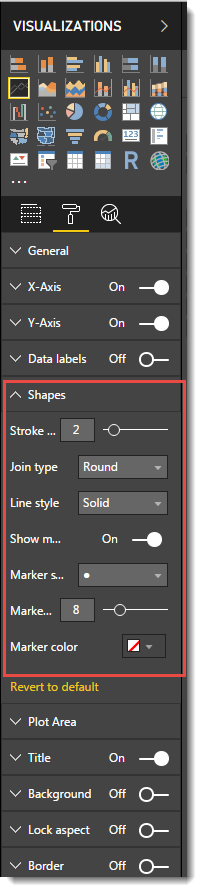
While using a Line Chart for percent Good sale for Customers, I see 0-20-40-60-80-100 as pre defined percentage that shows up on vertical axis (y axis). Is there a way to:
1. display 0-10-20-30-40... 100 for percentages?
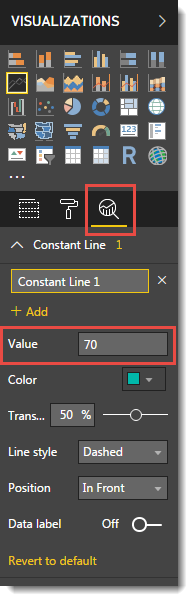
2. A horizontal dotted line at 70% that clearly shows who is above 70 and who is below 70%?
3. Every customer (x axis) should have his own dot on the graph where it belongs. Today, if i move the cursor i see a pop up value for each customer on the line, but I want to keep a visible dots for each customer. It is easily done in excel. I am looking for that in Power BI.
Thanks a lot.
- Mark as New
- Bookmark
- Subscribe
- Mute
- Subscribe to RSS Feed
- Permalink
- Report Inappropriate Content
- Mark as New
- Bookmark
- Subscribe
- Mute
- Subscribe to RSS Feed
- Permalink
- Report Inappropriate Content
yes, it worked for #2. Thanks a lot for pointing it out.
Is there a way to address 1 and 3? Thanks again!
- Mark as New
- Bookmark
- Subscribe
- Mute
- Subscribe to RSS Feed
- Permalink
- Report Inappropriate Content


- Mark as New
- Bookmark
- Subscribe
- Mute
- Subscribe to RSS Feed
- Permalink
- Report Inappropriate Content
I would suggest you to use a DIVIDE() function with its powerful alternative value feature as a third argument.
Percentage =
DIVIDE(
SUM(Table1[GoodSale]),
SUM(Table1[TotalSale ]),
BLANK() // will return blank if error
)
You can set the percentage in the Modeling menu and use conditional formatting for your coloring as @Phil_Seamark suggested.
Nick --
- Mark as New
- Bookmark
- Subscribe
- Mute
- Subscribe to RSS Feed
- Permalink
- Report Inappropriate Content
HI @ppgandhi11
Why not just add another calculated column using your formula.
new column = 'table'[GoodSale] * 100 / 'table'[TotalSale]

Helpful resources

FabCon & SQLCon – Barcelona 2026
Join us in Barcelona for FabCon and SQLCon, the Fabric, Power BI, SQL, and AI community event. Save €200 with code FABCMTY200.

Power BI Monthly Update - July 2026
Check out the July 2026 Power BI update to learn about new features.

Data Days 2026
Join Data Days 2026: 60 days of free live/on-demand sessions, challenges, study groups, and certification opportunities.

Power BI DataViz World Championships - June 2026
A new Power BI DataViz World Championship is coming this June! Don't miss out on submitting your entry.

| User | Count |
|---|---|
| 30 | |
| 25 | |
| 24 | |
| 23 | |
| 14 |


| User | Count |
|---|---|
| 50 | |
| 33 | |
| 21 | |
| 20 | |
| 19 |


