cancel
Showing results for 
Search instead for 
Did you mean: 

Learn from the best! Meet the four finalists headed to the FINALS of the Power BI Dataviz World Championships! Register now

Reply
HabibAdil
Helper IV
Helper IV

Counting Active Rows in a Time Period

Hi everyone,

Please can someone help me with the following. I tried to use the approach expalined in this link (https://powerpivotpro.com/2013/04/counting-active-rows-in-a-time-period-guest-post-from-chris-campbe...), but in vain.


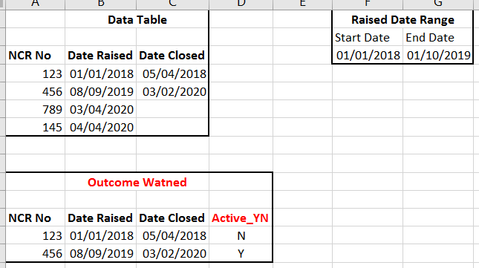
I want to know if a given NCR was active or not based on the Raised Date range selected. For example, the NCR No 456 which was closed on 03/02/2020 is active, but if I change the range upto today, then it would say N.


Thanks Everyone, Habib


Active NCR.PNG


1 ACCEPTED SOLUTION
Icey
Community Support
Community Support

Hi @HabibAdil ,


Just try this:

NCR Active_YN = 
VAR StatDate =
    MINX ( ALLSELECTED ( 'Calendar' ), 'Calendar'[Date] )
VAR EndDate =
    MAXX ( ALLSELECTED ( 'Calendar' ), 'Calendar'[Date] )
RETURN
    IF (
        SELECTEDVALUE ( OE_BD_NCR_Reports[NCR_Date_Raised] )
            IN VALUES ( 'Calendar'[Date] ),
        SWITCH (
            TRUE (),
            ISBLANK ( SELECTEDVALUE ( OE_BD_NCR_Reports[NCR_Date_Closed] ) ), "Y",
            SELECTEDVALUE ( OE_BD_NCR_Reports[NCR_Date_Closed] ) > EndDate, "Y",
            "N"
        )
    )

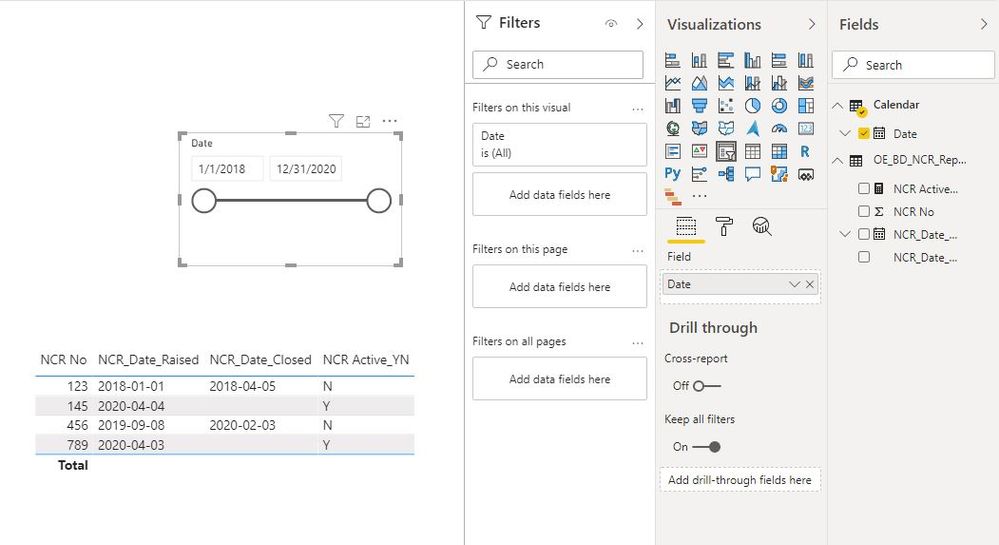
NCR.JPG

NCR2.JPG


Best Regards,

Icey


If this post helps, then please consider Accept it as the solution to help the other members find it more quickly.

View solution in original post

3 REPLIES 3
Icey
Community Support
Community Support

Hi @HabibAdil ,


Just try this:

NCR Active_YN = 
VAR StatDate =
    MINX ( ALLSELECTED ( 'Calendar' ), 'Calendar'[Date] )
VAR EndDate =
    MAXX ( ALLSELECTED ( 'Calendar' ), 'Calendar'[Date] )
RETURN
    IF (
        SELECTEDVALUE ( OE_BD_NCR_Reports[NCR_Date_Raised] )
            IN VALUES ( 'Calendar'[Date] ),
        SWITCH (
            TRUE (),
            ISBLANK ( SELECTEDVALUE ( OE_BD_NCR_Reports[NCR_Date_Closed] ) ), "Y",
            SELECTEDVALUE ( OE_BD_NCR_Reports[NCR_Date_Closed] ) > EndDate, "Y",
            "N"
        )
    )

NCR.JPG

NCR2.JPG


Best Regards,

Icey


If this post helps, then please consider Accept it as the solution to help the other members find it more quickly.

amitchandak
Super User
Super User

@HabibAdil , Try like

measure =
var _minx = minx(allselcted(Date), Date[date])
var _maxx = minx(allselcted(Date), Date[date])
return
if( isblank(
calculate(countrows(Table), filter(Table,((isblank(Table[Date_closed]) && Table[start_date] <=_minx) || Table[Date_closed] >=_minx) && (isblank(Table[Date_closed]) || Table[Date_closed] >=_minx)))), "No", "Yes")

Share with Power BI Enthusiasts: Full Power BI Video (20 Hours) YouTube
Microsoft Fabric Series 60+ Videos YouTube
Microsoft Fabric Hindi End to End YouTube

Hi@ Amitchandak,


Thank you for quick reply. I get No for all of them. The measure I create is as follow. I have a calender table which is related to NCR_Date_Raised field in OE_BD_NCR_Reports table. I do not see the var _max being used in the measure.


NCR Active_YN =
var _minx = MINX(ALLSELECTED(Calender),Calender[Date])
var _maxx = MAXX(ALLSELECTED(Calender),Calender[Date])
return
IF(ISBLANK(CALCULATE(COUNTROWS(OE_BD_NCR_Reports), FILTER(OE_BD_NCR_Reports,((ISBLANK(OE_BD_NCR_Reports[NCR_Date_Closed]) && OE_BD_NCR_Reports[NCR_Date_Raised]<=_minx) || OE_BD_NCR_Reports[NCR_Date_Closed]>= _minx && (ISBLANK(OE_BD_NCR_Reports[NCR_Date_Closed])||OE_BD_NCR_Reports[NCR_Date_Closed]>=_minx))))),"N","Y")

Helpful resources

Announcements
Power BI DataViz World Championships carousel

Power BI DataViz World Championships - June 2026

A new Power BI DataViz World Championship is coming this June! Don't miss out on submitting your entry.

Join our Fabric User Panel

Join our Fabric User Panel

Share feedback directly with Fabric product managers, participate in targeted research studies and influence the Fabric roadmap.

March Power BI Update Carousel

Power BI Community Update - March 2026

Check out the March 2026 Power BI update to learn about new features.