I have this table:
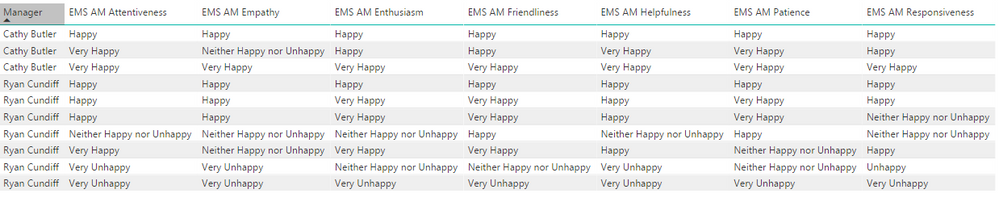
How do I go about:
1. Counting the total amount of all replies by manager (very happy + happy + unhappy etc.)
2. Bucketing the counts by category (count of happy, count of unhappy, etc.) by manager
3. Counting total number of all replies regardless of manager (total number of survey responses)
4. Bucketing total counts by category regardless of manager (count of happy, count of unhappy, etc.)
I'm eventually looking to make some kind of table/matrix that shows by account manager the number of each they have in comparison to the total. So for example the ending result on a small scale would look something like:
Cathy Butler across all categories has 25 "happy" responses
Ryan Cundiff across all categories has 20 "happy" responses
There are a total of 500 responses between all managers regardless of whether it's happy/unhappy/in between so these two together would account for 9% of all happy responses (45/500)
Thanks!


