cancel
Showing results for 
Search instead for 
Did you mean: 

The Power BI Data Visualization World Championships is back! Get ahead of the game and start preparing now! Learn more

Reply
AbbasAsaria90
Helper I
Helper I

Countifs across related tables

I have the following tables:

  • pd_nb_leads : each row corresponds to a sales lead created in a time period, one of the columns is the deal origin (i.e., sales channel) which is returned in an integer format
  • pd_dealorigin_metadata : this relates the integer with a text string (i.e., what the deal origin is in our CRM system)
  • Origin Mapping : This categorises the deal origins into a smaller number of main categories
  • Targets : This gives a target for each of the main categories in the Origin Mapping table
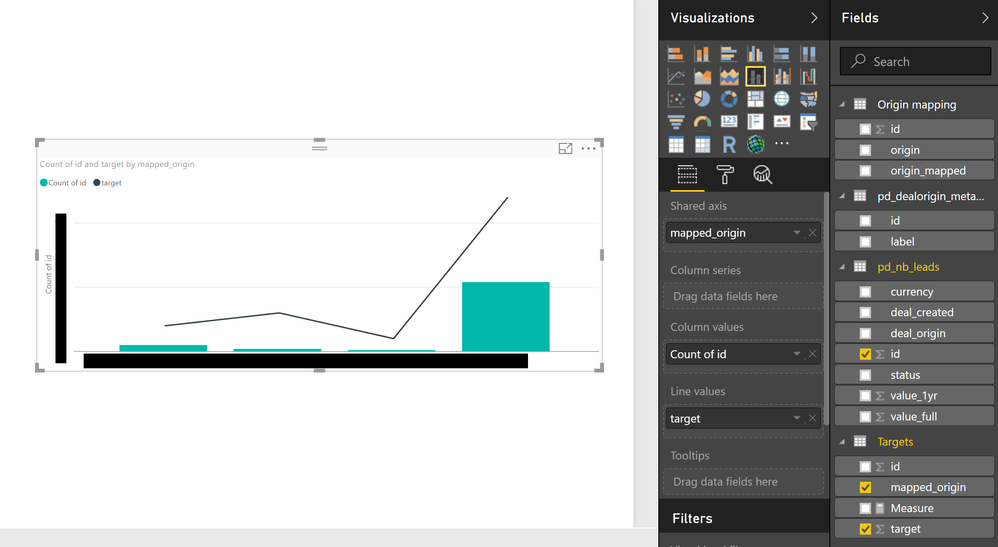
170831 two graphs lead progress.png


What I would like to do is show a percentage graph of how many leads have been created against the targets for each main category. By creating the adequate relationships between the four tables I have been able to show progess in absolute numbers (above) using a line and stacked column chart, but given the targets for each main category differ so much that gives less insight into the smaller categories


One solution I have in mind is having a calculated column in the Targets table to "Countif" the rows in the first table against their main category which appears in the Targets table, and having a second calculated column to look at the percentage. It's the first calculated column (the countif equivalent) that I'm having trouble with


Any suggestions? Thanks very much

1 ACCEPTED SOLUTION
v-jiascu-msft
Microsoft Employee
Microsoft Employee

@AbbasAsaria90,


Hi AA,


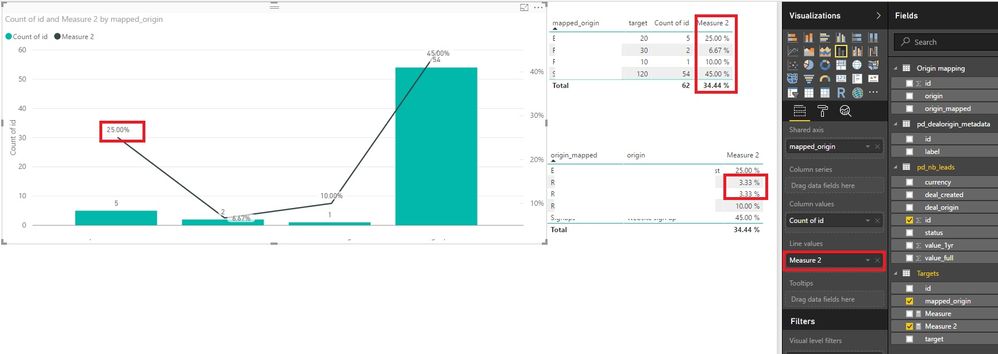
You can try this formula. 


Measure 2 =
DIVIDE ( COUNT ( 'pd_nb_leads'[id] ), SUM ( Targets[target] ), 0 )

Countifs across related tables.jpg


Best Regards!

Dale

Community Support Team _ Dale
If this post helps, then please consider Accept it as the solution to help the other members find it more quickly.

View solution in original post

5 REPLIES 5
v-jiascu-msft
Microsoft Employee
Microsoft Employee

Hi @AbbasAsaria90,


Could you please mark the proper answer as solution or share the solution if it's convenient for you? That will be a big help to the others.


Best Regards!
Dale

Community Support Team _ Dale
If this post helps, then please consider Accept it as the solution to help the other members find it more quickly.

Ah sorry about that - thanks it worked great!


Best,

AA

v-jiascu-msft
Microsoft Employee
Microsoft Employee

@AbbasAsaria90,


Hi AA,


You can try this formula. 


Measure 2 =
DIVIDE ( COUNT ( 'pd_nb_leads'[id] ), SUM ( Targets[target] ), 0 )

Countifs across related tables.jpg


Best Regards!

Dale

Community Support Team _ Dale
If this post helps, then please consider Accept it as the solution to help the other members find it more quickly.
Greg_Deckler
Community Champion
Community Champion

The general equivalent for COUNTIF is CALCULATE with a filter. In your case you would likely have to use a RELATED or RELATEDTABLE as part of your FILTER clause in your CALCULATE. Tough to be specific without sample data.


Follow on LinkedIn
@ me in replies or I'll lose your thread!!!
Instead of a Kudo, please vote for this idea
Become an expert!: Enterprise DNA
External Tools: MSHGQM
YouTube Channel!: Microsoft Hates Greg
Latest book!:
DAX For Humans

DAX is easy, CALCULATE makes DAX hard...

@Greg_Deckler


Thanks for your help! 


I've shared the pbix file here (https://www.dropbox.com/s/42sa3rwlrvxtyzy/170831%20sample%20leads%20file.pbix?dl=0) - if that helps


Best,

AA

Helpful resources

Announcements
Power BI DataViz World Championships

Power BI Dataviz World Championships

The Power BI Data Visualization World Championships is back! Get ahead of the game and start preparing now!

November Power BI Update Carousel

Power BI Monthly Update - November 2025

Check out the November 2025 Power BI update to learn about new features.

FabCon Atlanta 2026 carousel

FabCon Atlanta 2026

Join us at FabCon Atlanta, March 16-20, for the ultimate Fabric, Power BI, AI and SQL community-led event. Save $200 with code FABCOMM.