cancel
Showing results for 
Search instead for 
Did you mean: 

The Power BI Data Visualization World Championships is back! Get ahead of the game and start preparing now! Learn more

Reply
benz-fsproduce
Frequent Visitor

Countif

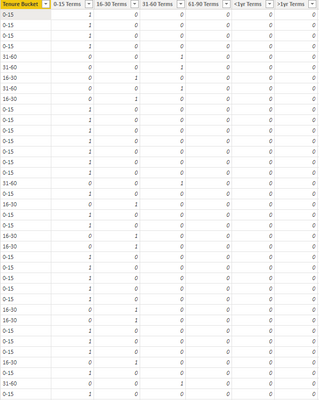
Hi, I am trying to do a "countif" function in Power Bi. I know that the formula does not work in Power Bi like it does in Excel. I created a formula for each column to show when employees were terminated within certain day ranges. If an employee was terminated within a certain range the value shows "1" and false "0". I would like to add a new measure for each of the columns "0-15 terms", "16-30" terms etc. I want the new measure to count all of the values "1". I have added a screen shot of what I am talking about. Thanks!

benzfsproduce_0-1659463906628.png


1 ACCEPTED SOLUTION
ChristianDGreat
Resolver I
Resolver I

I dont get how you have your table setup but i hope this works.


Count = 
CALCULATE(
    COUNT('Table'[0-15]),
    'Table'[0-15]=1
)

Just replace the 'Table'[0-15] with your other columns
 

View solution in original post

1 REPLY 1
ChristianDGreat
Resolver I
Resolver I

I dont get how you have your table setup but i hope this works.


Count = 
CALCULATE(
    COUNT('Table'[0-15]),
    'Table'[0-15]=1
)

Just replace the 'Table'[0-15] with your other columns
 

Helpful resources

Announcements
Power BI DataViz World Championships

Power BI Dataviz World Championships

The Power BI Data Visualization World Championships is back! Get ahead of the game and start preparing now!

December 2025 Power BI Update Carousel

Power BI Monthly Update - December 2025

Check out the December 2025 Power BI Holiday Recap!

FabCon Atlanta 2026 carousel

FabCon Atlanta 2026

Join us at FabCon Atlanta, March 16-20, for the ultimate Fabric, Power BI, AI and SQL community-led event. Save $200 with code FABCOMM.