cancel
Showing results for 
Search instead for 
Did you mean: 

The Power BI Data Visualization World Championships is back! Get ahead of the game and start preparing now! Learn more

Reply
flyingfox
Regular Visitor

Countif per alphanumeric Columns

Hi, I am new to PowerBI and am trying to figure out how to implement this scenario with DAX.

I have a table containing customers ID with some attributes and for each customer is associated a number of tickets (a ticket in a different cell):

  • Customer key
  • Customer description...
  • From Column n to Column (n+m) there is a Ticket number, starting with TT (e.g. TT001, TT099,etc)

For each row, it means for each customer, I would like to count the total number of Tickets.

I suppose to create a custom column containing the total number of  ticket, can anyone help me? In Excel I would have use a COUNTIF formula (filtering by LIKE "TT%"), it does not exist in Power BI. Thank you

1 ACCEPTED SOLUTION

Hello there @flyingfox ! Suppose you have a table like the one you shared, you can do the following:


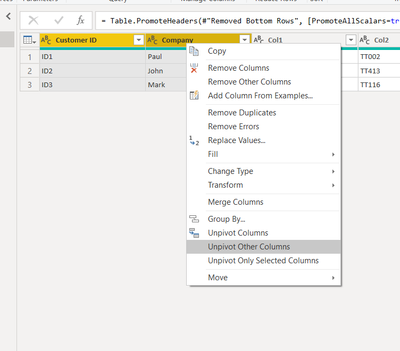
1. Select the Customer and Company columns and right click on one of the two columns and select "Unpivot Other Columns"
goncalogeraldes_1-1645008148673.png


2. You can remove the "Attribute" column and rename the "Value" column

3. Close and apply

4. Use the following count measure:


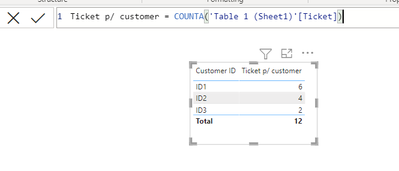
Ticket p/ customer = COUNTA('Table 1 (Sheet1)'[Ticket])


The final result will be this:
goncalogeraldes_2-1645008436901.png

Here is the M code if you need it:

let
    Source = Excel.Workbook(File.Contents("C:\Users\Book1.xlsx"), null, false),
    Sheet1_sheet = Source{[Item="Sheet1",Kind="Sheet"]}[Data],
    FilterNullAndWhitespace = each List.Select(_, each _ <> null and (not (_ is text) or 
    Text.Trim(_) <> "")),
    #"Removed Bottom Rows" = Table.RemoveLastN(Sheet1_sheet, each try 
    List.IsEmpty(List.Skip(FilterNullAndWhitespace(Record.FieldValues(_)), 1)) otherwise 
    false),
    #"Promoted Headers" = Table.PromoteHeaders(#"Removed Bottom Rows", 
    [PromoteAllScalars=true]),
    #"Unpivoted Other Columns" = Table.UnpivotOtherColumns(#"Promoted Headers", {"Company ", 
    "Customer ID"}, "Attribute", "Value"),
    #"Removed Columns" = Table.RemoveColumns(#"Unpivoted Other Columns",{"Attribute"}),
    #"Renamed Columns" = Table.RenameColumns(#"Removed Columns",{{"Value", "Ticket"}})
in
    #"Renamed Columns"

Hope this answer solves your problem!
If you need any additional help please @ me in your reply.
If my reply provided you with a solution, please consider marking it as a solution ✔️ or giving it a kudoe 👍
Thanks!

You can also check out my LinkedIn!

Best regards,
Gonçalo Geraldes

View solution in original post

3 REPLIES 3
flyingfox
Regular Visitor

Thank you Gonçalo for your help, but probably I miss something because it does not work. Let's call the table CUSTOMER; Col1, Col2, Col3....Coln are the columns containing a Ticket id (starting with TT). I would like to count the total number of Ticket for each customer.   Thank you

Customer IDCompany Col1Col2Col3Col4Col5Col6......
ID1PaulTT001TT002TT005TT006TT021TT201 
ID2JohnTT304TT413TT521TT601   
ID3MarkTT114TT116     


Hello there @flyingfox ! Suppose you have a table like the one you shared, you can do the following:


1. Select the Customer and Company columns and right click on one of the two columns and select "Unpivot Other Columns"

goncalogeraldes_1-1645008148673.png


2. You can remove the "Attribute" column and rename the "Value" column

3. Close and apply

4. Use the following count measure:


Ticket p/ customer = COUNTA('Table 1 (Sheet1)'[Ticket])


The final result will be this:

goncalogeraldes_2-1645008436901.png

Here is the M code if you need it:

let
    Source = Excel.Workbook(File.Contents("C:\Users\Book1.xlsx"), null, false),
    Sheet1_sheet = Source{[Item="Sheet1",Kind="Sheet"]}[Data],
    FilterNullAndWhitespace = each List.Select(_, each _ <> null and (not (_ is text) or 
    Text.Trim(_) <> "")),
    #"Removed Bottom Rows" = Table.RemoveLastN(Sheet1_sheet, each try 
    List.IsEmpty(List.Skip(FilterNullAndWhitespace(Record.FieldValues(_)), 1)) otherwise 
    false),
    #"Promoted Headers" = Table.PromoteHeaders(#"Removed Bottom Rows", 
    [PromoteAllScalars=true]),
    #"Unpivoted Other Columns" = Table.UnpivotOtherColumns(#"Promoted Headers", {"Company ", 
    "Customer ID"}, "Attribute", "Value"),
    #"Removed Columns" = Table.RemoveColumns(#"Unpivoted Other Columns",{"Attribute"}),
    #"Renamed Columns" = Table.RenameColumns(#"Removed Columns",{{"Value", "Ticket"}})
in
    #"Renamed Columns"

Hope this answer solves your problem!
If you need any additional help please @ me in your reply.
If my reply provided you with a solution, please consider marking it as a solution ✔️ or giving it a kudoe 👍
Thanks!

You can also check out my LinkedIn!

Best regards,
Gonçalo Geraldes

goncalogeraldes
Super User
Super User

Hello there @flyingfox ! Check if this works for you:

CountIf =
CALCULATE (
    COUNTA ( 'Table'[Ticket Number] ),
    FILTER ( 'Table', LEFT ( 'Table'[Ticket Number], 2 ) = "TT" )
)

Hope this answer solves your problem!
If you need any additional help please @ me in your reply.
If my reply provided you with a solution, please consider marking it as a solution ✔️ or giving it a kudoe 👍
Thanks!

You can also check out my LinkedIn!

Best regards,
Gonçalo Geraldes

Helpful resources

Announcements
Power BI DataViz World Championships

Power BI Dataviz World Championships

The Power BI Data Visualization World Championships is back! Get ahead of the game and start preparing now!

December 2025 Power BI Update Carousel

Power BI Monthly Update - December 2025

Check out the December 2025 Power BI Holiday Recap!

FabCon Atlanta 2026 carousel

FabCon Atlanta 2026

Join us at FabCon Atlanta, March 16-20, for the ultimate Fabric, Power BI, AI and SQL community-led event. Save $200 with code FABCOMM.