Join us at FabCon Atlanta from March 16 - 20, 2026, for the ultimate Fabric, Power BI, AI and SQL community-led event. Save $200 with code FABCOMM.
Register now!The Power BI Data Visualization World Championships is back! Get ahead of the game and start preparing now! Learn more
Hello -
I am very new to Power BI and I am trying to create a visualization of the status of various projects. My Data looks something like this:
| Project | Step 1 | Step 2 | Step 3 |
| A | Completed | In Progress | Not Started |
| B | In Progress | In Progress | In Progress |
| C | Completed | Completed | Completed |
| D | Completed | Not Started | Not Started |
| E | In Progress | In Progress | Not Started |
There are a total of 9 steps and about 300 total projects. My goal is to count the status for each step to then display as a chart. I want the data to look something like this:
| Step | Completed | In Progress | Not Started |
| Step 1 | 3 | 2 | 0 |
| Step 2 | 1 | 3 | 1 |
| Step 3 | 1 | 1 | 3 |
Whenever I try to create a calculated column I can only get the count for one of the steps. Can someone help get me on the correct path?
Much appreciated.
Jack
Solved! Go to Solution.
Hi jack_oplav,
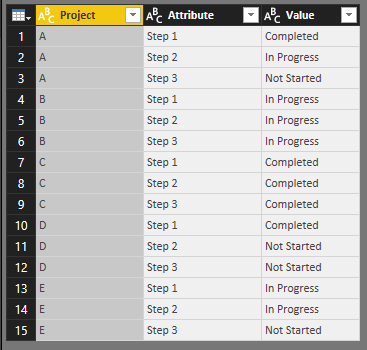
To achieve your requirement, click column [Step1], [Step2] and [Step3], then click unpivot columns like below:
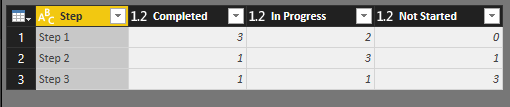
Then, click column [value] and click pivot columns based on column [Project], the result is like below:
Regards,
Jimmy Tao
Hello -
I am very new to Power BI and I am trying to create a visualization of the status of various projects. My Data looks something like this:
| Project | Step 1 | Step 2 | Step 3 |
| A | Completed | In Progress | Not Started |
| B | In Progress | In Progress | In Progress |
| C | Completed | Completed | Completed |
| D | Completed | Not Started | Not Started |
| E | In Progress | In Progress | Not Started |
There are a total of 9 steps and about 300 total projects. My goal is to count the status for each step to then display as a chart. I want the data to look something like this:
| Step | Completed | In Progress | Not Started |
| Step 1 | 3 | 2 | 0 |
| Step 2 | 1 | 3 | 1 |
| Step 3 | 1 | 1 | 3 |
Whenever I try to create a calculated column I can only get the count for one of the steps. Can someone help get me on the correct path?
Much appreciated.
Jack
Thank you so much! This is just what I was looking for.
I created the new table (Table 2) by duplicating the original table (Table 1) and doing the pivot steps you suggested. When I create the chart based on the Table 2, it does not filter in the report for Table 1 filters. I know the two tables need to be related, but I thought that duplicating Table 1 would automatically update the values for Table 2.
Thanks in advance for your assistance!
The Power BI Data Visualization World Championships is back! Get ahead of the game and start preparing now!
| User | Count |
|---|---|
| 38 | |
| 36 | |
| 33 | |
| 32 | |
| 29 |
| User | Count |
|---|---|
| 129 | |
| 88 | |
| 79 | |
| 68 | |
| 63 |