Join us at FabCon Atlanta from March 16 - 20, 2026, for the ultimate Fabric, Power BI, AI and SQL community-led event. Save $200 with code FABCOMM.
Register now!The Power BI Data Visualization World Championships is back! It's time to submit your entry. Live now!
Hi,
I am struggling to visually show how many repeat investors there are in my data for different funds. I have made a sample data set here:
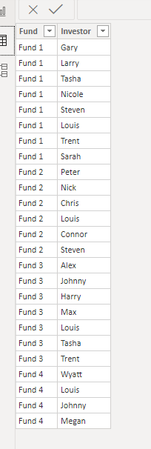
My goal is when I input another fund into this data, I can check that new funds investors against all of the investors that I already have. For example, I want to see if there are any matches between Fund 4's investors and the rest of the fund's investors. When I try a pivot table, it will show the column "Count of Investors" as 1 under the Fund 4's name "Louis", even though the name Louis is already in the data set multiple times in different funds:
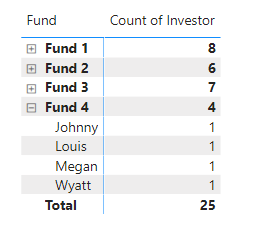
I would really appreciate any help I could get, as I am fairly new at Power BI and have spent countless hours trying to figure this out. Thank you
Solved! Go to Solution.
Hi @Anonymous ,
Just a small change to @mahoneypat formula for your desired result.
Fund Count =
IF (
ISINSCOPE ( 'Table'[Name] ),
CALCULATE (
DISTINCTCOUNT ( 'Table'[Fund] ),
ALL ( 'Table'[Fund] )
),
CALCULATE (
COUNT ( 'Table'[Fund] )
)
)
Regards,
Harsh Nathani
Appreciate with a Kudos!! (Click the Thumbs Up Button)
Did I answer your question? Mark my post as a solution!
You could write a Fund Count measure like this and use it instead of your count measure.
Fund Count =
CALCULATE ( DISTINCTCOUNT ( Table[Fund] ), ALL ( Table[Fund] ) )
If this works for you, please mark it as the solution. Kudos are appreciated too. Please let me know if not.
Regards,
Pat
To learn more about Power BI, follow me on Twitter or subscribe on YouTube.
Thank you @mahoneypat
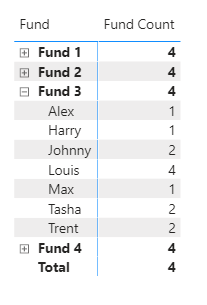
This worked for the individual fund names, however, it says there are 4 investors in each of the funds. Is there a way to have that show the actual amount?
Like shown in the picture below, it says 4 for all of them, when clearly there are 7 investors in Fund 3.
Hi @Anonymous ,
Just a small change to @mahoneypat formula for your desired result.
Fund Count =
IF (
ISINSCOPE ( 'Table'[Name] ),
CALCULATE (
DISTINCTCOUNT ( 'Table'[Fund] ),
ALL ( 'Table'[Fund] )
),
CALCULATE (
COUNT ( 'Table'[Fund] )
)
)
Regards,
Harsh Nathani
Appreciate with a Kudos!! (Click the Thumbs Up Button)
Did I answer your question? Mark my post as a solution!
I also tried to do it this way:
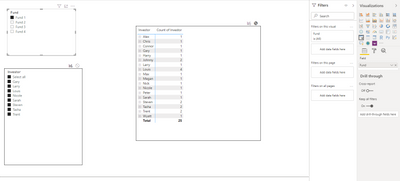
I edited the interactions so that the top left slicer (Fund) would filter the bottom left slicer(investor), but when I click "select all" on the bottom left slicer, it gives me all of the investors name in that matrix, not just Fund 1's investors.
The Power BI Data Visualization World Championships is back! It's time to submit your entry.
Check out the January 2026 Power BI update to learn about new features.
| User | Count |
|---|---|
| 71 | |
| 45 | |
| 34 | |
| 28 | |
| 23 |
| User | Count |
|---|---|
| 143 | |
| 121 | |
| 58 | |
| 40 | |
| 33 |