cancel
Showing results for 
Search instead for 
Did you mean: 

The Power BI Data Visualization World Championships is back! Get ahead of the game and start preparing now! Learn more

Reply
Thuy
Frequent Visitor

Count with 2 time filters and compare with last years

I have a table like this

ItemImport dateExport date
A1Jan 01, 2018Mar 03, 2020
A2Jan 04, 2018Feb 10, 2018
A3Mar 22, 2018Apr 29, 2018
A4Dec 19, 2018Jan 22, 2019
A5Feb 11, 2019Mar 12, 2019
A6Feb 15, 2019May 17, 2019
A7Jan 08, 2020Jan 10, 2020
A8Jan 09, 2020Apr 15, 2020
A9Mar 16, 2020Mar 20, 2020

My task is to count the items that have import dates and export dates of Quater I in the same year, then compare with last years.

The result is expected as:

Year   Number of items

2018 1

2019 1

2020 2

Please advise me. Thank you alot.

1 ACCEPTED SOLUTION
V-lianl-msft
Community Support
Community Support

Hi @Thuy ,


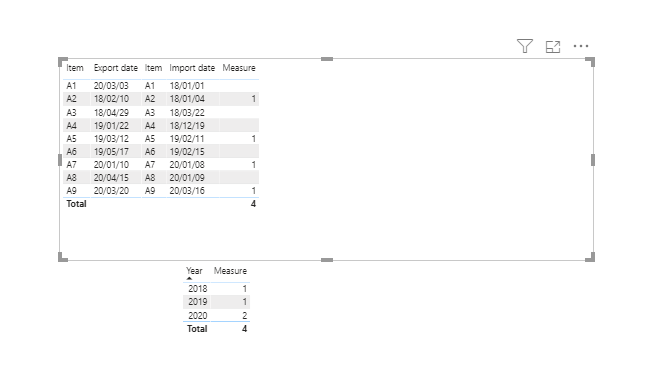
Based on your description, you want to calculate the number of items when the two dates and years are the same and the first quarter.

You can try the DAX below:

Measure =
CALCULATE (
    COUNT ( 'table'[Item] ),
    FILTER (
        'table',
        QUARTER ( 'table'[Export date] ) = 1
            && QUARTER ( 'table'[Import date] ) = 1
            && YEAR ( 'table'[Export date] ) = YEAR ( 'table'[Import date] )
    )
)

test_count_items.PNG

Sample .pbix


Best Regards,
Liang
If this post helps, then please consider Accept it as the solution to help the other members find it more quickly.

View solution in original post

1 REPLY 1
V-lianl-msft
Community Support
Community Support

Hi @Thuy ,


Based on your description, you want to calculate the number of items when the two dates and years are the same and the first quarter.

You can try the DAX below:

Measure =
CALCULATE (
    COUNT ( 'table'[Item] ),
    FILTER (
        'table',
        QUARTER ( 'table'[Export date] ) = 1
            && QUARTER ( 'table'[Import date] ) = 1
            && YEAR ( 'table'[Export date] ) = YEAR ( 'table'[Import date] )
    )
)

test_count_items.PNG

Sample .pbix


Best Regards,
Liang
If this post helps, then please consider Accept it as the solution to help the other members find it more quickly.

Helpful resources

Announcements
Power BI DataViz World Championships

Power BI Dataviz World Championships

The Power BI Data Visualization World Championships is back! Get ahead of the game and start preparing now!

December 2025 Power BI Update Carousel

Power BI Monthly Update - December 2025

Check out the December 2025 Power BI Holiday Recap!

FabCon Atlanta 2026 carousel

FabCon Atlanta 2026

Join us at FabCon Atlanta, March 16-20, for the ultimate Fabric, Power BI, AI and SQL community-led event. Save $200 with code FABCOMM.