Don't miss your chance to take the Fabric Data Engineer (DP-700) exam on us!
Learn moreThe FabCon + SQLCon recap series starts April 14th at 8am Pacific. If you’re tracking where AI is going inside Fabric, this first session is a can't miss. Register now
Hello, i have the following data:
| Date | Code | Values | Avg values based on each code | Count distinct codes | Count codes out of objective (<33) | Count codes inside objective (>=33) |
| 1/1/2021 | 111156 | 31.0 | 32.1 | 1 | 1 | |
| 1/1/2021 | 111156 | 33.2 | 1 | |||
| 2/1/2021 | 111157 | 34.1 | 33.6 | 1 | 1 | |
| 2/1/2021 | 111157 | 32.0 | 1 | |||
| 2/1/2021 | 111157 | 34.6 | ||||
3/1/2021 | 111189 | 35.0 | 35 | 1 | 1 | |
Total (wrong) | 3 | 2 | 3 | |||
Total (right) | 3 | 1 | 2 |
i want to calculate the count of codes that are inside and outside a certain objective. i have the following measures:
count outside objective = CALCULATE(DISTINCTCOUNT('Table'[Code]),FILTER('Table','Table'[Value]),'Table'[Value]<33,'Table'[Value]<>blank())
Solved! Go to Solution.
Hi @flavio29
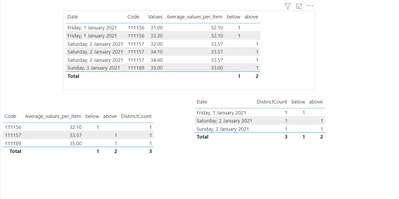
You need to create the following measures:
Average_values_per_item =
AVERAGEX (
FILTER (
ALLSELECTED ( 'Table'[Code], 'Table'[Values] ),
'Table'[Code] = SELECTEDVALUE ( 'Table'[Code] )
),
'Table'[Values]
)
DistinctCount = DISTINCTCOUNT('Table'[Code])
below =
CALCULATE (
DISTINCTCOUNT ( 'Table'[Code] ),
FILTER ( ALLSELECTED ( 'Table'[Values] ), [Average_values_per_item] < 33 )
)
above =
CALCULATE (
DISTINCTCOUNT ( 'Table'[Code] ),
FILTER ( ALLSELECTED ( 'Table'[Values] ), [Average_values_per_item] >= 33 )
)
Has you can see below and in attach PBIX file result are correct.
Regards
Miguel Félix
Proud to be a Super User!
Check out my blog: Power BI em PortuguêsHi @flavio29
You need to create the following measures:
Average_values_per_item =
AVERAGEX (
FILTER (
ALLSELECTED ( 'Table'[Code], 'Table'[Values] ),
'Table'[Code] = SELECTEDVALUE ( 'Table'[Code] )
),
'Table'[Values]
)
DistinctCount = DISTINCTCOUNT('Table'[Code])
below =
CALCULATE (
DISTINCTCOUNT ( 'Table'[Code] ),
FILTER ( ALLSELECTED ( 'Table'[Values] ), [Average_values_per_item] < 33 )
)
above =
CALCULATE (
DISTINCTCOUNT ( 'Table'[Code] ),
FILTER ( ALLSELECTED ( 'Table'[Values] ), [Average_values_per_item] >= 33 )
)
Has you can see below and in attach PBIX file result are correct.
Regards
Miguel Félix
Proud to be a Super User!
Check out my blog: Power BI em PortuguêsThank you Miguel, it really helped a lot!
I forgot to add that sometimes all the values are blank to some codes, so i dont want to count the codes in that situations. For that i stayed with my distinctcount measure and added one more filter to the below measure, like this:
Average_values_per_item =
AVERAGEX (
FILTER (
ALLSELECTED ( 'Table'[Code], 'Table'[Values] ),
'Table'[Code] = SELECTEDVALUE ( 'Table'[Code] )
),
'Table'[Values]
)
DistinctCount = CALCULATE(DISTINCTCOUNT('Table'[Code]),FILTER('Table','Table'[Value]))
below =
CALCULATE (
DISTINCTCOUNT ( 'Table'[Code] ),
FILTER ( ALLSELECTED ( 'Table'[Code] ), [Average_values_per_item] < 33 )
FILTER ( ALLSELECTED ( 'Table'[Code] ), [Average_values_per_item] <> 0 )
)
above =
CALCULATE (
DISTINCTCOUNT ( 'Table'[Code] ),
FILTER ( ALLSELECTED ( 'Table'[Code] ), [Average_values_per_item] >= 33 )
In below and above measures i also changed the Allselected argument to the Code column because was not giving the right results, but now works like a charm!
Hi @flavio29 ,
Just one thing in the below measure you do not need to repeat the filter statment you can rewrite has:
below =
CALCULATE (
DISTINCTCOUNT ( 'Table'[Code] ),
FILTER ( ALLSELECTED ( 'Table'[Code] ), [Average_values_per_item] < 33 && [Average_values_per_item] <> 0 )
)
Regards
Miguel Félix
Proud to be a Super User!
Check out my blog: Power BI em PortuguêsIf you have recently started exploring Fabric, we'd love to hear how it's going. Your feedback can help with product improvements.
A new Power BI DataViz World Championship is coming this June! Don't miss out on submitting your entry.
Share feedback directly with Fabric product managers, participate in targeted research studies and influence the Fabric roadmap.
| User | Count |
|---|---|
| 51 | |
| 43 | |
| 39 | |
| 19 | |
| 19 |
| User | Count |
|---|---|
| 70 | |
| 69 | |
| 34 | |
| 33 | |
| 30 |