Get Fabric certified for FREE!
Don't miss your chance to take the Fabric Data Engineer (DP-700) exam on us!
Learn more- Power BI forums
- Get Help with Power BI
- Desktop
- Service
- Report Server
- Power Query
- Mobile Apps
- Developer
- DAX Commands and Tips
- Custom Visuals Development Discussion
- Health and Life Sciences
- Power BI Spanish forums
- Translated Spanish Desktop
- Training and Consulting
- Instructor Led Training
- Dashboard in a Day for Women, by Women
- Galleries
- Data Stories Gallery
- Themes Gallery
- Contests Gallery
- QuickViz Gallery
- Quick Measures Gallery
- Visual Calculations Gallery
- Notebook Gallery
- Translytical Task Flow Gallery
- TMDL Gallery
- R Script Showcase
- Webinars and Video Gallery
- Ideas
- Custom Visuals Ideas (read-only)
- Issues
- Issues
- Events
- Upcoming Events
We've captured the moments from FabCon & SQLCon that everyone is talking about, and we are bringing them to the community, live and on-demand. Starts on April 14th. Register now
- Power BI forums
- Forums
- Get Help with Power BI
- Desktop
- Re: Count values from date
- Subscribe to RSS Feed
- Mark Topic as New
- Mark Topic as Read
- Float this Topic for Current User
- Bookmark
- Subscribe
- Printer Friendly Page

- Mark as New
- Bookmark
- Subscribe
- Mute
- Subscribe to RSS Feed
- Permalink
- Report Inappropriate Content
Count values from date
Hello guys,
I have a data set here that's like this:
| ID | Opening Data | Closing Date |
| 1 | 03/06/2018 | 03/06/2018 |
| 2 | 03/06/2018 | 04/06/2018 |
| 3 | 04/06/2018 | 05/06/2018 |
| 4 | 05/06/2018 | 05/06/2018 |
| 5 | 05/06/2018 | 05/06/2018 |
| 6 | 06/06/2018 | 06/06/2018 |
| 7 | 06/06/2018 | 06/06/2018 |
| 8 | 07/06/2018 | 08/06/2018 |
| 9 | 07/06/2018 | 08/06/2018 |
| 10 | 09/06/2018 | 10/06/2018 |
What I need to do is, use a graph to represent the number of opening and closed tickets by day. So let's say I drag opening date field to my X axis, when I try to do the count on the date rows, I get wrong values for the closing date.
Can anyone help me with that?
Thanks!
Solved! Go to Solution.


- Mark as New
- Bookmark
- Subscribe
- Mute
- Subscribe to RSS Feed
- Permalink
- Report Inappropriate Content
Hi,
I believe this is the result you want. You may download my PBI file from here. I edited the closing date for ID 9 to June 12.
Hope this helps.
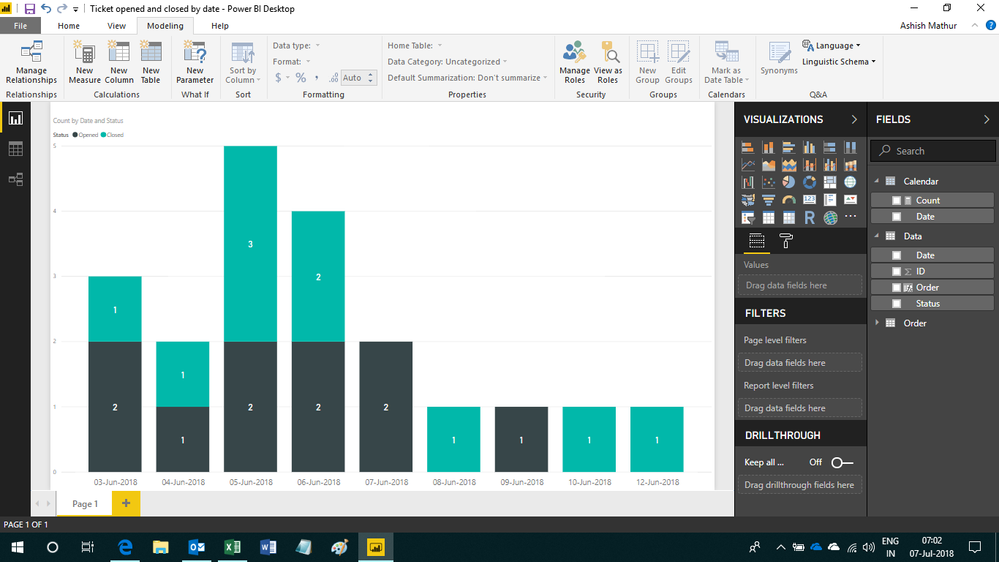
Regards,
Ashish Mathur
http://www.ashishmathur.com
https://www.linkedin.com/in/excelenthusiasts/
- Mark as New
- Bookmark
- Subscribe
- Mute
- Subscribe to RSS Feed
- Permalink
- Report Inappropriate Content
Hi @Anonymous
How do you calculate the count? Start/ end should be same? For the given above sample data, what is the expected coiunt for each start date?
Thanks
Raj
- Mark as New
- Bookmark
- Subscribe
- Mute
- Subscribe to RSS Feed
- Permalink
- Report Inappropriate Content
Hello @Anonymous!
I need to count the number of IDs for each date. Each ID represent the date when a ticket was open and closed, so my goal is to have them a graph illustrating how many tickets were open and closed on each day.
- Mark as New
- Bookmark
- Subscribe
- Mute
- Subscribe to RSS Feed
- Permalink
- Report Inappropriate Content
Hi,
If an ID opened on Jul 1, 2018 and closed on Jul 5, 2018, then i understand the opening and closing dates. But what about the dates in between? How should the dates from Jul 2-4 be treated?
Show your expected result in a Table. Once the table is ready, one can simply switch the result to a graph.
Regards,
Ashish Mathur
http://www.ashishmathur.com
https://www.linkedin.com/in/excelenthusiasts/
- Mark as New
- Bookmark
- Subscribe
- Mute
- Subscribe to RSS Feed
- Permalink
- Report Inappropriate Content
Hello @Ashish_Mathur
The dates in between should be ignored. My expected result is to get to know how many tickets were opened in a day, and how many were closed in that same day.
So an example:
| ID | Opening Date | Closing Date |
| 1 | 03/06/2018 | 03/06/2018 |
| 2 | 03/06/2018 | 04/06/2018 |
I would want to have a graph showing that I had 2 tickets opened on day 3, and only one closed on that same day, aswell as 0 tickets opened on day 4, and one closed on that same day.
I did a CALCULATE(COUNT(Table1[Opening Date]);Table1[Opening Date]) and a CALCULATE(COUNT(Table1[Closing Date]);Table1[Closing Date]) to count the number of occurences for each date, but when I try to plot the graph, I get mismatched results.
I believe it's a relationship problem. I have a separate date table, and if I relate it to the opening date, I get correct results on the opening date, but wrong results on the closing date. If I relate it to the closing date, I get correct results for the closing date, but wrong results for the opening date.
Any ideas?
- Mark as New
- Bookmark
- Subscribe
- Mute
- Subscribe to RSS Feed
- Permalink
- Report Inappropriate Content
Hi,
I believe this is the result you want. You may download my PBI file from here. I edited the closing date for ID 9 to June 12.
Hope this helps.
Regards,
Ashish Mathur
http://www.ashishmathur.com
https://www.linkedin.com/in/excelenthusiasts/
- Mark as New
- Bookmark
- Subscribe
- Mute
- Subscribe to RSS Feed
- Permalink
- Report Inappropriate Content
Yes, that does the trick! Amazing.
I was checking your steps and couldn't understand some of them, like, what's the purpose of the "order" table and some of the steps on the main table. If you ever have some free time would you mind explaning those?
Either way thanks so much for your help! 
- Mark as New
- Bookmark
- Subscribe
- Mute
- Subscribe to RSS Feed
- Permalink
- Report Inappropriate Content
You are welcome. The Order Table was created to specify the order of Status as Planned Opened and then closed. Without this table, the graph was first showing Closed and then Open. Please let me know know which other step you are not clear about.
Regards,
Ashish Mathur
http://www.ashishmathur.com
https://www.linkedin.com/in/excelenthusiasts/
- Mark as New
- Bookmark
- Subscribe
- Mute
- Subscribe to RSS Feed
- Permalink
- Report Inappropriate Content
"I would want to have a graph showing that I had 2 tickets opened on day 3, and only one closed on that same day, aswell as 0 tickets opened on day 4, and one closed on that same day" -- In the above message nothing opened/closed on same day for day 4.Its confusing.
Not sure what count you are expecting ... Can you display the expected result for your original sample data in table format?
Thanks
Raj
Helpful resources

New to Fabric Survey
If you have recently started exploring Fabric, we'd love to hear how it's going. Your feedback can help with product improvements.

Power BI DataViz World Championships - June 2026
A new Power BI DataViz World Championship is coming this June! Don't miss out on submitting your entry.

Join our Fabric User Panel
Share feedback directly with Fabric product managers, participate in targeted research studies and influence the Fabric roadmap.

Power BI Community Update - March 2026
Check out the March 2026 Power BI update to learn about new features.

| User | Count |
|---|---|
| 55 | |
| 34 | |
| 31 | |
| 19 | |
| 17 |


| User | Count |
|---|---|
| 74 | |
| 71 | |
| 38 | |
| 35 | |
| 25 |
