cancel
Showing results for 
Search instead for 
Did you mean: 

We've captured the moments from FabCon & SQLCon that everyone is talking about, and we are bringing them to the community, live and on-demand. Starts on April 14th. Register now

Reply
Qotsa
Helper V
Helper V

Count using filters

Hi,


I have this measure -


C/F Closed = CALCULATE(DISTINCTCOUNT([ClientRef]),[Carried Forward] = 1,ClientsList[EndDate] >= DATE(2019,1,1))
 
error is:
A function 'CALCULATE' has been used in a True/False expression that is used as a table filter expression. This is not allowed.
 
What I am trying to do is distinct count  ClientRef only if [Carried Forward] = 1 & ClientsList[EndDate]  >= DATE(2019,1,1))
 
Measure [Carried Forward] is 1 or 0
1 ACCEPTED SOLUTION
Anonymous
Not applicable

Hi,


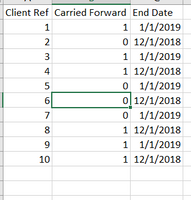
I created a little mock dataset that looks like this:

Count using filters 3.PNG


As you can see from the data, three Client Refs meet the criteria you've listed (1, 3, 9). I created the following calc that seemed to work for me:


C/F Closed = COUNTX( FILTER (FILTER ( ClientsList, ClientsList[Carried Forward] = 1 ), ClientsList[End Date] >= DATE(2019,1,1)), ClientsList[Client Ref])
 
It outputs 3, as expected:
 
Count using filters 2.PNG
 
Let me know if this works for you.
 
Thanks,
Ben


View solution in original post

2 REPLIES 2
Anonymous
Not applicable

Hi,


I created a little mock dataset that looks like this:

Count using filters 3.PNG


As you can see from the data, three Client Refs meet the criteria you've listed (1, 3, 9). I created the following calc that seemed to work for me:


C/F Closed = COUNTX( FILTER (FILTER ( ClientsList, ClientsList[Carried Forward] = 1 ), ClientsList[End Date] >= DATE(2019,1,1)), ClientsList[Client Ref])
 
It outputs 3, as expected:
 
Count using filters 2.PNG
 
Let me know if this works for you.
 
Thanks,
Ben


That's great Ben. Thanks alot.

Helpful resources

Announcements
New to Fabric survey Carousel

New to Fabric Survey

If you have recently started exploring Fabric, we'd love to hear how it's going. Your feedback can help with product improvements.

Power BI DataViz World Championships carousel

Power BI DataViz World Championships - June 2026

A new Power BI DataViz World Championship is coming this June! Don't miss out on submitting your entry.

Join our Fabric User Panel

Join our Fabric User Panel

Share feedback directly with Fabric product managers, participate in targeted research studies and influence the Fabric roadmap.

March Power BI Update Carousel

Power BI Community Update - March 2026

Check out the March 2026 Power BI update to learn about new features.