FabCon is coming to Atlanta
Join us at FabCon Atlanta from March 16 - 20, 2026, for the ultimate Fabric, Power BI, AI and SQL community-led event. Save $200 with code FABCOMM.
Register now!- Power BI forums
- Get Help with Power BI
- Desktop
- Service
- Report Server
- Power Query
- Mobile Apps
- Developer
- DAX Commands and Tips
- Custom Visuals Development Discussion
- Health and Life Sciences
- Power BI Spanish forums
- Translated Spanish Desktop
- Training and Consulting
- Instructor Led Training
- Dashboard in a Day for Women, by Women
- Galleries
- Data Stories Gallery
- Themes Gallery
- Contests Gallery
- QuickViz Gallery
- Quick Measures Gallery
- Visual Calculations Gallery
- Notebook Gallery
- Translytical Task Flow Gallery
- TMDL Gallery
- R Script Showcase
- Webinars and Video Gallery
- Ideas
- Custom Visuals Ideas (read-only)
- Issues
- Issues
- Events
- Upcoming Events
Get Fabric Certified for FREE during Fabric Data Days. Don't miss your chance! Request now
- Power BI forums
- Forums
- Get Help with Power BI
- Desktop
- Count unique ID's that only occur once in table an...
- Subscribe to RSS Feed
- Mark Topic as New
- Mark Topic as Read
- Float this Topic for Current User
- Bookmark
- Subscribe
- Printer Friendly Page

- Mark as New
- Bookmark
- Subscribe
- Mute
- Subscribe to RSS Feed
- Permalink
- Report Inappropriate Content
Count unique ID's that only occur once in table and apply additional filters
Hi,
I have data similar to the following:
ExampleTable1
| UniqueID | Qualified | Start Date |
| A | TRUE | 25/01/2020 |
| A | FALSE | 20/01/2020 |
| A | TRUE | 14/02/2020 |
| B | TRUE | 17/03/2020 |
| C | FALSE | 13/04/2019 |
| D | FALSE | 13/04/2020 |
[Start Date] is related to another table/column 'Calendar'[Date] (a list of all dates up to current day)
What I want to do is:
1. get UniqueID's that only occur once in the table (i.e. 'B', 'C', and 'D' in table above)
2. from that, filter rows that have qualification status equal to FALSE (i.e. 'C', 'D') and have occured in previous years to the current year (i.e. 'C')
3. count the number of rows in the table
So the result should be '1', as row containing ID 'C' is the only one to satify all critiera.
I've tried using SUMMARIZE for Step 1, but then I run into the problem of not knowing how to apply Step 2 to that data as I no longer have the columns I need to filter by.
Solved! Go to Solution.


- Mark as New
- Bookmark
- Subscribe
- Mute
- Subscribe to RSS Feed
- Permalink
- Report Inappropriate Content
Hi @lightw0rks ,
I've done this in two steps - first added Count of UniqueID in Power Query, then a measure.
// Call this table ffTable

let
    Source = Table.FromRows(Json.Document(Binary.Decompress(Binary.FromText("i45WclTSUQoJCnUFUkam+gaG+kYGRgZKsToQGTdHn2CwlAGGFFSToYm+gRFCxglJxlzfwBgh44xknKGxvoEJUMrQEizlgkUKpCsWAA==", BinaryEncoding.Base64), Compression.Deflate)), let _t = ((type nullable text) meta [Serialized.Text = true]) in type table [UniqueID = _t, Qualified = _t, #"Start Date" = _t]),
    #"Changed Type" = Table.TransformColumnTypes(Source,{{"UniqueID", type text}, {"Qualified", type logical}, {"Start Date", type date}}),
    #"Grouped Rows" = Table.Group(#"Changed Type", {"UniqueID"}, {{"Count", each Table.RowCount(_), Int64.Type}, {"data", each _, type table [UniqueID=text, Qualified=logical, Start Date=date]}}),
    #"Expanded data" = Table.ExpandTableColumn(#"Grouped Rows", "data", {"Qualified", "Start Date"}, {"Qualified", "Start Date"})
in
    #"Expanded data"
In Power Query, go to New Source>Blank Query then in Advanced Editor paste my code over the default code. Name this table ffTable. You can then follow the steps I took to complete this.
Measure:
yourMeasure =
CALCULATE(
    COUNT(ffTable[UniqueID]),
    ffTable[Count] = 1,
    ffTable[Qualified] = FALSE(),
    YEAR(ffTable[Start Date]) < YEAR(today())
)
This gives me the following output:
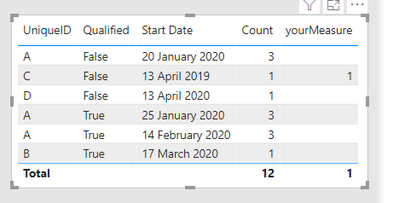
Pete
Now accepting Kudos! If my post helped you, why not give it a thumbs-up?
Proud to be a Datanaut!


- Mark as New
- Bookmark
- Subscribe
- Mute
- Subscribe to RSS Feed
- Permalink
- Report Inappropriate Content
@lightw0rks - Perhaps:
Measure =
  VAR __Table = DISTINCT(SELECTCOLUMNS(FILTER(SUMMARIZE('Table',[UniqueID],"__Count",COUNTROWS('Table'),[__Count]=1),"UniqueID",[UniqueID]))
RETURN
  COUNTROWS(FILTER('Table',YEAR([Start Date]) = YEAR(TODAY())-1 && [Unique ID] IN __Table))
Follow on LinkedIn
@ me in replies or I'll lose your thread!!!
Instead of a Kudo, please vote for this idea
Become an expert!: Enterprise DNA
External Tools: MSHGQM
YouTube Channel!: Microsoft Hates Greg
Latest book!: DAX For Humans
DAX is easy, CALCULATE makes DAX hard...
- Mark as New
- Bookmark
- Subscribe
- Mute
- Subscribe to RSS Feed
- Permalink
- Report Inappropriate Content
Thanks for your solutions guys. @amitchandak sorry i should have been more clear in my OP, each of the steps were part of a single calculation, not separate ones.
- Mark as New
- Bookmark
- Subscribe
- Mute
- Subscribe to RSS Feed
- Permalink
- Report Inappropriate Content
@lightw0rks - Perhaps:
Measure =
  VAR __Table = DISTINCT(SELECTCOLUMNS(FILTER(SUMMARIZE('Table',[UniqueID],"__Count",COUNTROWS('Table'),[__Count]=1),"UniqueID",[UniqueID]))
RETURN
  COUNTROWS(FILTER('Table',YEAR([Start Date]) = YEAR(TODAY())-1 && [Unique ID] IN __Table))
Follow on LinkedIn
@ me in replies or I'll lose your thread!!!
Instead of a Kudo, please vote for this idea
Become an expert!: Enterprise DNA
External Tools: MSHGQM
YouTube Channel!: Microsoft Hates Greg
Latest book!: DAX For Humans
DAX is easy, CALCULATE makes DAX hard...
- Mark as New
- Bookmark
- Subscribe
- Mute
- Subscribe to RSS Feed
- Permalink
- Report Inappropriate Content
Hi @lightw0rks ,
I've done this in two steps - first added Count of UniqueID in Power Query, then a measure.
// Call this table ffTable

let
    Source = Table.FromRows(Json.Document(Binary.Decompress(Binary.FromText("i45WclTSUQoJCnUFUkam+gaG+kYGRgZKsToQGTdHn2CwlAGGFFSToYm+gRFCxglJxlzfwBgh44xknKGxvoEJUMrQEizlgkUKpCsWAA==", BinaryEncoding.Base64), Compression.Deflate)), let _t = ((type nullable text) meta [Serialized.Text = true]) in type table [UniqueID = _t, Qualified = _t, #"Start Date" = _t]),
    #"Changed Type" = Table.TransformColumnTypes(Source,{{"UniqueID", type text}, {"Qualified", type logical}, {"Start Date", type date}}),
    #"Grouped Rows" = Table.Group(#"Changed Type", {"UniqueID"}, {{"Count", each Table.RowCount(_), Int64.Type}, {"data", each _, type table [UniqueID=text, Qualified=logical, Start Date=date]}}),
    #"Expanded data" = Table.ExpandTableColumn(#"Grouped Rows", "data", {"Qualified", "Start Date"}, {"Qualified", "Start Date"})
in
    #"Expanded data"
In Power Query, go to New Source>Blank Query then in Advanced Editor paste my code over the default code. Name this table ffTable. You can then follow the steps I took to complete this.
Measure:
yourMeasure =
CALCULATE(
    COUNT(ffTable[UniqueID]),
    ffTable[Count] = 1,
    ffTable[Qualified] = FALSE(),
    YEAR(ffTable[Start Date]) < YEAR(today())
)
This gives me the following output:
Pete
Now accepting Kudos! If my post helped you, why not give it a thumbs-up?
Proud to be a Datanaut!

- Mark as New
- Bookmark
- Subscribe
- Mute
- Subscribe to RSS Feed
- Permalink
- Report Inappropriate Content
@lightw0rks , Try
1. Try with UniqueID this measure
measure = countx(filter(summarize(all(table), table[UniqueID], "_1",count(Table[UniqueID])),[_1]=1),[UniqueID])
2.
measure =
var _max = date(year(today())-1,1,1)
return
calculate(coutrows(Table), filter(Table,Year(Table[Date]) >= _max))
3.
coutrows(Table),

Helpful resources

Power BI Monthly Update - November 2025
Check out the November 2025 Power BI update to learn about new features.

Fabric Data Days
Advance your Data & AI career with 50 days of live learning, contests, hands-on challenges, study groups & certifications and more!

FabCon Atlanta 2026
Join us at FabCon Atlanta, March 16-20, for the ultimate Fabric, Power BI, AI and SQL community-led event. Save $200 with code FABCOMM.


