cancel
Showing results for 
Search instead for 
Did you mean: 

Learn from the best! Meet the four finalists headed to the FINALS of the Power BI Dataviz World Championships! Register now

Reply
BI_Analyticz
Helper V
Helper V

Count the Machines with Single Status

Hi Friends,


I am trying to do a calculation and stuck since I am new. Below is the list of machines. If you can see Machine 1 is having Fixed as well as Open status entries. I want to calculate only the machines which is having only the fixed status. If the same machine is having multiple status then I should not count it. How can I do this. Kindly help.


Result count should Machine 7,8,9,10,11


BI_Analyticz_0-1634131717743.png


1 ACCEPTED SOLUTION
v-kelly-msft
Community Support
Community Support

Hi  @BI_Analyticz ,


Create a measure as below:

Measure = 
var _tab=CALCULATETABLE(VALUES('Table'[Status]),FILTER(ALL('Table'),'Table'[Machine Name]=MAX('Table'[Machine Name])))
Return
IF("Open" in _tab,BLANK(),1)

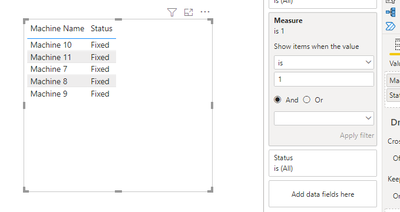
Add the measure to the filter pane and select measure is 1,and you will see:

vkellymsft_0-1634527500081.png

For the related .pbix file,pls see attached.


Best Regards,
Kelly

Did I answer your question? Mark my reply as a solution!

View solution in original post

2 REPLIES 2
v-kelly-msft
Community Support
Community Support

Hi  @BI_Analyticz ,


Create a measure as below:

Measure = 
var _tab=CALCULATETABLE(VALUES('Table'[Status]),FILTER(ALL('Table'),'Table'[Machine Name]=MAX('Table'[Machine Name])))
Return
IF("Open" in _tab,BLANK(),1)

Add the measure to the filter pane and select measure is 1,and you will see:

vkellymsft_0-1634527500081.png

For the related .pbix file,pls see attached.


Best Regards,
Kelly

Did I answer your question? Mark my reply as a solution!

jppv20
Solution Sage
Solution Sage

Hi @BI_Analyticz ,


You can create a new column using this:


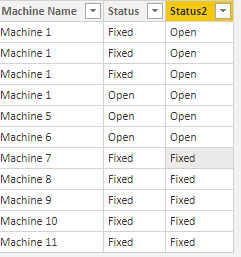
Status2 = IF(CALCULATE(MAX(Machines[Status]),ALLEXCEPT(Machines,Machines[Machine Name]))<>"Open","Fixed","Open")
 
Result:
jppv20_0-1634134509114.png


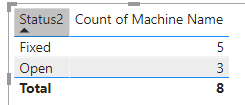
If you put it in a table you will get this:

jppv20_1-1634134594965.png


Jori


If I answered your question, please mark it as a solution to help other members find it more quickly.

Connect on Linkedin

Helpful resources

Announcements
Join our Fabric User Panel

Join our Fabric User Panel

Share feedback directly with Fabric product managers, participate in targeted research studies and influence the Fabric roadmap.

February Power BI Update Carousel

Power BI Monthly Update - February 2026

Check out the February 2026 Power BI update to learn about new features.

FabCon Atlanta 2026 carousel

FabCon Atlanta 2026

Join us at FabCon Atlanta, March 16-20, for the ultimate Fabric, Power BI, AI and SQL community-led event. Save $200 with code FABCOMM.