Join us at FabCon Atlanta from March 16 - 20, 2026, for the ultimate Fabric, Power BI, AI and SQL community-led event. Save $200 with code FABCOMM.
Register now!Get Fabric Certified for FREE during Fabric Data Days. Don't miss your chance! Request now
Hi,
Firstly, sorry for my english.
We want to restitute the number of document on each status by date.
My fact table likes :
| users | Date event | Type event |
| 1 | 01/03/2020 | Sended |
| 1 | 04/03/2020 | Recevied |
| 1 | 06/03/2020 | Integrated |
| 1 | 06/03/2020 | Finished |
| 2 | 01/03/2020 | Sended |
| 2 | 03/03/2020 | Received |
| 3 | 02/03/2020 | Sended |
| 3 | 10/03/2020 | Received |
| 3 | 11/03/2020 | Integrated |
| 3 | 15/03/2020 | Finished |
| 4 | 05/03/2020 | Sended |
| 4 | 06/03/2020 | Received |
| 4 | 07/03/2020 | Integrated |
The workflow document is : Sended, received, integrated and finished
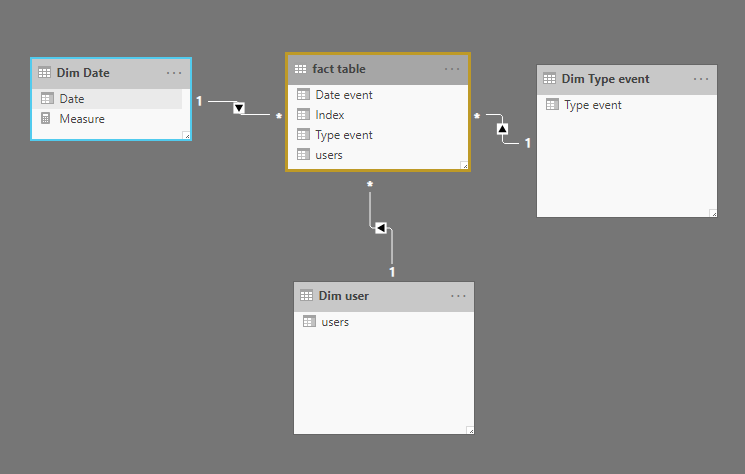
i have 3 dimensions : date, user et type event.
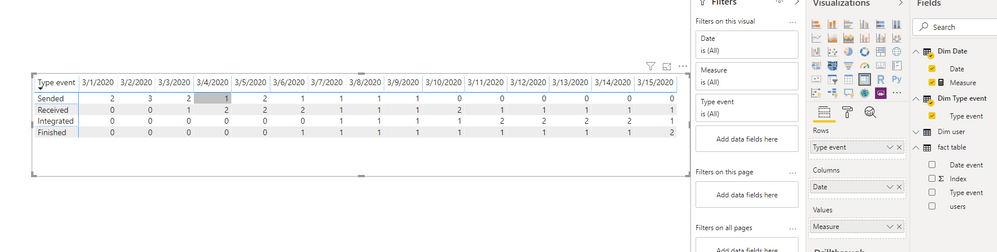
On each date, i want to know the stock on each type event :
| Type events | 01/03/2020 | 02/03/2020 | 03/03/2020 | 04/03/2020 | 05/03/2020 | 06/03/2020 | 07/03/2020 | 08/03/2020 | 09/03/2020 | 10/03/2020 | 11/03/2020 | 12/03/2020 | 13/03/2020 | 14/03/2020 | 15/03/2020 |
| Sended | 2 | 3 | 2 | 1 | 2 | 1 | 1 | 1 | 1 | 0 | 0 | 0 | 0 | 0 | 0 |
| Received | 0 | 0 | 1 | 2 | 2 | 2 | 1 | 1 | 1 | 2 | 1 | 1 | 1 | 1 | 1 |
| Integrated | 0 | 0 | 0 | 0 | 0 | 0 | 1 | 1 | 1 | 1 | 2 | 2 | 2 | 2 | 1 |
| Finish | 0 | 0 | 0 | 0 | 0 | 1 | 1 | 1 | 1 | 1 | 1 | 1 | 1 | 1 | 2 |
I want to create a measure but i don't know the dax syntax which can do it.
Thanks for your helps
Hi @gringo89 ,
We can use the following steps to meet your requirement.
Measure =
COUNTROWS (
FILTER (
SUMMARIZE (
FILTER (
ALLSELECTED ( 'fact table' ),
'fact table'[Date event] <= MIN ( 'Dim Date'[Date] )
),
'fact table'[users],
"LastType",
VAR maxIndex =
CALCULATE (
MAX ( 'fact table'[Index] )
)
RETURN
CALCULATE (
MAX ( 'fact table'[Type event] ),
'fact table'[Index] = maxIndex
)
),
[LastType] IN DISTINCT ( 'Dim Type event'[Type event] )
)
) +0
BTW, pbix as attached.
Best regards,
Hi @v-lid-msft
thanks for you're help.
I think that this approach can resolve my requirement.
I use SSAS (2016 version) live connection and i have an error with 'IN DISTINCT' syntax. I don't understand...
Hummm.. the 'in' operator is not supported on sql server 2016 (compatibilty tabular 1200) 😞
Hi All,
Any solution for this requirement ?
Check out the November 2025 Power BI update to learn about new features.
Advance your Data & AI career with 50 days of live learning, contests, hands-on challenges, study groups & certifications and more!