Hi,
Firstly, sorry for my english.
We want to restitute the number of document on each status by date.
My fact table likes :
| users | Date event | Type event |
| 1 | 01/03/2020 | Sended |
| 1 | 04/03/2020 | Recevied |
| 1 | 06/03/2020 | Integrated |
| 1 | 06/03/2020 | Finished |
| 2 | 01/03/2020 | Sended |
| 2 | 03/03/2020 | Received |
| 3 | 02/03/2020 | Sended |
| 3 | 10/03/2020 | Received |
| 3 | 11/03/2020 | Integrated |
| 3 | 15/03/2020 | Finished |
| 4 | 05/03/2020 | Sended |
| 4 | 06/03/2020 | Received |
| 4 | 07/03/2020 | Integrated |
The workflow document is : Sended, received, integrated and finished
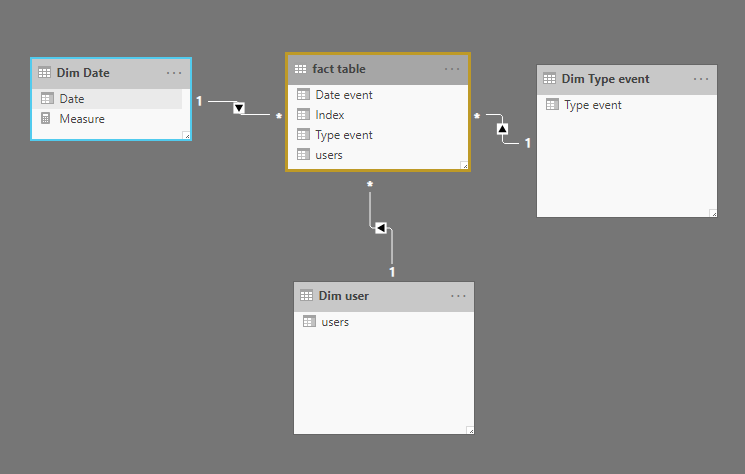
i have 3 dimensions : date, user et type event.
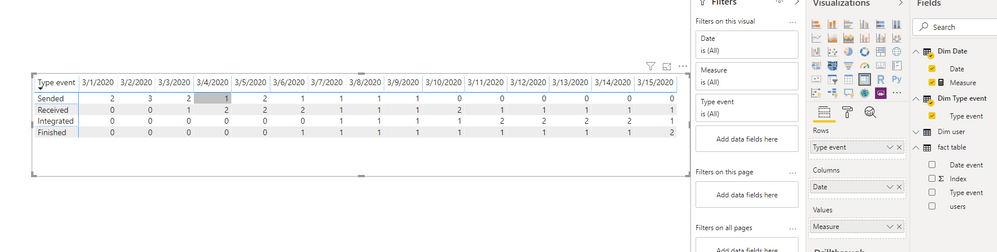
On each date, i want to know the stock on each type event :
| Type events | 01/03/2020 | 02/03/2020 | 03/03/2020 | 04/03/2020 | 05/03/2020 | 06/03/2020 | 07/03/2020 | 08/03/2020 | 09/03/2020 | 10/03/2020 | 11/03/2020 | 12/03/2020 | 13/03/2020 | 14/03/2020 | 15/03/2020 |
| Sended | 2 | 3 | 2 | 1 | 2 | 1 | 1 | 1 | 1 | 0 | 0 | 0 | 0 | 0 | 0 |
| Received | 0 | 0 | 1 | 2 | 2 | 2 | 1 | 1 | 1 | 2 | 1 | 1 | 1 | 1 | 1 |
| Integrated | 0 | 0 | 0 | 0 | 0 | 0 | 1 | 1 | 1 | 1 | 2 | 2 | 2 | 2 | 1 |
| Finish | 0 | 0 | 0 | 0 | 0 | 1 | 1 | 1 | 1 | 1 | 1 | 1 | 1 | 1 | 2 |
I want to create a measure but i don't know the dax syntax which can do it.
Thanks for your helps