This is best Fabric, Power BI, SQL and AI community event. How do we know? The last event sold out! Save €200 with code FABCMTY200.
Register nowA new Data Days event is coming soon! This time we’re going bigger than ever. Fabric, Power BI, SQL, AI and more. Don't miss out.
Hello all,
I have a problem and hope you can help me.
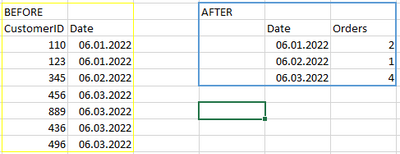
In my table as you can see I have a customer and a date, where they make an order.
How can I calculate the rows together. Example in 06.01.2022 there should show 2 orders.
Is there a measure given?
Thank you all for your help.
Solved! Go to Solution.
Hey @amitchandak
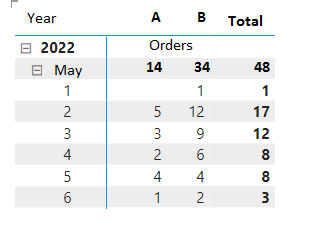
I have a problem with the total which came out from the Matrix. I used the countrow function, which works fine, but it calculate it totaly wrong! In A the Sum is 15 not 14. The row calculation which you tell me is pretty fine, but the column calculation which summarize them together is false.
The total column is not an Measure, its just the result which Power BI show me.
So is there a measure to calculate the results 100% right? Or have I a mistake in my measure, which I done before?
Thank you for help.
Check out the May 2026 Power BI update to learn about new features.
Sign up to receive a private message when registration opens and key events begin.
If you have recently started exploring Fabric, we'd love to hear how it's going. Your feedback can help with product improvements.
| User | Count |
|---|---|
| 26 | |
| 25 | |
| 22 | |
| 19 | |
| 17 |
| User | Count |
|---|---|
| 42 | |
| 41 | |
| 40 | |
| 21 | |
| 20 |