Join the FabCon + SQLCon recap series. Up next: Power BI, Real-Time Intelligence, IQ and AI, and Data Factory take center stage. All sessions are available on-demand after the live show. Register now
Hi All,
Very basic, yet I am strugling to get the correct result.
I would like to create a trend line with countrows per month/year.
Legend should be x-axis year/month. y-axis # of records. Then to create a slicer/filter according to year/month.
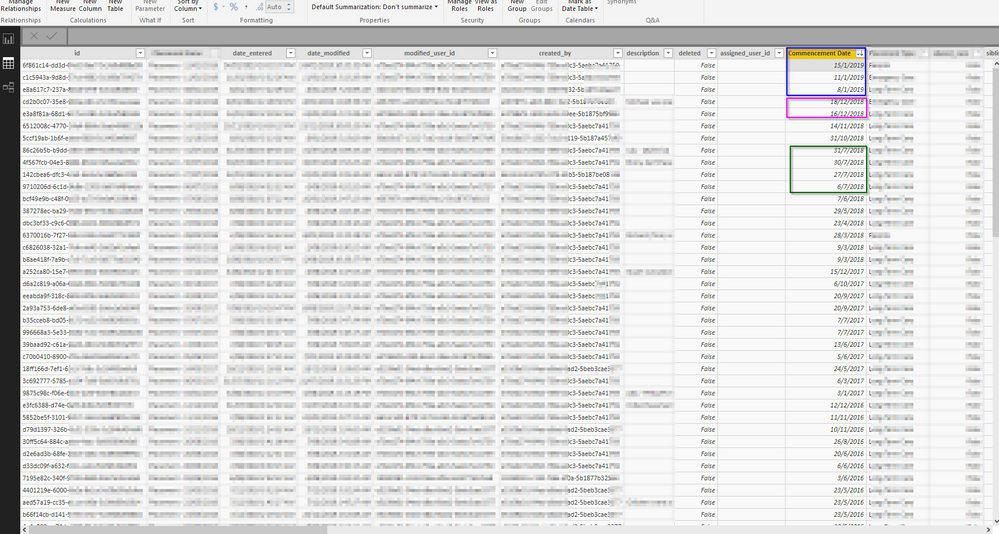
For example, the data in the screenshot below wll be transltated to -->
Jan-2019; 3
Dec-2018; 2
Nov-2018;1
Oct-2018; 1
Sep-2018; 0
...
I have created a date table.
I have created a measure to count rows in my table.
I linked Commencment date to the date table.
But it is not working for some reason.
Either the trend line is not showing, or the legend is not showing or count is by month over years and not per month/year.
Any guidance?
Cheers!
Solved! Go to Solution.
Hi @Anonymous,
For you requirement, I have made a test based on your information.
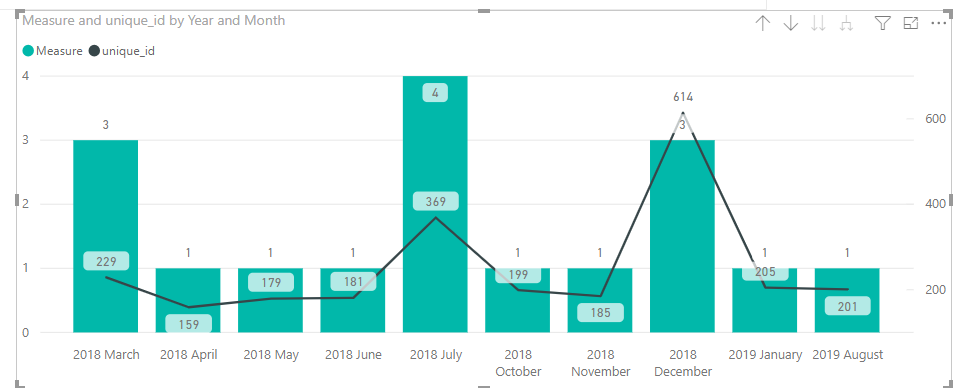
Please check if the below image is your desired output.
More details, please refer to the attachment.
Best Regards,
Cherry
Hi @Anonymous,
I have a little confused about your scenario.
What visual do you want to create? Line chart?
If is is convenient, could you share your data sample which could reproduce your scenario and your formula so that I can have a test with your data to get the solution.
Best Regards,
Cherry
Hi,
This is a dummy data below.
I am trying to create a line graph, or bars.
I want the x-axis to show the month/year (Date Column). y-axis to show the count of records in each month/year
I created a measure -->
| id | Date | Type | End Date | unique_id | Status | Day Diff | Column X | Column Y | Column Z |
| 1 | 15/1/2019 | R | 205 | Open | 17 | 5.136949 | -3.91096 | 0.586164 | |
| 2 | 8/1/2019 | L | 201 | Open | 24 | 1.359541 | -2.32321 | 0.60219 | |
| 3 | 24/12/2018 | S | 208 | Open | 39 | 6.243304 | -2.39623 | 0.982917 | |
| 4 | 18/12/2018 | S | 202 | Open | 45 | 1.510626 | -9.75608 | 0.456368 | |
| 5 | 16/12/2018 | L | 204 | Open | 47 | 3.868114 | -7.35411 | 0.89261 | |
| 6 | 14/11/2018 | L | 185 | Open | 79 | 4.008227 | -7.62658 | 0.141866 | |
| 7 | 31/10/2018 | L | 199 | Open | 93 | 1.022142 | -3.6657 | 0.579697 | |
| 8 | 31/7/2018 | L | 25 | Open | 185 | 9.40272 | -9.36574 | 0.214208 | |
| 9 | 30/7/2018 | L | 31/03/17 | 21 | Closed | 186 | 8.558588 | -8.81116 | 0.927714 |
| 10 | 27/7/2018 | L | 206 | Open | 189 | 5.023559 | -9.98515 | 0.521363 | |
| 11 | 6/7/2018 | L | 117 | Open | 210 | 5.424869 | -3.68395 | 0.605868 | |
| 12 | 7/6/2018 | L | 181 | Open | 239 | 8.132357 | -4.60333 | 0.567406 | |
| 13 | 29/5/2018 | L | 179 | Open | 248 | 4.581901 | -8.42041 | 0.265024 | |
| 14 | 23/4/2018 | L | 159 | Open | 284 | 6.736259 | -9.82179 | 0.275311 | |
| 15 | 28/3/2018 | R | 14/06/18 | 55 | Closed | 310 | 7.567686 | -9.49027 | 0.734757 |
| 16 | 9/3/2018 | L | 83 | Open | 329 | 8.056153 | -0.55206 | 0.777119 | |
| 17 | 9/3/2018 | L | 91 | Open | 329 | 0.207545 | -2.61912 | 0.578116 |
Hi @Anonymous,
For you requirement, I have made a test based on your information.
Please check if the below image is your desired output.
More details, please refer to the attachment.
Best Regards,
Cherry
Hello,
I tried to do the same chart than you in your PIBX
I put the same attributes on X and Y but I can not get the format YYYY-MM like you. I have just months. Can you show how to get this please ?
Thank you !
Check out the April 2026 Power BI update to learn about new features.
If you have recently started exploring Fabric, we'd love to hear how it's going. Your feedback can help with product improvements.
A new Power BI DataViz World Championship is coming this June! Don't miss out on submitting your entry.
| User | Count |
|---|---|
| 42 | |
| 37 | |
| 35 | |
| 22 | |
| 15 |
| User | Count |
|---|---|
| 67 | |
| 58 | |
| 29 | |
| 27 | |
| 25 |