Get certified for free when you join Fabric Data Days 2026 and dive into Fabric, Power BI, SQL, AI, and other essential data skills.
Join nowJuly 7 - July 17 | Round 2 of the Power BI Dataviz World Championships. Don't miss your chance! Learn more
Hi all,
I shame me, but how and where do I create a measure(Table.RowCount) to count the number of rows in a table?
Solved! Go to Solution.
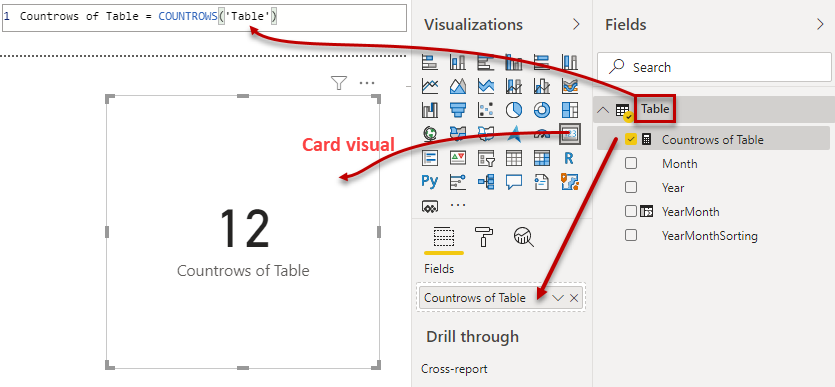
Hi @Frixel
take a look at the figure:
With kind regards from the town where the legend of the 'Pied Piper of Hamelin' is at home
FrankAT (Proud to be a Datanaut)
Hi @Frixel
following example: Countrows = COUNTROWS(YourTable)
With kind regards from the town where the legend of the 'Pied Piper of Hamelin' is at home
FrankAT (Proud to be a Datanaut)
Hi @Frixel
does your question belongs to Excel, Power Query or DAX?
With kind regards from the town where the legend of the 'Pied Piper of Hamelin' is at home
FrankAT (Proud to be a Datanaut)
I have a query in powerbi and in the visual a table.
i want to know how many rows there are in the query
Hi @Frixel
take a look at the figure:
With kind regards from the town where the legend of the 'Pied Piper of Hamelin' is at home
FrankAT (Proud to be a Datanaut)
Join us in Barcelona for FabCon and SQLCon, the Fabric, Power BI, SQL, and AI community event. Save €200 with code FABCMTY200.
Join Data Days 2026: 60 days of free live/on-demand sessions, challenges, study groups, and certification opportunities.
| User | Count |
|---|---|
| 30 | |
| 28 | |
| 26 | |
| 23 | |
| 17 |
| User | Count |
|---|---|
| 57 | |
| 43 | |
| 33 | |
| 24 | |
| 20 |