cancel
Showing results for 
Search instead for 
Did you mean: 

Learn from the best! Meet the four finalists headed to the FINALS of the Power BI Dataviz World Championships! Register now

Reply
YKarpenko
New Member

Count rows for column combinations

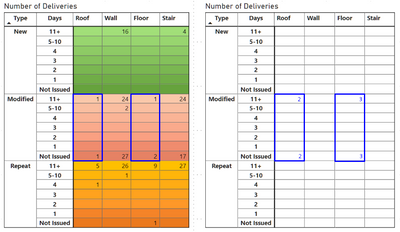
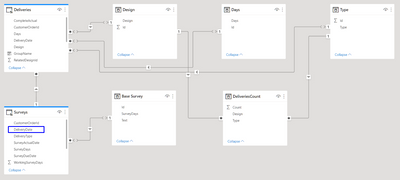
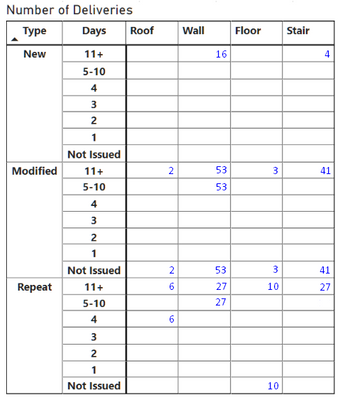
I need measure for Deliveries table , wich counts rows for each combination 'New, Modified, Repeat' (Type, in matrix as row) and 'Roof, Wall, Floor, Stair' (Design, in matrix as column) in each cell, where data is, but ignore Days column context (in matrix as row). Table filtered by DeliveryDate column in related (many to one) table Surveys. In right table — what i have with COUNTROWS('Deliveries'), in left table — marked sample of expected result. Could you help me please?

YKarpenko_0-1646649495343.png

YKarpenko_1-1646650455624.png


6 REPLIES 6
v-zhangti
Community Support
Community Support

Hi, @YKarpenko 


Can you provide a simple PBIX file for testing? Sensitive information can be removed in advance.


Best Regards

@v-zhangti I'm resolved this issue by creating next table:


DeliveriesCount = 
GROUPBY(
    FILTER(
        ALLSELECTED('Deliveries'),
        Deliveries[Days] <> "Late"
    ),
    'Deliveries'[Type],
    'Deliveries'[Design],
    'Deliveries'[CustomerOrderId],
    'Deliveries'[Days],
    "Count", COUNTX(
        CURRENTGROUP(),
        'Deliveries'[RelatedDesignId]
    )
)


Thank guys for your advices

Anonymous
Not applicable

Table 1 being your deliveries table

table 2 being your Days dimension table


nickolajj_0-1646658083523.png


@Anonymous result as in previous case. I tried CALCULATECOUNTROWS('Deliveries'), ALLSELECTED(Days[Days])

YKarpenko
New Member

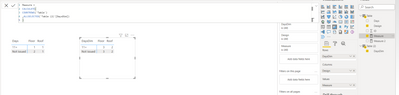
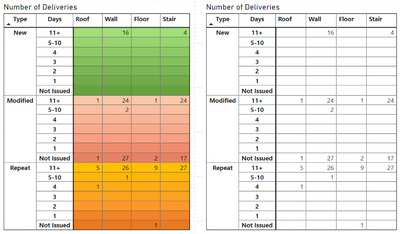
@amitchandak, thanks. I tried CALCULATE( COUNTROWS('Deliveries'), REMOVEFILTERS(Deliveries[Days]) ) (right table), but result the same as just with COUNTROWS('Deliveries') (left table). What I'm doing wrong?

YKarpenko_0-1646655986335.png

Example of expected result

YKarpenko_1-1646656437493.png


amitchandak
Super User
Super User

@YKarpenko , In your, measure add removefilters(Table[Days])


Assume you are using M1 measure in left

M2 = calculate([M1],removefilters(Table[Days])  )


Share with Power BI Enthusiasts: Full Power BI Video (20 Hours) YouTube
Microsoft Fabric Series 60+ Videos YouTube
Microsoft Fabric Hindi End to End YouTube

Helpful resources

Announcements
Join our Fabric User Panel

Join our Fabric User Panel

Share feedback directly with Fabric product managers, participate in targeted research studies and influence the Fabric roadmap.

February Power BI Update Carousel

Power BI Monthly Update - February 2026

Check out the February 2026 Power BI update to learn about new features.

FabCon Atlanta 2026 carousel

FabCon Atlanta 2026

Join us at FabCon Atlanta, March 16-20, for the ultimate Fabric, Power BI, AI and SQL community-led event. Save $200 with code FABCOMM.