cancel
Showing results for 
Search instead for 
Did you mean: 

The Power BI Data Visualization World Championships is back! Get ahead of the game and start preparing now! Learn more

Reply
Kym_EVO
Frequent Visitor

Count only the latest values for filtered string

Hello,


We have multiple locations and receive enquiries from multiple people each with a unique ID. When their enquiry status is updated it is timestamped and I'm wanting to create a snapshot table that shows me the total of each status as it currently sits so only the most recent status for each location.


I'm thinking I'll need to create a measure for each 'Status' that counts the number of times that status is the latest status per EnquiryId per Location.


This is an example of the data:

LocationEnquiryIdStatusEnquiry Date
Location 1ID1Active11/15/2021 9:53:19 AM
Location 1ID1In Progress11/17/2021 1:09:43 AM
Location 1ID1Archived11/18/2021 1:09:43 AM
Location 1ID2Active11/4/2021 10:59:50 PM
Location 1ID2In Progress11/5/2021 1:24:29 AM
Location 1ID2Active11/16/2021 10:10:20 PM
Location 1ID2Enrolled11/17/2021 3:28:02 AM
Location 1ID3Active11/3/2021 7:21:23 AM
Location 1ID3Active11/3/2021 9:21:16 AM
Location 2ID4Active11/15/2021 11:27:42 AM
Location 2ID5Active10/8/2021 1:44:24 AM
Location 2ID5Enrolled10/8/2021 1:44:58 AM
Location 2ID6Active11/12/2021 8:50:15 AM
Location 2ID6In Progress11/17/2021 10:38:32 PM
Location 2ID6Enrolled11/22/2021 11:45:25 PM


And this would be the resulting table with each column based on a measure:

LocationCurrent "Active"Current "In Progress"Current "Enrolled"Current "Archived"
Location 11011
Location 21020


Any help would be greatly appreciated.

Thanks.

1 ACCEPTED SOLUTION
ryan_mayu
Super User
Super User

@Kym_EVO 

you can create a column

IfLast = 
VAR _last=CALCULATE(max('Table'[Enquiry Date]),ALLEXCEPT('Table','Table'[Location],'Table'[EnquiryId]))
return if('Table'[Enquiry Date]=_last,"Y","N")

then create four measures

active = CALCULATE(COUNTROWS('Table'),'Table'[IfLast]="Y",'Table'[Status]="Active")+0

inprogress = CALCULATE(COUNTROWS('Table'),'Table'[IfLast]="Y",'Table'[Status]="In Progress")+0

enrolled = CALCULATE(COUNTROWS('Table'),'Table'[IfLast]="Y",'Table'[Status]="Enrolled")+0

archived = CALCULATE(COUNTROWS('Table'),'Table'[IfLast]="Y",'Table'[Status]="Archived")+0

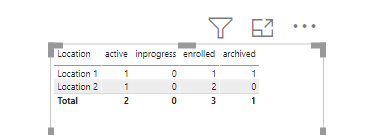
1.PNG

pls see the attachment below


Did I answer your question? Mark my post as a solution!

Proud to be a Super User!


View solution in original post

4 REPLIES 4
VahidDM
Super User
Super User

Hi @Kym_EVO 


Try this measure:

Measure =
VAR _a =
    SUMMARIZE (
        SUMMARIZE (
            ALL ( 'Table' ),
            'Table'[Location],
            'Table'[EnquiryId],
            "MDate", MAX ( 'Table'[Enquiry Date] )
        ),
        [MDate]
    )
VAR _B =
    CALCULATE (
        COUNTA ( 'Table'[Status] ),
        FILTER (
            ALLEXCEPT ( 'Table', 'Table'[Location], 'Table'[Status], 'Table'[EnquiryId] ),
            'Table'[Enquiry Date] IN _a
        )
    )
RETURN
    _B


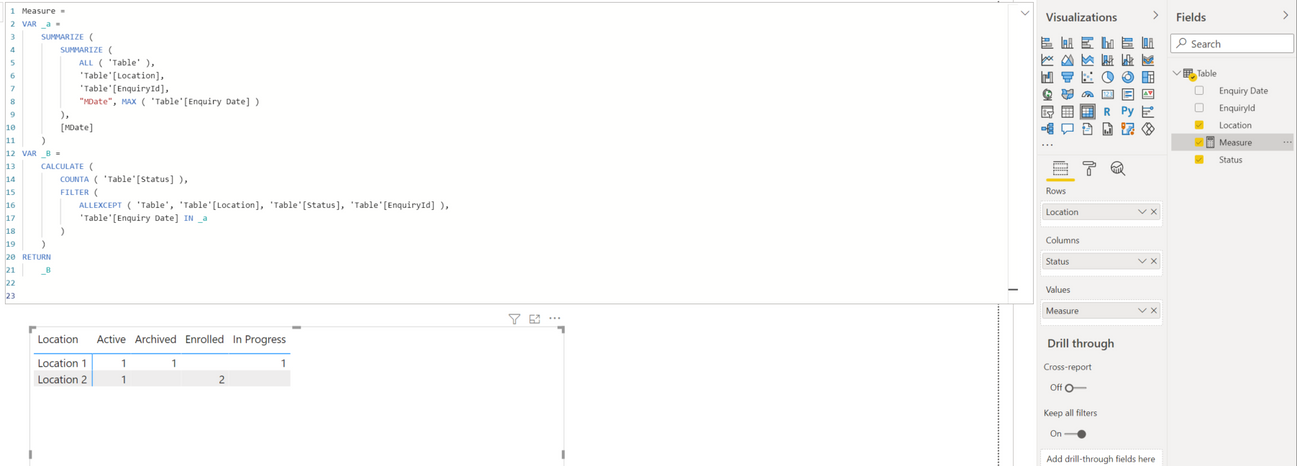
Output:


VahidDM_0-1637806050695.png


If this post helps, please consider accepting it as the solution to help the other members find it more quickly.
Appreciate your Kudos!!
LinkedIn: 
www.linkedin.com/in/vahid-dm/


Kym_EVO
Frequent Visitor

Thanks very much @ryan_mayu, adding the extra column to show if it was the last date was what I was missing. Appreciate your help.

you are welcome


Did I answer your question? Mark my post as a solution!

Proud to be a Super User!


ryan_mayu
Super User
Super User

@Kym_EVO 

you can create a column

IfLast = 
VAR _last=CALCULATE(max('Table'[Enquiry Date]),ALLEXCEPT('Table','Table'[Location],'Table'[EnquiryId]))
return if('Table'[Enquiry Date]=_last,"Y","N")

then create four measures

active = CALCULATE(COUNTROWS('Table'),'Table'[IfLast]="Y",'Table'[Status]="Active")+0

inprogress = CALCULATE(COUNTROWS('Table'),'Table'[IfLast]="Y",'Table'[Status]="In Progress")+0

enrolled = CALCULATE(COUNTROWS('Table'),'Table'[IfLast]="Y",'Table'[Status]="Enrolled")+0

archived = CALCULATE(COUNTROWS('Table'),'Table'[IfLast]="Y",'Table'[Status]="Archived")+0

1.PNG

pls see the attachment below


Did I answer your question? Mark my post as a solution!

Proud to be a Super User!


Helpful resources

Announcements
Power BI DataViz World Championships

Power BI Dataviz World Championships

The Power BI Data Visualization World Championships is back! Get ahead of the game and start preparing now!

December 2025 Power BI Update Carousel

Power BI Monthly Update - December 2025

Check out the December 2025 Power BI Holiday Recap!

FabCon Atlanta 2026 carousel

FabCon Atlanta 2026

Join us at FabCon Atlanta, March 16-20, for the ultimate Fabric, Power BI, AI and SQL community-led event. Save $200 with code FABCOMM.