FabCon is coming to Atlanta
Join us at FabCon Atlanta from March 16 - 20, 2026, for the ultimate Fabric, Power BI, AI and SQL community-led event. Save $200 with code FABCOMM.
Register now!- Power BI forums
- Get Help with Power BI
- Desktop
- Service
- Report Server
- Power Query
- Mobile Apps
- Developer
- DAX Commands and Tips
- Custom Visuals Development Discussion
- Health and Life Sciences
- Power BI Spanish forums
- Translated Spanish Desktop
- Training and Consulting
- Instructor Led Training
- Dashboard in a Day for Women, by Women
- Galleries
- Data Stories Gallery
- Themes Gallery
- Contests Gallery
- QuickViz Gallery
- Quick Measures Gallery
- Visual Calculations Gallery
- Notebook Gallery
- Translytical Task Flow Gallery
- TMDL Gallery
- R Script Showcase
- Webinars and Video Gallery
- Ideas
- Custom Visuals Ideas (read-only)
- Issues
- Issues
- Events
- Upcoming Events
Get Fabric Certified for FREE during Fabric Data Days. Don't miss your chance! Request now
- Power BI forums
- Forums
- Get Help with Power BI
- Desktop
- Re: Count of timestamps with average level greate...
- Subscribe to RSS Feed
- Mark Topic as New
- Mark Topic as Read
- Float this Topic for Current User
- Bookmark
- Subscribe
- Printer Friendly Page


- Mark as New
- Bookmark
- Subscribe
- Mute
- Subscribe to RSS Feed
- Permalink
- Report Inappropriate Content
Count of timestamps with average level greater
Hi, (I think) I'm trying to do something similar to https://community.powerbi.com/t5/Desktop/How-to-find-count-of-records-that-are-greater-than-the-aver... but with a level of aggregation.
So, I have a table
| Timestamp | Level | Person |
| 1,3 | 11 | 1 |
| 1,3 | 15 | 2 |
| 1,3 | 9 | 3 |
| 2,2 | 9 | 1 |
| 2,2 | 11 | 2 |
| 2,2 | 8 | 3 |
| 2,2 | 8 | 4 |
| 3,4 | 21 | 1 |
| 3,4 | 22 | 2 |
| 3,4 | 8 | 3 |
| 3,4 | 31 | 4 |
| 3,4 | 27 | 5 |
| 3,4 | 89 | 6 |
What I'd like to achieve is a COUNT of Timestamps with AVERAGE level within ranges. So, in my example, I'd like to get
| Category | Count |
| Count of timestamps with average level <10 | 1 |
| Count of timestamps with average level 10-20 | 1 |
| Count of timestamps with average level >20 | 1 |
So I can create visuals displaying each category.
Source table at https://drive.google.com/open?id=15Uik0PevF4fNtN8hWn5WoTAJTFJvX9I6
Solved! Go to Solution.


- Mark as New
- Bookmark
- Subscribe
- Mute
- Subscribe to RSS Feed
- Permalink
- Report Inappropriate Content
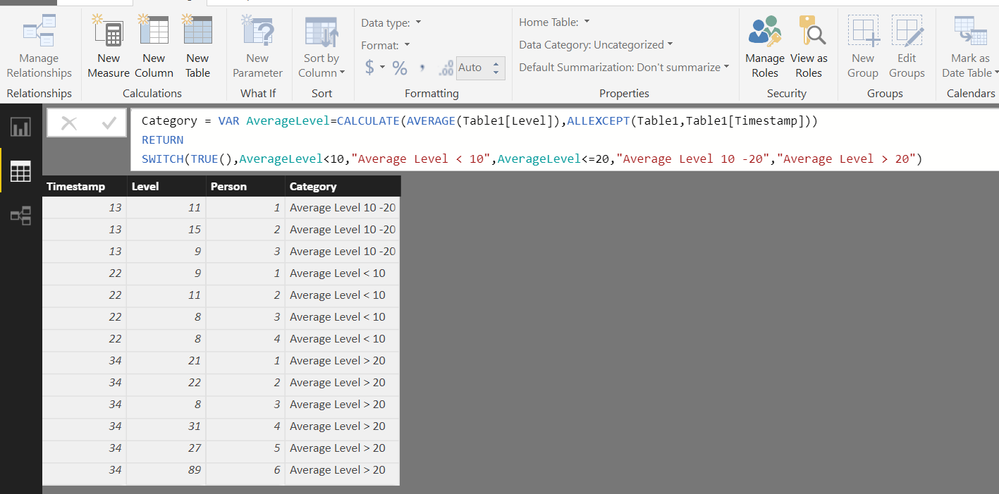
Try adding a calculated column as follows
Category =
VAR AverageLevel =
    CALCULATE ( AVERAGE ( Table1[Level] ), ALLEXCEPT ( Table1, Table1[Timestamp] ) )
RETURN
    SWITCH (
        TRUE (),
        AverageLevel < 10, "Average Level < 10",
        AverageLevel <= 20, "Average Level 10 -20",
        "Average Level > 20"
    )
Regards
Zubair
Please try my custom visuals
- Mark as New
- Bookmark
- Subscribe
- Mute
- Subscribe to RSS Feed
- Permalink
- Report Inappropriate Content
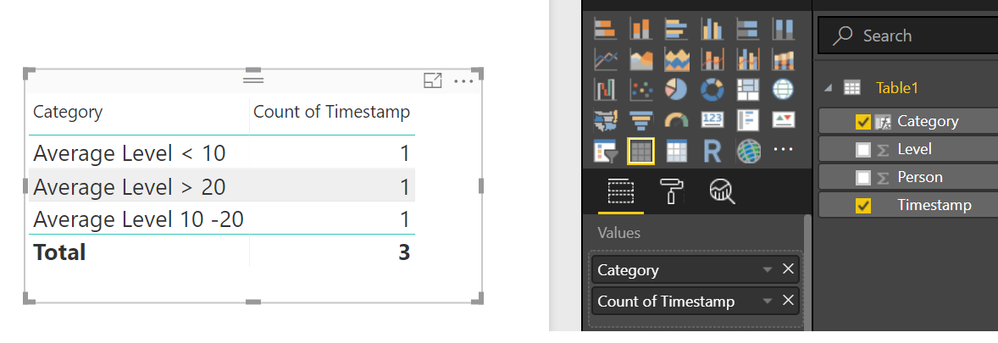
Then you can take a distinctcount of TimeStamps for each category
Regards
Zubair
Please try my custom visuals
- Mark as New
- Bookmark
- Subscribe
- Mute
- Subscribe to RSS Feed
- Permalink
- Report Inappropriate Content
Try adding a calculated column as follows
Category =
VAR AverageLevel =
    CALCULATE ( AVERAGE ( Table1[Level] ), ALLEXCEPT ( Table1, Table1[Timestamp] ) )
RETURN
    SWITCH (
        TRUE (),
        AverageLevel < 10, "Average Level < 10",
        AverageLevel <= 20, "Average Level 10 -20",
        "Average Level > 20"
    )
Regards
Zubair
Please try my custom visuals
- Mark as New
- Bookmark
- Subscribe
- Mute
- Subscribe to RSS Feed
- Permalink
- Report Inappropriate Content
Works perfectly!
- Mark as New
- Bookmark
- Subscribe
- Mute
- Subscribe to RSS Feed
- Permalink
- Report Inappropriate Content
Just a question about aggregating. If I wanted to use the filter in a formula, rather as a visual filter, how would you go about it?
I tried:
Level1 = CALCULATE(
DISTINCTCOUNT( 'Table'[Category] );
'Table'[Category] = "Average Level < 10")
But I alwas get a result of 1, even when I increase the number of timestamps <10
- Mark as New
- Bookmark
- Subscribe
- Mute
- Subscribe to RSS Feed
- Permalink
- Report Inappropriate Content
Scratch that, the formula should be
Level1 = CALCULATE(
DISTINCTCOUNT( 'Table'[Timestamp] );
'Table'[Category] = "Average Level < 10")
- Mark as New
- Bookmark
- Subscribe
- Mute
- Subscribe to RSS Feed
- Permalink
- Report Inappropriate Content
Then you can take a distinctcount of TimeStamps for each category
Regards
Zubair
Please try my custom visuals

Helpful resources

Power BI Monthly Update - November 2025
Check out the November 2025 Power BI update to learn about new features.

Fabric Data Days
Advance your Data & AI career with 50 days of live learning, contests, hands-on challenges, study groups & certifications and more!

FabCon Atlanta 2026
Join us at FabCon Atlanta, March 16-20, for the ultimate Fabric, Power BI, AI and SQL community-led event. Save $200 with code FABCOMM.


