Join us at FabCon Atlanta from March 16 - 20, 2026, for the ultimate Fabric, Power BI, AI and SQL community-led event. Save $200 with code FABCOMM.
Register now!Vote for your favorite vizzies from the Power BI Dataviz World Championship submissions. Vote now!
Hi!
I have the dataset attached, and want to have the following output:
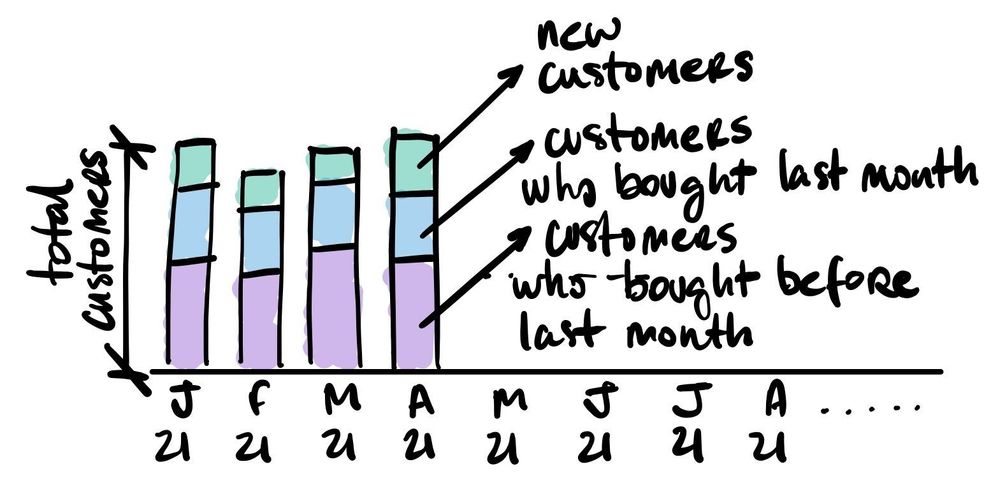
monthly, the total quantity of customers (id-cliente), categorized in:
Example of the desired output:
Any ideas of how to do it?
Tks!!
Solved! Go to Solution.
Hi @gtrani ,
According to your description, I download your dataset and here's my solution.
Create two calculated columns.
YearMonth =
YEAR ( [Data] ) & "-"
& IF ( LEN ( MONTH ( [Data] ) ) = 1, 0 & "" & MONTH ( [Data] ), MONTH ( [Data] ) )
Category =
VAR _New =
COUNTROWS (
FILTER (
'Planilha1',
'Planilha1'[id-cliente] = EARLIER ( 'Planilha1'[id-cliente] )
&& 'Planilha1'[YearMonth] < EARLIER ( 'Planilha1'[YearMonth] )
)
)
VAR _LastM =
COUNTROWS (
FILTER (
'Planilha1',
'Planilha1'[id-cliente] = EARLIER ( 'Planilha1'[id-cliente] )
&& EOMONTH ( 'Planilha1'[Data], 0 ) = EOMONTH ( EARLIER ( Planilha1[Data] ), -1 )
)
)
RETURN
IF ( _New = 0, "New", IF ( _LastM > 0, "LastM", "Before" ) )
Put YearMonth column in X-axis, Category in Y-axis and Legend, Get the result.
I attach my sample below for your reference.
Best Regards,
Community Support Team _ kalyj
If this post helps, then please consider Accept it as the solution to help the other members find it more quickly.
Hi @gtrani ,
According to your description, I download your dataset and here's my solution.
Create two calculated columns.
YearMonth =
YEAR ( [Data] ) & "-"
& IF ( LEN ( MONTH ( [Data] ) ) = 1, 0 & "" & MONTH ( [Data] ), MONTH ( [Data] ) )
Category =
VAR _New =
COUNTROWS (
FILTER (
'Planilha1',
'Planilha1'[id-cliente] = EARLIER ( 'Planilha1'[id-cliente] )
&& 'Planilha1'[YearMonth] < EARLIER ( 'Planilha1'[YearMonth] )
)
)
VAR _LastM =
COUNTROWS (
FILTER (
'Planilha1',
'Planilha1'[id-cliente] = EARLIER ( 'Planilha1'[id-cliente] )
&& EOMONTH ( 'Planilha1'[Data], 0 ) = EOMONTH ( EARLIER ( Planilha1[Data] ), -1 )
)
)
RETURN
IF ( _New = 0, "New", IF ( _LastM > 0, "LastM", "Before" ) )
Put YearMonth column in X-axis, Category in Y-axis and Legend, Get the result.
I attach my sample below for your reference.
Best Regards,
Community Support Team _ kalyj
If this post helps, then please consider Accept it as the solution to help the other members find it more quickly.
Vote for your favorite vizzies from the Power BI World Championship submissions!
If you love stickers, then you will definitely want to check out our Community Sticker Challenge!
Check out the January 2026 Power BI update to learn about new features.
| User | Count |
|---|---|
| 56 | |
| 52 | |
| 45 | |
| 17 | |
| 16 |
| User | Count |
|---|---|
| 108 | |
| 108 | |
| 39 | |
| 33 | |
| 25 |