Join us at FabCon Atlanta from March 16 - 20, 2026, for the ultimate Fabric, Power BI, AI and SQL community-led event. Save $200 with code FABCOMM.
Register now!The Power BI Data Visualization World Championships is back! Get ahead of the game and start preparing now! Learn more
I would like to get a count of employees on leave for each day of the year. I have a calendar table as well as a table with the following fields:
-Employee
-Leave From Date
-Leave To Date
-Leave in hours
For example, if employee#1 was on leave from 2018-01-08 until 2018-01-12 and employee #2 was on leave from 2017-01-11 until 2018-01-12 then I would like to return the following data:
Date Employees on Leave
2018-01-08 1
2018-01-09 1
2018-01-10 1
2018-01-11 2
2018-01-12 2
Solved! Go to Solution.
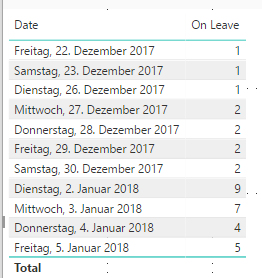
Hey,
I made a fast pbix of your data.
Find it under this link:
https://1drv.ms/u/s!AuNGof2uT8Pphf1ZoYRQWh9C0Lz3aQ
Its in german, but I think the point is understandable 😄
Greetings.
ok, but what is the problem about?
I would like to get a count of employees on leave for each day of the year that the leave range spans.
I have a calendar table as well as a table with the following fields:
-Employee
-Leave From Date
-Leave To Date
-Leave in hours
For example, if employee#1 was on leave from 2018-01-08 until 2018-01-12 and employee #2 was on leave from 2018-01-11 until 2018-01-12 then I would like to return the following data:
Date Employees on Leave
2018-01-08 1
2018-01-09 1
2018-01-10 1
2018-01-11 2
2018-01-12 2
Currently, the calendar date is linked to the "Leave from Date". The "Employees on Leave" count I currently see is only counting the day that the employee starts their leave ("Leave from Date") and does not count the employee on leave each day until it reaches the "Leave to Date". So I see:
Date Employees on Leave
2018-01-08 1
2018-01-11 1
hey,
refer starting point here : https://blog.gbrueckl.at/2014/12/events-in-progress-for-time-periods-in-dax/
You need a date table with no relations to other tabels in your model.
Then try something like
On Leave =
CALCULATE(
COUNTROWS(EmployeeID);
FILTER( 'EmployeeLeave'; 'EmployeeLeave'[Leave From Date] <= MAX(NewDateTable[Date]));
FILTER( 'EmployeeLeave'; 'EmployeeLeave'[Leave To Date] = BLANK() || 'EmployeeLeave'[Leave To Date] > MAX( NewdateTable[Date]))
)
Using the above measure I was unable to get the correct count of employees On Leave. Here is an example of some the data:
| EmplID | From Date | To Date |
| 1 | 2017-12-22 | 2018-01-03 |
| 2 | 2017-12-27 | 2018-01-03 |
| 3 | 2018-01-02 | 2018-01-05 |
| 4 | 2018-01-02 | 2018-01-05 |
| 5 | 2018-01-02 | 2018-01-02 |
| 6 | 2018-01-02 | 2018-01-03 |
| 7 | 2018-01-02 | 2018-01-02 |
| 8 | 2018-01-02 | 2018-01-03 |
| 9 | 2018-01-02 | 2018-01-05 |
| 10 | 2018-01-04 | 2018-01-04 |
| 11 | 2018-01-05 | 2018-01-05 |
| 12 | 2018-01-05 | 2018-01-05 |
This is the result I am seeing (ie. 2018-01-02 should have a count of 9 not 7):
| Date | On Leave |
| 2017-12-22 | 1 |
| 2017-12-23 | 1 |
| 2017-12-24 | 1 |
| 2017-12-25 | 1 |
| 2017-12-26 | 1 |
| 2017-12-27 | 2 |
| 2017-12-28 | 2 |
| 2017-12-29 | 2 |
| 2017-12-30 | 2 |
| 2017-12-31 | 2 |
| 2018-01-01 | 2 |
| 2018-01-02 | 7 |
| 2018-01-03 | 3 |
| 2018-01-04 | 3 |
| 2018-01-05 | 1 |
| 2018-01-06 | 1 |
| 2018-01-07 | 1 |
| 2018-01-08 | 1 |
| 2018-01-09 | 1 |
It would also be great if I could remove weekends and holidays from the table.
Hey,
I made a fast pbix of your data.
Find it under this link:
https://1drv.ms/u/s!AuNGof2uT8Pphf1ZoYRQWh9C0Lz3aQ
Its in german, but I think the point is understandable 😄
Greetings.
The Power BI Data Visualization World Championships is back! Get ahead of the game and start preparing now!
| User | Count |
|---|---|
| 41 | |
| 38 | |
| 36 | |
| 30 | |
| 28 |
| User | Count |
|---|---|
| 128 | |
| 88 | |
| 79 | |
| 67 | |
| 62 |