cancel
Showing results for 
Search instead for 
Did you mean: 

The Power BI Data Visualization World Championships is back! Get ahead of the game and start preparing now! Learn more

Reply
Anonymous
Not applicable

Count of days based on filter for average

Hi, i am a newbie in power bi so pardon my ignorance 🙂

I have application wise traffic data since 24-Feb-2020 till 08-Apr-2020 (45 days). An application has sub application so for single day multiple rows per application is possible.


I just want to get daily average traffic of each application based on the selected days in filter. But i am unable to get the days count correctly.


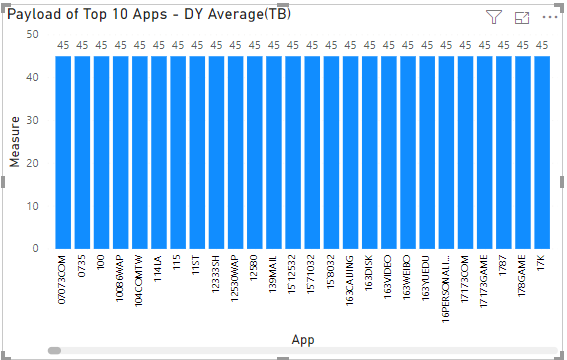
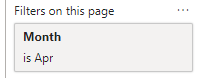
I applied month filter for Apr, there are 8 dates data for April. It is possible that some application might have only 5 days data for April. So i want to return count of days per each application.


I used following formula, but it is returning me 45 for each application, though i've applied Apr filter.


Measure =
var start_Date=FIRSTDATE(ALLSELECTED('App'[Date]))
var end_Date=LASTDATE(ALLSELECTED('App'[Date]))
return
CALCULATE(DATEDIFF(start_Date, end_Date, DAY))
 
Capture.PNG
Capture2.PNG


Once i get the correct count of day, I will divide it with sum of traffic to get the average.
 
any help would be appreciated.
1 ACCEPTED SOLUTION
amitchandak
Super User
Super User

@Anonymous 
The formula and relation has some problem

distinct date use
distinctcount('App'[Date])

Share with Power BI Enthusiasts: Full Power BI Video (20 Hours) YouTube
Microsoft Fabric Series 60+ Videos YouTube
Microsoft Fabric Hindi End to End YouTube

View solution in original post

3 REPLIES 3
amitchandak
Super User
Super User

@Anonymous 
The formula and relation has some problem

distinct date use
distinctcount('App'[Date])

Share with Power BI Enthusiasts: Full Power BI Video (20 Hours) YouTube
Microsoft Fabric Series 60+ Videos YouTube
Microsoft Fabric Hindi End to End YouTube
Anonymous
Not applicable

hey this really worked, how silly of me 😞


thanks for the help

🙂

Greg_Deckler
Community Champion
Community Champion

It looks like a relationship is not setup correctly. 


Please see this post regarding How to Get Your Question Answered Quickly: https://community.powerbi.com/t5/Community-Blog/How-to-Get-Your-Question-Answered-Quickly/ba-p/38490


Follow on LinkedIn
@ me in replies or I'll lose your thread!!!
Instead of a Kudo, please vote for this idea
Become an expert!: Enterprise DNA
External Tools: MSHGQM
YouTube Channel!: Microsoft Hates Greg
Latest book!:
DAX For Humans

DAX is easy, CALCULATE makes DAX hard...

Helpful resources

Announcements
November Power BI Update Carousel

Power BI Monthly Update - November 2025

Check out the November 2025 Power BI update to learn about new features.

Fabric Data Days Carousel

Fabric Data Days

Advance your Data & AI career with 50 days of live learning, contests, hands-on challenges, study groups & certifications and more!

FabCon Atlanta 2026 carousel

FabCon Atlanta 2026

Join us at FabCon Atlanta, March 16-20, for the ultimate Fabric, Power BI, AI and SQL community-led event. Save $200 with code FABCOMM.