Join us at FabCon Atlanta from March 16 - 20, 2026, for the ultimate Fabric, Power BI, AI and SQL community-led event. Save $200 with code FABCOMM.
Register now!The Power BI Data Visualization World Championships is back! Get ahead of the game and start preparing now! Learn more
Hi,
I am facing a following problen. I have dashboard connected to mailboxes using Microsoft Exchange. I know it is possible to check if email have any attachment. But is it possible to get a count of attachment in each email?
Solved! Go to Solution.
Hi @MarcinGal ,
There is Attachment column next to HasAttachments containing a table of attachments. You can create a custom column to count how many rows each table has.
Table.CountRows([Attachment])
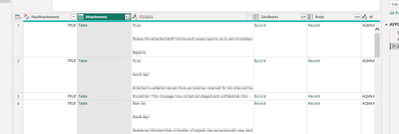
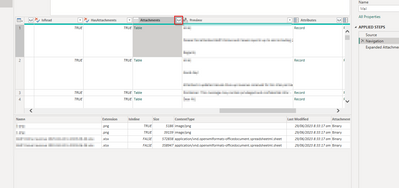
You may need to expand the table if you're looking for a specific file type or you can filter each table prior to counting the rows
let
filteredtable = Table.SelectRows([Attachments], each [Extension] = ".xlsx" and [IsInline] = false )
in Table.RowCount(filteredtable)
//IsInline = TRUE means they are what you see on an email like a company logi or a custom image signature (if I am right) so filter this to false
//PQ recognizes false and not FALSE as the opposite of true
//PQ is case-sensitive
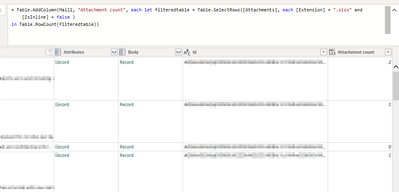
Each email has its own ID so you'll know which count is for
Hi @MarcinGal ,
There is Attachment column next to HasAttachments containing a table of attachments. You can create a custom column to count how many rows each table has.
Table.CountRows([Attachment])
You may need to expand the table if you're looking for a specific file type or you can filter each table prior to counting the rows
let
filteredtable = Table.SelectRows([Attachments], each [Extension] = ".xlsx" and [IsInline] = false )
in Table.RowCount(filteredtable)
//IsInline = TRUE means they are what you see on an email like a company logi or a custom image signature (if I am right) so filter this to false
//PQ recognizes false and not FALSE as the opposite of true
//PQ is case-sensitive
Each email has its own ID so you'll know which count is for
Thank you so much for your help! The only issue i encountered was that not in all cases there was a [IsInline] field. After removing it from function it works perfectly 😄
Hi @MarcinGal ,
You can use try ... otherwise ... to handle errors.
let
filteredtable1 = Table.SelectRows([Attachments], each [Extension] = ".xlsx" and [IsInline] = false ),
filteredtable2 = Table.SelectRows([Attachments], each [Extension] = ".xlsx" )
in Table.RowCount(try filtertable1 otherwise filteredtable2)
Hi @MarcinGal ,
So far, to my knowledge, this may not be achieveable.
Best regards,
Community Support Team_Binbin Yu
If this post helps, then please consider Accept it as the solution to help the other members find it more quickly.
The Power BI Data Visualization World Championships is back! Get ahead of the game and start preparing now!
Check out the November 2025 Power BI update to learn about new features.
| User | Count |
|---|---|
| 59 | |
| 46 | |
| 42 | |
| 23 | |
| 17 |
| User | Count |
|---|---|
| 190 | |
| 122 | |
| 96 | |
| 66 | |
| 47 |