cancel
Showing results for 
Search instead for 
Did you mean: 

The Power BI Data Visualization World Championships is back! Get ahead of the game and start preparing now! Learn more

Reply
tdupton
Frequent Visitor

Count of Positions

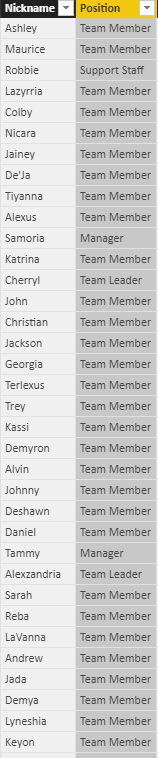
I'm trying to create a measure to count employees by position.  The data is coming from a SQL view.  It seems straightforward but all of my counts are way off.  I've used countrows, counta, count...all with the exact same results.  What DAX counts is way less that what is actually present in the datasource.

Count of Managers = CALCULATE(COUNTROWS(qryActiveEmployees),qryActiveEmployees[Position]="Manager")

 Capture.PNG

4 REPLIES 4
Aron_Moore
Solution Specialist
Solution Specialist

Try count instead of countrows. You may want the explicit filter too.


Either

Count of Managers = CALCULATE(COUNT(qryActiveEmployees[Nickname]),qryActiveEmployees[Position]="Manager")

or

Count of Managers = CALCULATE(COUNT(qryActiveEmployees[Nickname]),FILTER(qryActiveEmployees,qryActiveEmployees[Position]="Manager"))


Count of Managers = CALCULATE(COUNT(qryActiveEmployees[FirstName]),FILTER(qryActiveEmployees,qryActiveEmployees[Position]="Manager"))

I've tried all of the variations. They all return 1 manager when, in fact, there are 11 in the datasource.  I can view the dataset and filter by the Position field and see all of the managers just fine.  No matter what position I choose, DAX returns way less than the datasource shows.


I thought it could be a whitespace problem but I've already applied Clean and Trim.  Is this some kind of bug?  I shouldn't have to group them first in order to count them, right?

Hi,


That formula should be a measure, not a calculated column.  Furthermore, you do not need the FILTER function.  Try this measure


= CALCULATE(COUNT(qryActiveEmployees[FirstName]),qryActiveEmployees[Position]="Manager")


Hope this helps.


Regards,
Ashish Mathur
http://www.ashishmathur.com
https://www.linkedin.com/in/excelenthusiasts/

Thanks, everyone.  As it turns out the formula worked all the time.  It was actually a relationship that was filtering the data on my report.  I had a relationship between the hire date from the employee table and a calendar table.  I'm still not certain why it was filtering out results, but I'm going to investigate that issue.


Thanks for the quick replies.

Helpful resources

Announcements
November Power BI Update Carousel

Power BI Monthly Update - November 2025

Check out the November 2025 Power BI update to learn about new features.

Fabric Data Days Carousel

Fabric Data Days

Advance your Data & AI career with 50 days of live learning, contests, hands-on challenges, study groups & certifications and more!

FabCon Atlanta 2026 carousel

FabCon Atlanta 2026

Join us at FabCon Atlanta, March 16-20, for the ultimate Fabric, Power BI, AI and SQL community-led event. Save $200 with code FABCOMM.