Advance your Data & AI career with 50 days of live learning, dataviz contests, hands-on challenges, study groups & certifications and more!
Get registeredGet Fabric Certified for FREE during Fabric Data Days. Don't miss your chance! Request now
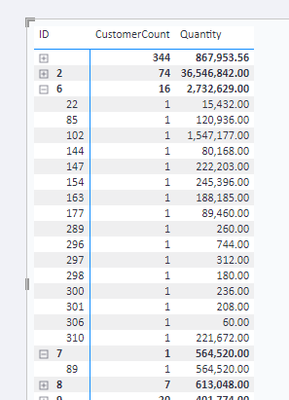
Hi, I am simply trying to get a count of customers to show the same as the parent line. Below is what I have. What I want to have happen is every customer number below ID 6 to be equal to 16 instead of 1. The same thing would apply to all the other IDs as well. So ID 2 would have every customer number below it as 74 for example.
Hi @LostPBIUser ,
Did the above suggestions help with your scenario? if that is the case, you can consider Kudo or Accept the helpful suggestions to help others who faced similar requirements.
If these also don't help, please share more detailed information and description to help us clarify your scenario to test.
How to Get Your Question Answered Quickly
Regards,
Xiaoxin Sheng
Hi @LostPBIUser ,
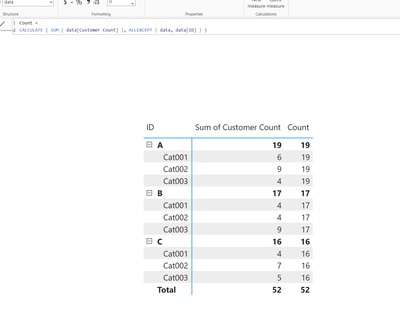
Try this measure:
=
CALCULATE ( [Customer Count], ALLEXCEPT ( data, data[ID] ) )
This calculates the count of customers per ID.
That didn't work. It still shows '1' for each individual customer id when expanded on. I need for it to show '16' on each individual customer.
Hi @LostPBIUser ,
It should work unless there are peculiarities in your model that makes it not work or you're using the wrong columns. Please see sample pbix.
Advance your Data & AI career with 50 days of live learning, contests, hands-on challenges, study groups & certifications and more!
Check out the October 2025 Power BI update to learn about new features.