cancel
Showing results for 
Search instead for 
Did you mean: 

Next up in the FabCon + SQLCon recap series: The roadmap for Microsoft SQL and Maximizing Developer experiences in Fabric. All sessions are available on-demand after the live show. Register now

Reply
dgdgdg122db
Helper II
Helper II

Count occurrence with condition

Hi 

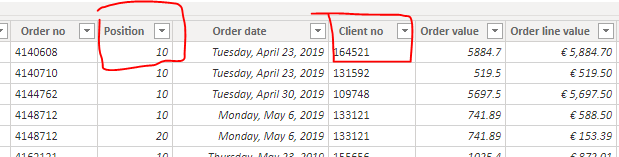
I have a table looks like this:

Capture2.PNG

What I want to achieve is to count the occurrence of the client no. where the Position is 10.


I want to use Card visualization in my report: 

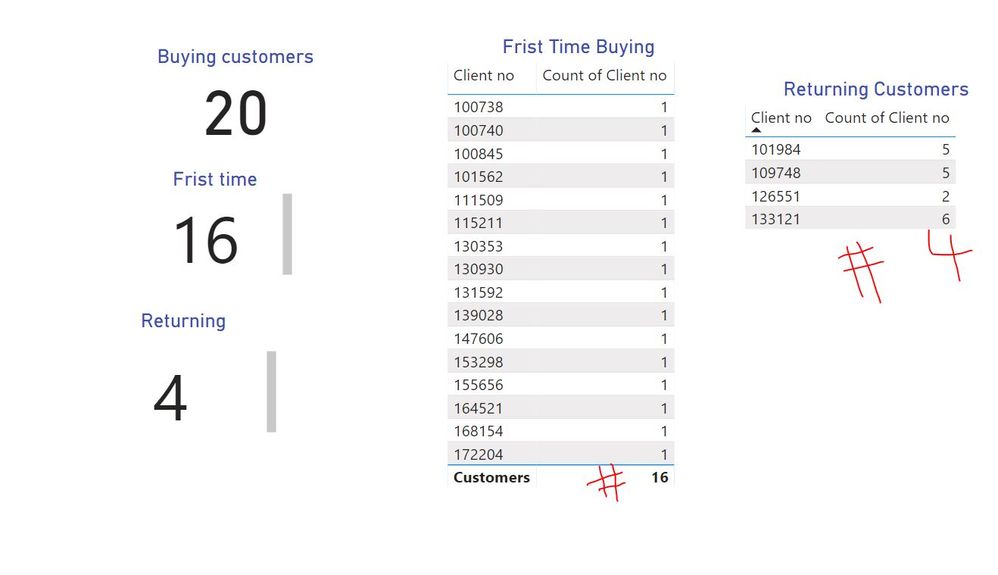
1. have a total buying customer (the distinct count of client no) 20

2. 16 of them are buying for the first time ( the distinct count of client no =1 )

3. 4 of them are returning (the distinct count of client no >1)


The report should have three Cards:

22222.JPG

Please help 😞


1 ACCEPTED SOLUTION
jdbuchanan71
Super User
Super User

Hello @dgdgdg122db 

We need just a few measures to get what you are looking for.

A count of all the rows, this we will use for filtering later.

Line Count = COUNTROWS ( 'Table' )

A count of the distinct customers (the 20)

Buying Customers = DISTINCTCOUNT ( 'Table'[Client no] )

The first time buyers

First Time Buyers = 
CALCULATE ( 
    [Buying Customers], FILTER ( VALUES ( 'Table'[Client no] ) , [Line Count] = 1 )
)

And the returning customers

Returning Customers = 
CALCULATE ( 
    [Buying Customers], FILTER ( VALUES ( 'Table'[Client no] ) , [Line Count] > 1 )
)

I'm not sure what you mean about the filter on position 10 but the position filed can be added as a page level filter and that will limit all the measures above to only calculate against the lines in position 10 if that is what you are looking for.

I have attached my sample file for you to look at.

View solution in original post

2 REPLIES 2
jdbuchanan71
Super User
Super User

Hello @dgdgdg122db 

We need just a few measures to get what you are looking for.

A count of all the rows, this we will use for filtering later.

Line Count = COUNTROWS ( 'Table' )

A count of the distinct customers (the 20)

Buying Customers = DISTINCTCOUNT ( 'Table'[Client no] )

The first time buyers

First Time Buyers = 
CALCULATE ( 
    [Buying Customers], FILTER ( VALUES ( 'Table'[Client no] ) , [Line Count] = 1 )
)

And the returning customers

Returning Customers = 
CALCULATE ( 
    [Buying Customers], FILTER ( VALUES ( 'Table'[Client no] ) , [Line Count] > 1 )
)

I'm not sure what you mean about the filter on position 10 but the position filed can be added as a page level filter and that will limit all the measures above to only calculate against the lines in position 10 if that is what you are looking for.

I have attached my sample file for you to look at.

Hi @jdbuchanan71  

Thank you very much for your help! 


Helpful resources

Announcements
New to Fabric survey Carousel

New to Fabric Survey

If you have recently started exploring Fabric, we'd love to hear how it's going. Your feedback can help with product improvements.

Power BI DataViz World Championships carousel

Power BI DataViz World Championships - June 2026

A new Power BI DataViz World Championship is coming this June! Don't miss out on submitting your entry.

FabCon and SQLCon Highlights Carousel

FabCon &SQLCon Highlights

Experience the highlights from FabCon & SQLCon, available live and on-demand starting April 14th.

March Power BI Update Carousel

Power BI Community Update - March 2026

Check out the March 2026 Power BI update to learn about new features.