


cancel
Showing results for 
Search instead for 
Did you mean: 

Get Fabric Certified for FREE during Fabric Data Days. Don't miss your chance! Request now

Reply
DarylRob
Helper I
Helper I

Count occurrence of all delimited words in single column

Hi so i've got one column in my table that contains sector infomation much like the below.


Sectors Covered
Consumer Discretionary;Consumer Discretionary Products;Automotive
Health Care;Health Care Facilities & Svcs
Consumer Services;Insurance;Consumer Discretionary;Financials;Consumer Discretionary Services;Automotive
Consumer Discretionary Products;Consumer Discretionary Services;Retail & Whsle - Discretionary;Consumer Staple Products;Retail - Consumer Staples


I need some osrt of output, like a table that would count all occruances of each in the table


SectorCount
Consumer Discretionary3
Consumer Discretionary Products1
Automotive2
Financials1


1 ACCEPTED SOLUTION

Hi @DarylRob ,

According to your description, I modify the sample. There's a Revenue column in the fact table. If rows in the Sector Covered contains any value in the Sector table, sum the Revenue with these rows.

vkalyjmsft_0-1666752826130.png

In the sample, you can see , the second row "Health Care;Health Care Facilities & Svcs" doesn't contains values in Sector table, so the result should be 8(1+3+4). Here's my solution, create a measure.

Sum =
VAR _T =
    ADDCOLUMNS (
        'Table',
        "Flag",
            IF (
                COUNTROWS (
                    FILTER (
                        VALUES ( Sector[Sector] ),
                        SEARCH ( 'Sector'[Sector], 'Table'[Sectors Covered],, 0 )
                    )
                ) > 0,
                1
            )
    )
RETURN
    SUMX ( FILTER ( _T, [Flag] = 1 ), [Revenue] )

Get the result:

vkalyjmsft_1-1666753066941.png

I attach my sample below for your reference.


Best Regards,
Community Support Team _ kalyj

If this post helps, then please consider Accept it as the solution to help the other members find it more quickly.

View solution in original post

4 REPLIES 4
v-yanjiang-msft
Community Support
Community Support

Hi @DarylRob ,

According to your description, I create a sample, there're two tables

Table:

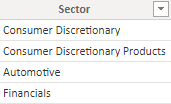
vkalyjmsft_0-1666593857002.png

Sector table:

vkalyjmsft_1-1666593887443.png

Here's my solution, create a measure.

Count =
VAR _T =
    ADDCOLUMNS (
        'Table',
        "Sector",
            IF (
                CONTAINSSTRINGEXACT ( 'Table'[Sectors Covered], MAX ( 'Sector'[Sector] ) ),
                1
            )
    )
RETURN
    SUMX ( _T, [Sector] )

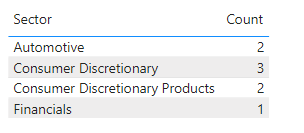
Get the correct result:

vkalyjmsft_2-1666593960945.png

Note: In your sample, there're two Consumer Discretionary Products, so the count should be 2.

vkalyjmsft_3-1666594014183.png

I attach my sample below for your reference.


Best Regards,
Community Support Team _ kalyj

If this post helps, then please consider Accept it as the solution to help the other members find it more quickly.


This perfect thank you, 


Just on this as well, is there a way to tweak it so instead of counting the number of occurances we could Sum the total of another column in the original table, say if there was a "Revenue" column. We could then sum the revenue for all those that contain a specific sector?

Hi @DarylRob ,

According to your description, I modify the sample. There's a Revenue column in the fact table. If rows in the Sector Covered contains any value in the Sector table, sum the Revenue with these rows.

vkalyjmsft_0-1666752826130.png

In the sample, you can see , the second row "Health Care;Health Care Facilities & Svcs" doesn't contains values in Sector table, so the result should be 8(1+3+4). Here's my solution, create a measure.

Sum =
VAR _T =
    ADDCOLUMNS (
        'Table',
        "Flag",
            IF (
                COUNTROWS (
                    FILTER (
                        VALUES ( Sector[Sector] ),
                        SEARCH ( 'Sector'[Sector], 'Table'[Sectors Covered],, 0 )
                    )
                ) > 0,
                1
            )
    )
RETURN
    SUMX ( FILTER ( _T, [Flag] = 1 ), [Revenue] )

Get the result:

vkalyjmsft_1-1666753066941.png

I attach my sample below for your reference.


Best Regards,
Community Support Team _ kalyj

If this post helps, then please consider Accept it as the solution to help the other members find it more quickly.

hokeson
Microsoft Employee
Microsoft Employee

you can use split column by delimiter transformation. select the delimiter. here probably semicolon, each occurrence, and in advanced options split to Rows. 

then you get a table of all occurrances.

use matrix visual and to rows put sectors and in values count of sectors.

    Source = Table.FromRows(Json.Document(Binary.Decompress(Binary.FromText("hVCxCsJADP2V0NlCcXC5SSpFN7GDQ+0QzkAD155ccgX/3kO0SLF0C+/lveS9pslKP0jsKcCBxQZS9gOGp/kPwzn4e7QqZh/V9155pKzdNNmR0GkHJQYyPzNUaNmxMgncYlFsd1CPVt6S6UJNYWRLYk4JCDhYWrhuKh4Szehk6b/Ja/bfWpw1uwspsvtmuHbiCPKlymrFR+In8484h9lG6qF9AQ==", BinaryEncoding.Base64), Compression.Deflate)), let _t = ((type nullable text) meta [Serialized.Text = true]) in type table [#"Sectors Covered" = _t]),
    #"Changed Type" = Table.TransformColumnTypes(Source,{{"Sectors Covered", type text}}),
    #"Split Column by Delimiter" = Table.ExpandListColumn(Table.TransformColumns(#"Changed Type", {{"Sectors Covered", Splitter.SplitTextByDelimiter(";", QuoteStyle.Csv), let itemType = (type nullable text) meta [Serialized.Text = true] in type {itemType}}}), "Sectors Covered"),
    #"Changed Type1" = Table.TransformColumnTypes(#"Split Column by Delimiter",{{"Sectors Covered", type text}})
in
    #"Changed Type1"

Helpful resources

Announcements
November Power BI Update Carousel

Power BI Monthly Update - November 2025

Check out the November 2025 Power BI update to learn about new features.

Fabric Data Days Carousel

Fabric Data Days

Advance your Data & AI career with 50 days of live learning, contests, hands-on challenges, study groups & certifications and more!

FabCon Atlanta 2026 carousel

FabCon Atlanta 2026

Join us at FabCon Atlanta, March 16-20, for the ultimate Fabric, Power BI, AI and SQL community-led event. Save $200 with code FABCOMM.

Top Solution Authors
Top Kudoed Authors