FabCon is coming to Atlanta
Join us at FabCon Atlanta from March 16 - 20, 2026, for the ultimate Fabric, Power BI, AI and SQL community-led event. Save $200 with code FABCOMM.
Register now!- Power BI forums
- Get Help with Power BI
- Desktop
- Service
- Report Server
- Power Query
- Mobile Apps
- Developer
- DAX Commands and Tips
- Custom Visuals Development Discussion
- Health and Life Sciences
- Power BI Spanish forums
- Translated Spanish Desktop
- Training and Consulting
- Instructor Led Training
- Dashboard in a Day for Women, by Women
- Galleries
- Data Stories Gallery
- Themes Gallery
- Contests Gallery
- QuickViz Gallery
- Quick Measures Gallery
- Visual Calculations Gallery
- Notebook Gallery
- Translytical Task Flow Gallery
- TMDL Gallery
- R Script Showcase
- Webinars and Video Gallery
- Ideas
- Custom Visuals Ideas (read-only)
- Issues
- Issues
- Events
- Upcoming Events
Get Fabric Certified for FREE during Fabric Data Days. Don't miss your chance! Request now
- Power BI forums
- Forums
- Get Help with Power BI
- Desktop
- Re: Count number of transactions in a month
- Subscribe to RSS Feed
- Mark Topic as New
- Mark Topic as Read
- Float this Topic for Current User
- Bookmark
- Subscribe
- Printer Friendly Page

- Mark as New
- Bookmark
- Subscribe
- Mute
- Subscribe to RSS Feed
- Permalink
- Report Inappropriate Content
Count number of transactions in a month
Hi,
I have a table called Transactions which has a list of all our transactions and associated columns for each transaction:
e.g.
Transaction ID || Customer ID || Product ID || Year-Month
Transaction1 || Customer1 || Product1 || 2019-01
Transaction2 || Customer1 || Product2 || 2019-01
Transaction3 || Customer2 || Product2 || 2019-01
Transaction4 || Customer2 || Product2 || 2019-01
Transaction5 || Customer2 || Product3 || 2019-01
Transaction6 || Customer3 || Product1 || 2019-01
Transaction7 || Customer1 || Product1 || 2019-02
Transaction8 || Customer2 || Product2 || 2019-02
Transaction9 || Customer1 || Product2 || 2019-02
Transaction10 || Customer3 || Product1 || 2019-02
I would somehow like to create a measure/column which will count the number of transactions that a customer has done in a month, so that I can create the following visual (matrix) in the report:
"Distinct count of Customer IDs by Number of transactions in month, Product ID and Year-Month":
--------------------------- || 2019-01 || 2019-02 .............
1 transaction in month || 1 || 2
---- Product1 || 1 || 1
---- Product2 || 0 || 2
---- Product3 || 0 || 0
2 transactions in month || 1 || 1
---- Product1 || 1 || 1
---- Product2 || 1 || 1
---- Product3 || 0 || 0
3 transactions in month || 1 || 0
---- Product1 || 0 || 0
---- Product2 || 1 || 0
---- Product3 || 1 || 0
I have tried various different measures/columns to try and get this to work but I can't seem to get it right. Please can anyone help on this?
Thank you in advance.
Solved! Go to Solution.


- Mark as New
- Bookmark
- Subscribe
- Mute
- Subscribe to RSS Feed
- Permalink
- Report Inappropriate Content
Hi @Anonymous
First you can create a column
Number of transactions in month2 =
CALCULATE (
    DISTINCTCOUNT ( 'Table'[Transaction ID] ),
    ALLEXCEPT ( 'Table', 'Table'[Year-Month], 'Table'[Customer ID] )
)
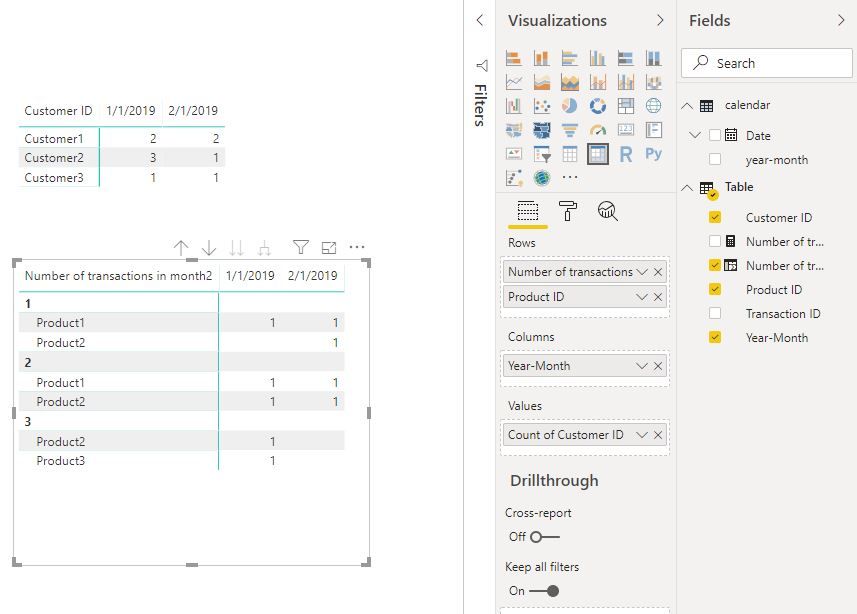
Then add columns in a matrix as below
Best Regards
Maggie
Community Support Team _ Maggie Li
If this post helps, then please consider Accept it as the solution to help the other members find it more quickly.
- Mark as New
- Bookmark
- Subscribe
- Mute
- Subscribe to RSS Feed
- Permalink
- Report Inappropriate Content
Hi @Anonymous
Is this problem sloved?
If it is sloved, could you kindly accept it as a solution to close this case?
If not, please let me know.
Best Regards
Maggie
- Mark as New
- Bookmark
- Subscribe
- Mute
- Subscribe to RSS Feed
- Permalink
- Report Inappropriate Content
Hi @Anonymous
First you can create a column
Number of transactions in month2 =
CALCULATE (
    DISTINCTCOUNT ( 'Table'[Transaction ID] ),
    ALLEXCEPT ( 'Table', 'Table'[Year-Month], 'Table'[Customer ID] )
)
Then add columns in a matrix as below
Best Regards
Maggie
Community Support Team _ Maggie Li
If this post helps, then please consider Accept it as the solution to help the other members find it more quickly.
- Mark as New
- Bookmark
- Subscribe
- Mute
- Subscribe to RSS Feed
- Permalink
- Report Inappropriate Content
HI @Anonymous ,
I don't think you need a measure.
Did you try usingMatrix visual and Did you drag the field like this?
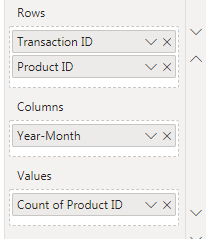
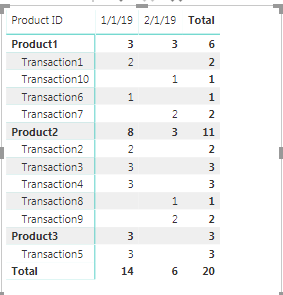
Based on your sample data I get the output somehting like this>

Let me know if this works for you.
Thanks,
Tejaswi
- Mark as New
- Bookmark
- Subscribe
- Mute
- Subscribe to RSS Feed
- Permalink
- Report Inappropriate Content
Hi @Anonymous ,
Thank you for your reply, however I do not want to group Transaction ID in the rows, I want to group Number of Transactions in Month.
So the 2nd table in my original post is what I would like to get to - showing number of distinct Customer IDs who have done X transactions in month, then split by product.
E.g. in my example above, in Jan 2019, one customer did one transaction in the month (Customer3), one did 2 transactions in the month (Customer1) and one did 3 transactions in the month (Customer2). Similarly in Feb, two customers did 1 transaction in the month and one customer did 2 transactions in the month.
I hope that makes sense!
- Mark as New
- Bookmark
- Subscribe
- Mute
- Subscribe to RSS Feed
- Permalink
- Report Inappropriate Content
Hi @Anonymous ,
Try this calculated Column to give the count of Cust ID
Occurences of Cust ID =
CALCULATE (
    COUNT ( 'Table (5)'[Year-Month] ),
    FILTER (
        ALLEXCEPT ( 'Table (5)', 'Table (5)'[Customer ID] ),
        MONTH ( 'Table (5)'[Year-Month] ) = MONTH ( EARLIER ( 'Table (5)'[Year-Month] ) )
    )
)
Also since you have a Unique Transaction ID, getting the matrix like the one you showed will be little diffcult.
But you can give a shot with this formula.
If you want you can show something like this.
Thanks,
Tejaswi
Helpful resources

Power BI Monthly Update - November 2025
Check out the November 2025 Power BI update to learn about new features.

Fabric Data Days
Advance your Data & AI career with 50 days of live learning, contests, hands-on challenges, study groups & certifications and more!

FabCon Atlanta 2026
Join us at FabCon Atlanta, March 16-20, for the ultimate Fabric, Power BI, AI and SQL community-led event. Save $200 with code FABCOMM.


